
Contributor I
April 26, 2020

HomeKit Room Integration Question

  • April 26, 2020
  • 15 replies
  • 21207 views

Hi!


New owner introduced to the Sonos family as of this weekend, picked up a pair of One SL’s to be used in the garage. Previously I’ve been an all HomePod guy. 
 

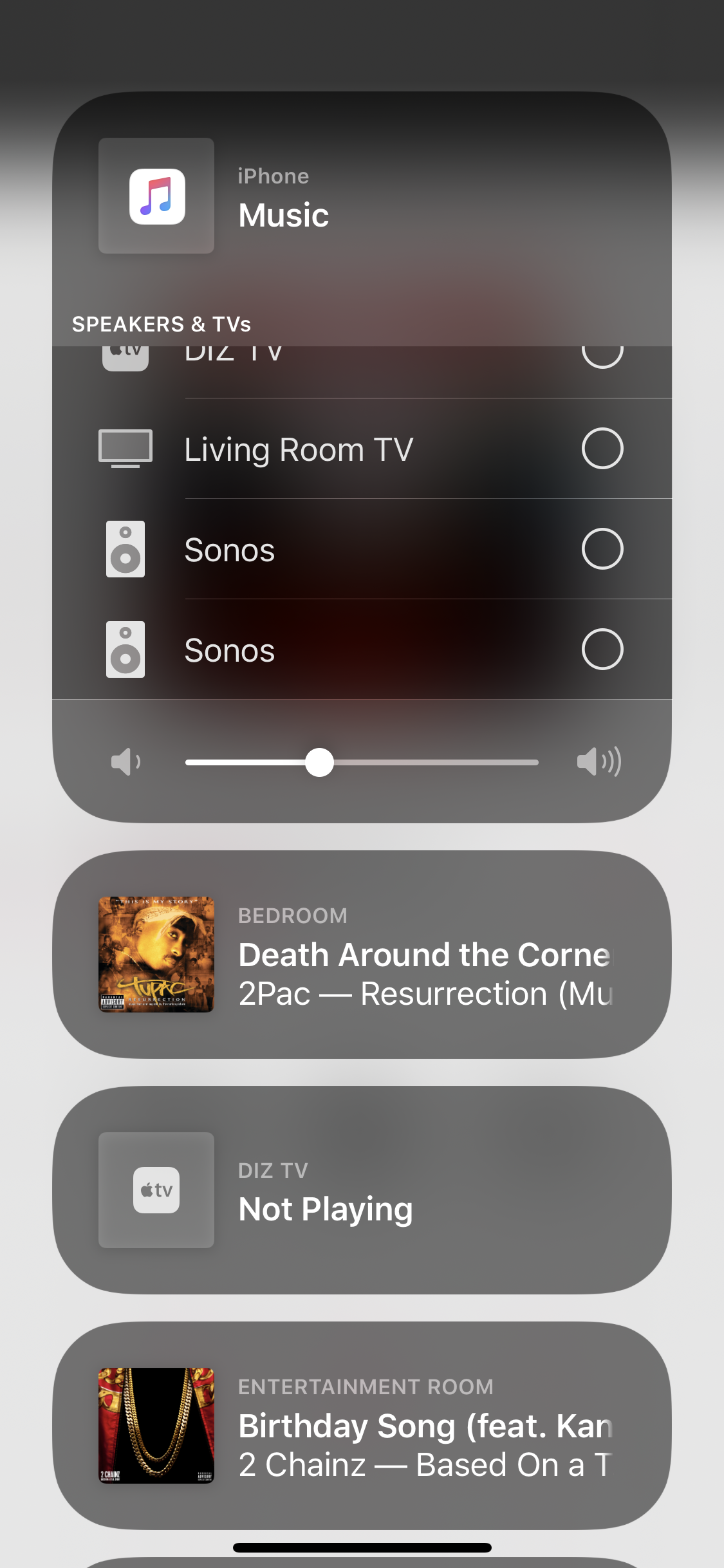
So here is my issue, and let me know if this is simply just not a feature of non-Apple speakers via AirPlay. With my HomePods, I have each designated to specific rooms - and to play I hit the AirPlay button, scroll to select desired room, browse music and play. By this method, all sound is completely separated from my phone, IE: if I wanted to pull up YouTube the sound will go through my phone and the music will be uninterrupted on the speakers. Also, adjusting my phones volume with the buttons will do just that, adjust my phones volume and not the speaker volume. I figured this would be exactly how it would work on a non-Apple speaker when connected to HomeKit. To my dismay, my ‘Garage’ room completely disappeared from the AirPlay toggle once I removed my HomePod from that room and added the two Sonos One’s. The only way to play music on the speakers is to select them individually without being able to select them from a designated ‘room’, which binds some phone audio to the speakers. Within the HomeKit app both Sonos One’s are assigned to the Garage room. I’ll attach a screenshot below. In this screenshot you’ll see that my Garage ‘room’ does not appear, like my other rooms with HomePods do. Any help would be appreciated, as I’m questioning my purchase decision at this point. Thank you. 
 

This topic has been closed for further comments. You can use the search bar to find a similar topic, or create a new one by clicking Create Topic at the top of the page.

15 replies

Enthusiast II
May 1, 2020

I don’t think you can do what you want. At least I haven’t figured out a way to. My Sonos speakers only show up like you want when I am streaming to them from an iOS device. When I first start airplaying to a speaker, I have to select it in under the iPhone area. And the audio is always dependent on the device airplaying to it. 

Lyricist II
November 29, 2020

I’ve been struggling with the same dilema. The HomeKit/Airplay integration is rough at best and really under utilized. It needs to be available from the airplay menu as described to really be beneficial. 
 

your side question is possible. I have a 5.1 setup with beam and 2 one sl’s grouped in the sonos app. You can add these as “one speaker” in HomeKit after they are grouped within the sonos app.


let me know if you have had any luck with the airplay issue.

Lyricist II
November 29, 2020

Just to add, because I have a 5.1 setup and Apple TV, I get a pseudo version of what you are getting at because the Apple TV shows up as it’s own room in air play. I can then control audio via the Apple TV, but the tv always turns on as a result. Not the best solution. 

Lyricist I
November 30, 2020

Hi!


New owner introduced to the Sonos family as of this weekend, picked up a pair of One SL’s to be used in the garage. Previously I’ve been an all HomePod guy. 
 

So here is my issue, and let me know if this is simply just not a feature of non-Apple speakers via AirPlay. With my HomePods, I have each designated to specific rooms - and to play I hit the AirPlay button, scroll to select desired room, browse music and play. By this method, all sound is completely separated from my phone, IE: if I wanted to pull up YouTube the sound will go through my phone and the music will be uninterrupted on the speakers. Also, adjusting my phones volume with the buttons will do just that, adjust my phones volume and not the speaker volume. I figured this would be exactly how it would work on a non-Apple speaker when connected to HomeKit. To my dismay, my ‘Garage’ room completely disappeared from the AirPlay toggle once I removed my HomePod from that room and added the two Sonos One’s. The only way to play music on the speakers is to select them individually without being able to select them from a designated ‘room’, which binds some phone audio to the speakers. Within the HomeKit app both Sonos One’s are assigned to the Garage room. I’ll attach a screenshot below. In this screenshot you’ll see that my Garage ‘room’ does not appear, like my other rooms with HomePods do. Any help would be appreciated, as I’m questioning my purchase decision at this point. Thank you. 


I think I could understand your problem. Because I meet the same thing. I cannot separate the sound of my iPhone and Sonos One via Airplay2. I must use Sonos app and Apple Music integrated with speaker to do that.This is extremely inconvenient!

Trending Lyricist I
December 30, 2020

I have used a similar configuration with AirPlay without a problem.

I set them up in the Sonos app first and then the HomeKit app generally recognizes them when you “add accessory”.

Are your Garage speakers set up as a stereo pair (in the Sonos app)?