

Liz P.
Sonos Staff
August 17, 2026
News

They're here! - iOS Live Activities

Related content:Software

Hey all, today is the day! iOS Live Activities are here. We’re excited to finally bring back Sonos control from the iOS lock screen, but in an all-new way with iOS Live Activities. We know this is a much requested, anticipated, and needed feature, and we can’t wait for you to try it out.


First things first. Live Activities are off by default and you will need to enable it before you can use it. Here’s what to do:

  • Make sure you’re logged in as the system owner
  • Account > App Preferences > Live Activity
  • “Always Allow” first time you see the Live Activity 
  • “Allow Live Activity” and “More Frequent Updates” in iOS Settings for the Sonos app


How do Live Activities work and look?

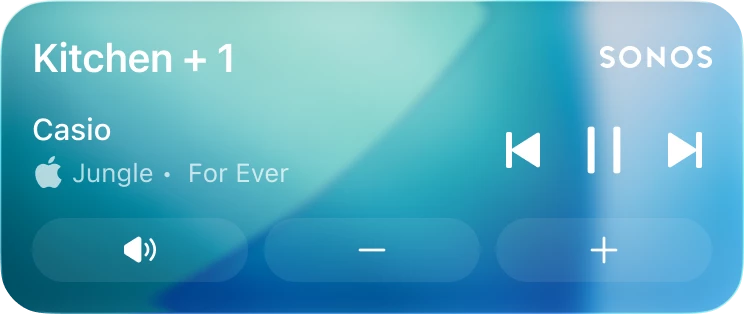
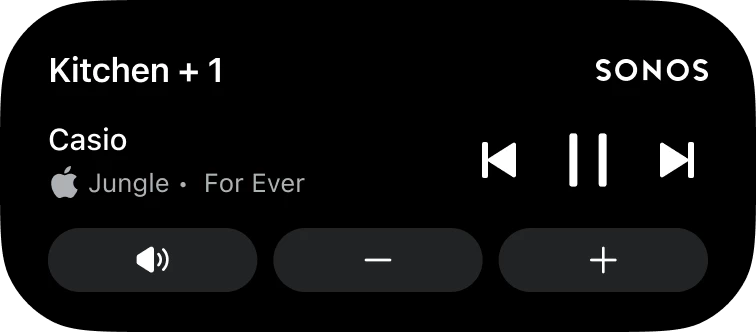
Once enabled the activity will appear after you initiate playback and then close the app. It will show the current room or group you were last playing audio from. When playback stops, the live activity will disappear after 15 minutes. While the iOS Live Activity can be viewed from your Lock Screen, you must first unlock your iPhone with FaceID or a Passcode before being able to make playback changes.


On the Lock Screen:
In the Dynamic Island:


Expanded in the Dynamic Island:


What if I don’t want the Live Activity to be showing on the screen?

If you want to keep Live Activities enabled but not have it appear on your screen you can swipe it away. To get it back go to App Preferences > Live Activity and toggle it on/off or force quit the app and relaunch it.


What if my Live Activity is only showing outlines?

If you are only seeing outlines you most likely need to change the iOS setting under Face ID & Passcodes > “Allow Access When Locked” > Toggle on “Live Activities”.


We’re super excited that the feature is now out, but that doesn’t mean the team has stopped working on it. 

  • Right now we are unable to support album art on the Live Activity, but alternative ways to enhance the lock screen experience are being explored.
  • Live Activities include support for Apple Watch and CarPlay so the Live Activity will show up on your Apple Watch or car, but right now the controls aren’t supported.
  • If you prefer to initiate playback on Sonos from outside the Sonos app (Direct Control from supported services, Bluetooth, or AirPlay) you can still use the local playback controls that appear on screen or the Live Activity. You can choose which you prefer to use.

Two more things before we leave you to explore the feature:

  • For Android users: we hope you’re still enjoying the lock screen notifications the team shipped out in February. Be sure to let us know if you have any feature requests and look forward to more good things coming your way. 
  • iOS 27 is coming later this year from Apple and the teams have been exploring the new capabilities it has in Beta. No news to share right now but keep your eyes peeled and ears open!


As always, please let us know any of your questions, concerns, or feedback! We’ll take it all. 

38 replies

106rallye
August 20, 2026

You can trigger an update when Apple does not show it but there really is one by going to the App Store and searching for the Sonos app. If you tap the right search result it will show update, even if it isn’t in the list of updates Apple provides.

Enthusiast II
August 20, 2026

Thanks and well done to the Sonos team! Quite a nice improvement!

Between this enhancement, the app redesign, and last year’s Apple Music Lossless support, I find I’m now using the Sonos app more often than the Apple Music app + AirPlay … this may also improve my audio quality slightly since AirPlay still, AFAIK, transcodes the lossless stream to 256 Mbps AAC.

So thank you, and I look forward to the improvements you have in mind.

MoPac
Headliner III
August 21, 2026

I’m using iPhone 15. App & firmware up to date.  Lock Screen activated.

Played a radio station on TV Room grouped with 4 other rooms.  Radio station was displayed on Lock Screen.  Ungrouped and watched TV for a while.  Played a Spotify playlist on TV Room grouped with 4 other rooms.  Ungrouped again then watched some more TV.  Lock Screen is still stuck on the original radio station.  The Lock Screen is not updating.

Also even though the rooms are no longer grouped the lock screen shows TV Room + 4.


Lyricist I
August 25, 2026

I can find the settings but live activity’s and dynamic island doesn't work.

is this a bug ?

AjTrek1
August 25, 2026

I can find the settings but live activity’s and dynamic island doesn't work.

is this a bug ?

Since you found the setting then we must assume the app is up to date. That said is your device up to date? Have you tried stopping the app and restarting it?

In my experience with “Live Activities” Sonos may take a few seconds to appear on the Home Screen after it’s locked.

You must also give it permission to stay on when it first appears.

Silly question… Sonos is actively Streaming Content to a room when trying to see it in “Live Activity”?

Together Everyone Achieves More = T.E.A.M.
Airgetlam
August 25, 2026

One of the things I didn’t parse correctly, at least initially, is that I had to turn it on both in Apple’s settings as well as in the settings in the Sonos controller, but once I’d done so, it worked for me. 

Bruce
Lyricist I
August 25, 2026

I can find the settings but live activity’s and dynamic island doesn't work.

is this a bug ?

Since you found the setting then we must assume the app is up to date. That said is your device up to date? Have you tried stopping the app and restarting it?

In my experience with “Live Activities” Sonos may take a few seconds to appear on the Home Screen after it’s locked.

You must also give it permission to stay on when it first appears.

Silly question… Sonos is actively Streaming Content to a room when trying to see it in “Live Activity”?

iPhone is up to date, Sonos app and speakers are.

app rebooted, device rebooted. 
checked settings in the app and iPhone 

and yes I’m playing music 😂

Enthusiast II
September 7, 2026

This is very useful on my ipad with one small request but I’m not sure if it is possible?

When listening to Planet Rock radio station this feature shows part of what is now playing but it doesn’t scroll like it does on the full screen view. So in a lot of cases you only see the title (sometimes part of the title) and no band name.

It’s not the end of the World but it would be nice if it could scroll those details.