

News

📲 The new Sonos App & Player Updates for late-January are Now Available! 🔊

  • January 27, 2026
  • 31 replies
  • 1170 views
Mike R. H.
Forum|alt.badge.img+14

Hey everyone!

This morning, the team is deploying an update to both the Sonos app and player firmware. This release introduces a long-requested feature and several stability fixes to keep your system running smoothly. As always, if you’d like to look at previous updates check out our App Release Notes here, as well as our System (Player) Release Notes here.

This will be another Phased Rollout, which means that the update may not get pushed to your system right away. Some iOS users update by going directly to the App Store. If you still do not see the update, try refreshing the App Store by pulling down (as if you were refreshing a page) on the Account page that shows all your pending app updates.

Note that this rollout will take approximately 2 weeks to reach all users.


App Update

iOS - 81.00.52

Android - 81.00.51

  • Save Queue as Playlist: You can now save your current queue as a playlist, making it easy to revisit your favorite listening moments anytime.

  • Fixed issue with slider size not changing when font set larger than medium

Player Update

  • Security Improvements

  • Player Stability Fixes

Release Notes & Support

You can find our full archive of release notes for previous updates here:

Questions or feedback? Let us know in the comments below! Our team is listening and we appreciate your input as we continue to improve the Sonos experience.


31 replies

bockersjv
Forum|alt.badge.img+21
  • Local Superstar
  • January 27, 2026

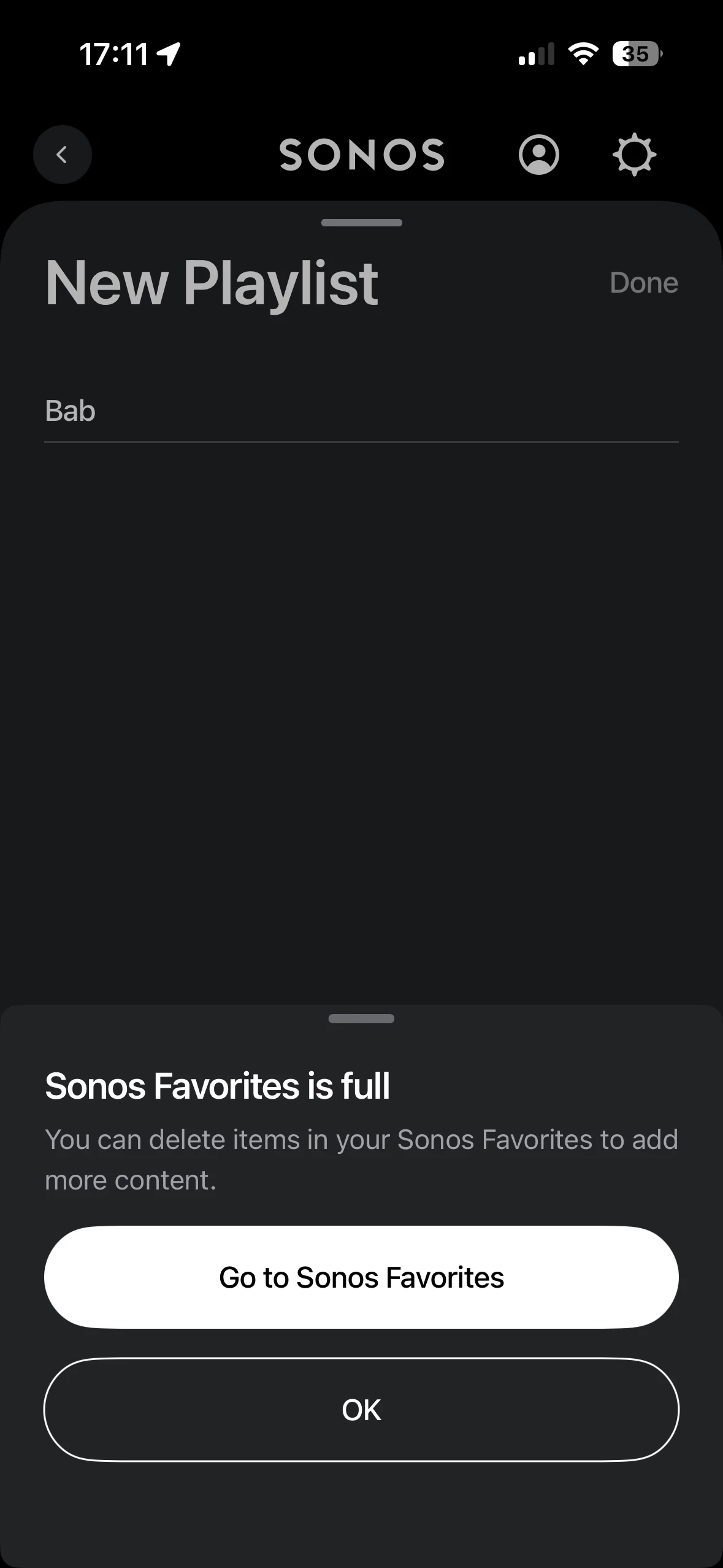
I see the option but when trying to save i get Sonos Favourites Full😳  Maybe because I’ve not got the full update yet or is there a limit?


Tried deleting a playlist to add a new one but same response. 


bockersjv
Forum|alt.badge.img+21
  • Local Superstar
  • January 27, 2026

Resolved…. Found an errant speaker that had not updated. Undated that, cleared queue, closed app. Opened app and tried again and success!  
 

was going to delete the post but this may help others. 


Mr. T
  • January 27, 2026

The App release notes can’t even get the iOS app version number correct.


Forum|alt.badge.img+6
  • Prodigy I
  • January 27, 2026

Haven't got the previous release features  yet (library sort options), right app version just no feature...

So not breath holding for this to be switched on once app updates!


Forum|alt.badge.img+10
  • Prodigy II
  • January 28, 2026

That’s the best update I’ve had for a long time. I think the last one went okay but I had to restart the app when it hung on finishing up. This went very smooth. I’ve been bumping my Apple ratings back up in recent times. 
 

edit to be a bit fairer, as I mentioned my router died so it’s probably been a factor for a few months. 


Forum|alt.badge.img+4
  • Renowned Enthusiast II
  • January 28, 2026

I did the app and firmware updates for my four iOS devices. All now show as completely up to date, but the new Save queue option is only available on two of the devices. Can I expect this particular part of the update to show up on the other two devices over the next several days, or should it have shown up right away? If it should already be there and it isn’t, what should I do to fix this? 


Airgetlam
  • January 28, 2026

I’d probably call Sonos Support to discuss it.

When you speak directly to the Support staff, they have tools at their disposal that will allow them to give you advice specific to your network and Sonos system.


Forum|alt.badge.img+2
  • Enthusiast II
  • January 28, 2026

I did the app and firmware updates for my four iOS devices. All now show as completely up to date, but the new Save queue option is only available on two of the devices. Can I expect this particular part of the update to show up on the other two devices over the next several days, or should it have shown up right away? If it should already be there and it isn’t, what should I do to fix this? 


Same for me. All Sonos Apps and firmware on latest version, iOS operating systems all on latest version.  Save Queue option only shows on my iPad.  The Save Queue option is still not available on 2 iPhones (14 pro and SE gen 2). 


Airgetlam
  • January 28, 2026

I’m curious, what did Support say, when you called in?


Forum|alt.badge.img+4
  • Renowned Enthusiast II
  • January 28, 2026

I’m holding off calling for a bit to see if this does actually update within the next few days. Per another thread about this, I’m not the only one having this issue. For practical purposes, I can save playlists on two of my devices and then use them on all the devices.  I’m pretty busy right now and I don’t want to get stuck on a long Customer Service call unless it’s really necessary. I was hoping to just get more information by posting on the forum. Thank you for your suggestion and I may eventually need to call them.


Stanley_4
  • Lead Maestro
  • January 28, 2026

I've never had to wait for the internal activations past two weeks of the app becoming available to me for download.


  • January 29, 2026

My android app and speakers are updated to the latest version (Five, Move, One, and Roam).
I can’t find how to save my queue to a playlist in the android app.
Can someone post a small guide with screenshot of where and how to do it?

My current queue contains only Pocket Cast podcast episodes, maybe it’s not supported yet or there’s a bug with it?


Edit: same with a queue containing only tracks from bandcamp, or another one containing only tracks from qobuz. I only find the option to add the current track to a playlist, or in the queue, to add the track for which I clicked the 3-dot button.


Stanley_4
  • Lead Maestro
  • January 29, 2026

My android app and speakers are updated to the latest version (Five, Move, One, and Roam).
I can’t find how to save my queue to a playlist in the android app.
Can someone post a small guide with screenshot of where and how to do it?

My current queue contains only Pocket Cast podcast episodes, maybe it’s not supported yet or there’s a bug with it?


Edit: same with a queue containing only tracks from bandcamp, or another one containing only tracks from qobuz. I only find the option to add the current track to a playlist, or in the queue, to add the track for which I clicked the 3-dot button.

Has the option been enabled on your controller? Look back at past posts here and you will see where it will be when activated. Until it is activated it will be unavailable regardless of the update status. 


  • January 30, 2026
[…]

Has the option been enabled on your controller? Look back at past posts here and you will see where it will be when activated. Until it is activated it will be unavailable regardless of the update status. 

I’ve checked the others messages before posting, but I’d missed the fact that for Sonos, “Phased Rollout” means that it’s the new features that are phased and not the whole update.

What I mainly checked was if there was a screenshot or an explanation on how that new feature is in the UI. The only screenshot is for the “Sonos Favorites is full error” from ​@bockersjv https://en.community.sonos.com/product-updates/the-new-sonos-app-player-updates-for-late-january-are-now-available-6932905?postid=16880578#post16880578


Reading the message https://en.community.sonos.com/product-updates/the-new-sonos-app-player-updates-for-late-january-are-now-available-6932905?postid=16880653#post16880653 where ​@User117655 are saying the features from last month “Additional music library settings for Android” is not yet rollout their his system, I went to check if it is in mine and couldn’t find how to do it. So either it’s still not rollout for me, or I didn’t find it.

What I’ve found in last month thread are messages from users asking for a screenshot of how that feature UI is from people were it was rollout, and nobody posting an image. https://en.community.sonos.com/product-updates/latest-software-update-early-december-25-6932060


So I ask again, can someone whose controller has the new “save queue to playlist” feature rolled-out please post a screenshot of it? And while I’m at it, can someone with the “Additional music library settings for Android” feature from last month enable also post an image? Last month thread has been closed so there no way to post it there.

I just want to know if I’m just too dumb to find the features or if there is an anomaly with sonos. (I’m pretty sure it’s the later option, but I’d like to cover my bases.)

Thanks a lot.


Forum|alt.badge.img+2
  • Enthusiast II
  • January 30, 2026

There are some screenshots of the Save Queue to Playlist functionality in this thread. 


Forum|alt.badge.img+4
  • Enthusiast II
  • January 30, 2026

On android. [UK]

All good, but still no hd/hi res banners on Local Library or album art from same source on queue view. 👎

Prompt availability of both hardware & software updates this time.👍👍


MoPac
Forum|alt.badge.img+18
  • Headliner III
  • January 30, 2026

 This is weird.  My iPhone 15 does not have the 3 dots on the queue screen.  The iPhone 13 I just purchased sans cover to use for calibration/TruePlay does have the 3 dots.  Makes no sense.  On the 15 did the delete app, reinstall.  Still no 3 dots.


Stanley_4
  • Lead Maestro
  • January 30, 2026

The dots are a function of the phased rollout, until they are rolled out to your device you don't get them. 

Device, not Account like the app and firmware updates.

Frustrating and poorly documented, or I missed it.


  • Lyricist III
  • February 2, 2026

Haven't got the previous release features  yet (library sort options), right app version just no feature...

So not breath holding for this to be switched on once app updates!

Me neither. It’s mind boggling how they deploy that. I got the “rounded corners of the album art” from the previous update, I have this “save queue to playlist” feature” but still no library sorting options.


Forum|alt.badge.img+6
  • Prodigy I
  • February 2, 2026

@MarqsM Just (last hour or so) got the save playlist option turned on but still no library indexing options that I can see anywhere... so I have caught up with you and you are not alone!


Forum|alt.badge.img+6
  • Prodigy I
  • February 2, 2026

Also something I am seeing with this release is a regular prompt to join my system which, when I do, completes OK (apparently).

On selecting 'Done' though I am returned to the 'join system' prompt until quitting and restarting the app (Android) which is then fine until the next time it thinks I need to join!

So... for this release, for me, 1 Fixed, 1 Broken and 1 Missing (still).


Forum|alt.badge.img+4
  • Renowned Enthusiast II
  • February 2, 2026

@MarqsM Just (last hour or so) got the save playlist option turned on but still no library indexing options that I can see anywhere... so I have caught up with you and you are not alone!

My save playlist option also updated today and is now available on all my devices.


Forum|alt.badge.img+2
  • Enthusiast II
  • February 2, 2026

Hallelujah…. my ‘three dots’ have now appeared on all devices today.  So after a mere 20 month wait I can once again save the queue as a new playlist.  Still seems bizarre to me to roll out a phased software update on a device by device basis, rather than by account.

I’ve now got my hopes raised that by October 2027 I may be able to revert back to playing the queue on a speaker after playing a radio station, without having to fire up my laptop or a third party App!


MoPac
Forum|alt.badge.img+18
  • Headliner III
  • February 3, 2026

 Mine finally show on my iPhone 15.  Weird that the 3 dots first showed on the older iPhone 13.


  • Lyricist III
  • February 3, 2026

Also something I am seeing with this release is a regular prompt to join my system which, when I do, completes OK (apparently).

On selecting 'Done' though I am returned to the 'join system' prompt until quitting and restarting the app (Android) which is then fine until the next time it thinks I need to join!

So... for this release, for me, 1 Fixed, 1 Broken and 1 Missing (still).

Correct. The same thing happened to me yesterday - for the first time ever. The app couldn’t join the system for several minutes. Eventually, it succeeded - after 15 minutes or so. Since then it was behaving OK. But I have no idea what it was disconnected in the first place - it had worked fine day before.