
News

๐Ÿ“ฒ New Sonos App & Player updates for early-March are now available! ๐Ÿ”Š

Related content:Software News
  • March 10, 2026
  • 44 replies
  • 1029 views

Howdy folks! This morning the team is deploying an update to both the Sonos app and player firmware. This release is quiet with the usual stability and performance fixes to keep your system running smoothly.

This will be a Phased Rollout, which means the update may not get pushed to your system right away. Note that this rollout will take approximately 2 weeks to reach all users.

iOS Users: If you do not see the update in the App Store, try refreshing the App Store by pulling down on the Account page that shows all your pending app updates.

ย 

๐Ÿš€ Whatโ€™s New
ย 

๐Ÿ› ๏ธ Update Details

App Update

  • iOS: 82.01.12
  • Android: 82.01.9

ย 

  • Bug fixes and app improvements

Player Update

  • Modern Players - 94.1-75011
  • Legacy Players - 86.6-75010

ย 

  • Support for Sonos Play
  • Bug fixes and performance improvements

ย 

๐Ÿ’ฌ Release Notes & Support

You can find our full archive of release notes for previous updates here:

Questions or feedback? Let us know with a comment below. Weโ€™re listening and appreciate your input!

ย 

44 replies

Forum|alt.badge.img+1
  • Trending Lyricist I
  • March 11, 2026

Hi,ย 

Thought I'd shareย  my first update issue with latest app/firmware, normally the updates are seamless, however the latest update, my system lost all the speakers era300's and sub-mini , they wouldn't bond with the soundbar, tried the usual steps, without success so factory resetย  them, still with the same result, my network could see them, yet refused to bond.

I even changed the network on all devices same result.

Eventually spoke to support, who were pretty good, it was found UNP was switched off in the controller app; soon as UNP was switched back on, the speakers were immediately available to the app for configuration.ย 

I guess with UNP set to off in my appย  causedย  issues; so why only now has this surfaced, and the other updates firmware, didn't mind UNP off?

Its not end of days stuff, I'm happy the system is back, just curious.

I'm not a fan of unp, I think I switched it off last November/December 2025 when I bought the system, however this was the first time having unp set to off in the app upset system updates,

ย 

ย 


Smilja
  • March 11, 2026

โ€‹@Dg7559, What isย UNP? UPNP?


MoPac
Forum|alt.badge.img+19
  • Headliner III
  • March 11, 2026

I thought UPnP was so other control point apps could see the Sonos devices and play to them using UPnP/DLNA. ย I use that capability a lot so that I can play music that is not indexed. ย I access the two MinimServer servers.


Forum|alt.badge.img+1
  • Lyricist III
  • March 11, 2026

Reporting all devices connected via ETHERNET cable no longer work after this update. Devices with WIFI working without issue. If unplugging the ETHERNET cable, device will connect with WIFI right away. This update has caused ETHERNET connected devices to stop working. System contains three devices, two on ethernet, one on wifi. Only solution at this time is to remove ethernet cables from devices. Level two support call scheduled.


MoPac
Forum|alt.badge.img+19
  • Headliner III
  • March 11, 2026

ย My Port on Ethernet worksโ€ฆ. I think. ย All unpluggedย now with storm coming in. ย Will check again after storm.

ย The Port WiFi was also turned OFF.


Forum|alt.badge.img+1
  • Trending Lyricist I
  • March 11, 2026

โ€‹@Dg7559, What isย UNP? UPNP?

Yes,ย  my bad


Smilja
  • March 12, 2026

โ€‹@Dg7559, Thanks a lot for sharing the solution.


Forum|alt.badge.img+17
  • Local Superstar
  • March 12, 2026

Eventually spoke to support, who were pretty good, it was found UNP was switched off in the controller app; soon as UNP was switched back on, the speakers were immediately available to the app for configuration.ย 

I guess with UNP set to off in my appย  causedย  issues; so why only now has this surfaced, and the other updates firmware, didn't mind UNP off?

Its not end of days stuff, I'm happy the system is back, just curious.

I'm not a fan of unp, I think I switched it off last November/December 2025 when I bought the system, however this was the first time having unp set to off in the app upset system updates,

What happens if you disable UPnP now the speakers have been reconfigured?

My understanding is UPnP is only required for legacy Sonos Windows/MacOS Apps, and also 3rd Party integration. I have HA integration, so require UPnP, but when I disable UPnP, iOS App still works fine with latest Sonos system firmware.


Forum|alt.badge.img+1
  • Trending Lyricist I
  • March 12, 2026

I switched UPNP off in the app, when I bought the system late last year, all previous the updates all went through seamlessly.

However, this March update, caused the system to lose the speakers, i could see them on the network, Sonos confirmed from their end they can see them on diagnostics.

After Sonos mentioned to turn UPNP on, instantly the speakers were presented to the system for configuration.ย 

ย 

I saw other instances of this condition on other forums.ย 

I'm just happy all is working, On router level UPnP is disabled, so I assume the private network, was affected with this update, requiring UPnP on for the controller app maybe; who knows?

ย 


MoPac
Forum|alt.badge.img+19
  • Headliner III
  • March 12, 2026

ย Plugged the Ethernet connected Port back in ( we had a storm ). ย It shows in the app. ย My system, though, has always had UPnP on. ย I believe it is on by default.


Forum|alt.badge.img+17
  • Local Superstar
  • March 12, 2026

I saw other instances of this condition on other forums.ย 

I'm just happy all is working, On router level UPnP is disabled, so I assume the private network, was affected with this update, requiring UPnP on for the controller app maybe; who knows?

ย 

Have you tried disabling UPnP again?


Forum|alt.badge.img+1
  • Trending Lyricist I
  • March 12, 2026

Hi,ย 

Yes it's now been disabled, as i personally have no need for it.

All speakers are fine and not affected by disabling the UPnP in the app.ย 

So as it has been off since I owned the system, and quite a few updates have gone in smoothly, without issue.ย 

This March update seemed to require UPnP to be on, some forums have reported the same issue, and toggledย  UPnP back on to bond their speakers again.ย 

ย 


MoPac
Forum|alt.badge.img+19
  • Headliner III
  • March 12, 2026

ย Is there something detrimental when UPnP is ON in the Sonos app? ย Why turn it OFF? ย I understand why it should be OFF in the router. ย Just donโ€™t understand why folks are turning it OFF in the app.


Forum|alt.badge.img+18
  • Prodigy II
  • March 12, 2026

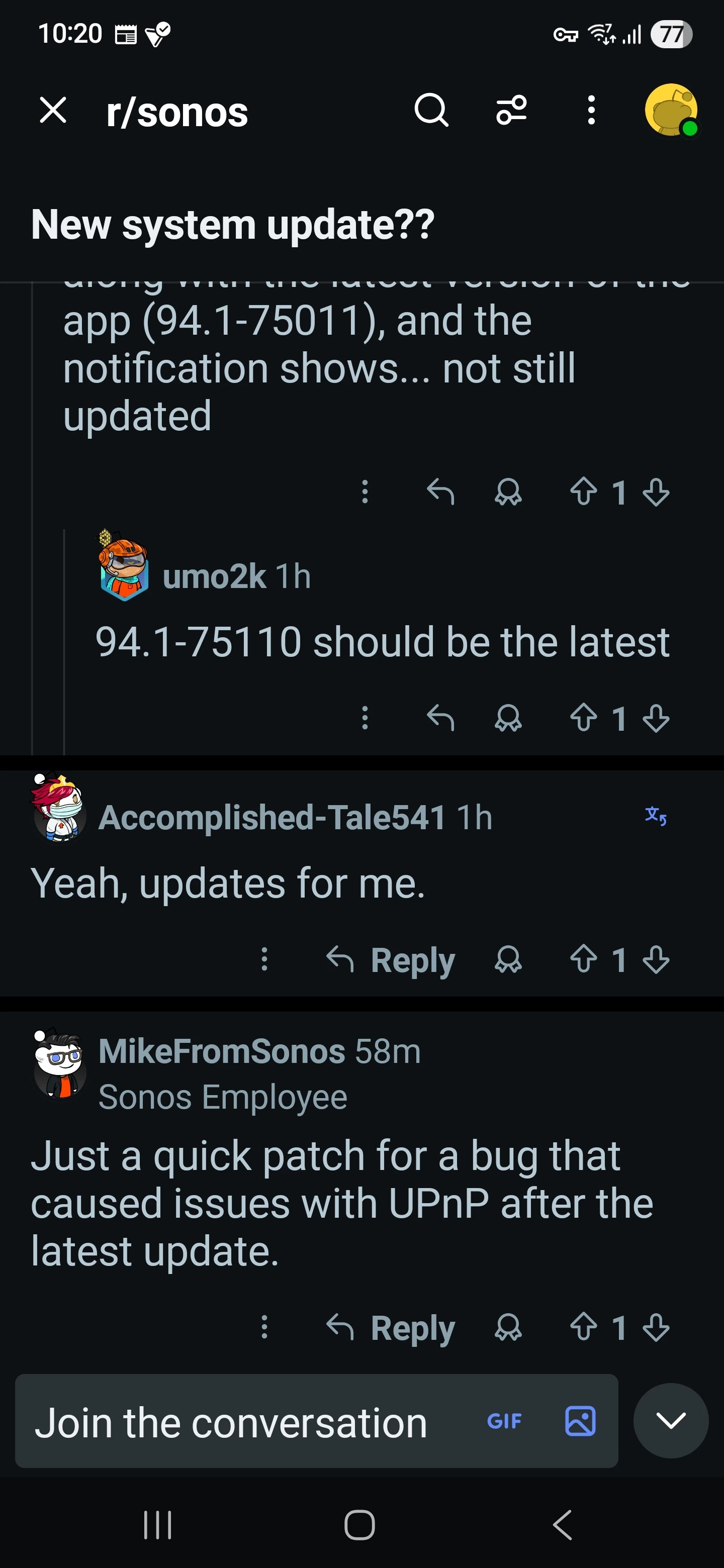
Iโ€™ve just had another system update. My speakers areย now on 94.1-75110, whereas the one rolled out on Tuesdayย ended 75011.ย 

My legacy speakers (Symfoniskย and Sub gen 2) are also on a higher build number than the one listed on Tuesdayย - itโ€™s now 86.6-75110, vs 75010.ย 

It doesnโ€™t matter, I just wondered if this mini-update added/changed anything...

ย 


  • March 12, 2026

Iโ€™ve just had another system update. My speakers areย now on 94.1-75110, whereas the one rolled out on Tuesdayย ended 75011.ย 

My legacy speakers (Symfoniskย and Sub gen 2) are also on a higher build number than the one listed on Tuesdayย - itโ€™s now 86.6-75110, vs 75010.ย 

It doesnโ€™t matter, I just wondered if this mini-update added/changed anything...

ย 

Same here. And wondering the same thing. I havenโ€™t noticed anything different yet and havenโ€™t found any information about the update.


Forum|alt.badge.img+18
  • Prodigy II
  • March 12, 2026

โ€‹@kdowlingย 

Given this thread started with โ€œThis release is quiet with the usual stability and performance fixes to keep your system running smoothlyโ€, I suspect something was missed and it remains a quiet release (rather than it adding a home page button to transferย cash into a nominated bank account). ย ;)


  • March 12, 2026

โ€‹@kdowlingย 

Given this thread started with โ€œThis release is quiet with the usual stability and performance fixes to keep your system running smoothlyโ€, I suspect something was missed and it remains a quiet release (rather than it adding a home page button to transferย cash into a nominated bank account). ย ;)

I suspect youโ€™re correct. But if a bank account is needed for that new home page button, I hereby nominate mine.


Airgetlam
  • March 12, 2026

Todayโ€™s (I think?) โ€˜firmwareโ€™ / โ€˜Systemโ€™ update isnโ€™t reflected on the linked page.ย 


Forum|alt.badge.img+1
  • Trending Lyricist I
  • March 13, 2026

ย Is there something detrimental when UPnP is ON in the Sonos app? ย Why turn it OFF? ย I understand why it should be OFF in the router. ย Just donโ€™t understand why folks are turning it OFF in the app.

Anyway There was a bug with UPnP they patched it according to Sonos

ย 


Forum|alt.badge.img+17
  • Local Superstar
  • March 13, 2026

ย Is there something detrimental when UPnP is ON in the Sonos app? ย Why turn it OFF? ย I understand why it should be OFF in the router. ย Just donโ€™t understand why folks are turning it OFF in the app.

UPnP SSDP messages areย multicast, which in a large Wi-Fi network can be excessive. Disabling will reduced unwanted multicast traffic, however needs to be enabledย for legacy Windows/MacOS Sonos Apps and 3rd party Apps that still requireย UPnP/SSDP. If just using just S2 App on phone/tablet and/or play.sonos.com, can be disabled.

https://support.sonos.com/en-gb/article/adjust-connection-security-settings

UPnP: This pertains to integrations that utilize the unsupported UPnP protocol. Note that turning this setting off will also prevent the Sonos app for macOS and Windows from controlling your system.


MoPac
Forum|alt.badge.img+19
  • Headliner III
  • March 13, 2026

ย So far no issues here so Iโ€™ll leave UPnP on. ย Particularly because I do use the Windows app & SonoPhone. ย Also I stream to Sonos devices using other control point apps using UPnP. ย Iโ€™m guessing that would not work if UPnP was turned OFF.


Forum|alt.badge.img+1
  • Lyricist III
  • March 13, 2026

Appliedย the second โ€œminorโ€ update on March 12 and it did not fix my ETHERNET issues. Level Two support blaming my Pi-Hole for blocking malware, adware, and phishing domains. One sonos domain blocked in the Pi-Hole has been whitelisted, but still no connection with ETHERNET.ย 

Unplug the cable, power cycle speaker, and it connects via WIFI without any issue.

Tried with UPNP OFF (it was originally set to on) and no help. L2 Support says UPNP should remain ON.


Stanley_4
  • Grand Maestro
  • March 13, 2026

Official Sonos take on PiHole

https://en.community.sonos.com/advanced-setups-229000/sonos-pi-hole-6870549

ย 

If I see Sonos update or post-update oddities I just disable my PiHole for five minutes and try Sonos again. If Sonos works a look at the PiHole logs tells me what Sonos tweak is needed.


Forum|alt.badge.img+1
  • Lyricist III
  • March 13, 2026

Yes I did try to disable pi-hole and it didnโ€™t help.

Is there any stance on recursive DNS?


Stanley_4
  • Grand Maestro
  • March 14, 2026

Since that is the normal operating mode ofย DNS it shouldn't be an issue.

Some of the DNS security options could cause problems if not working, shouldn't be just for Sonos though. The errors if any should be in the DNS logs.