
Ditte
March 9, 2021

Meet Sonos Roam, the ultra-portable smart speaker
Related content:Hardware
Meet Sonos Roam, the ultra-portable smart speaker

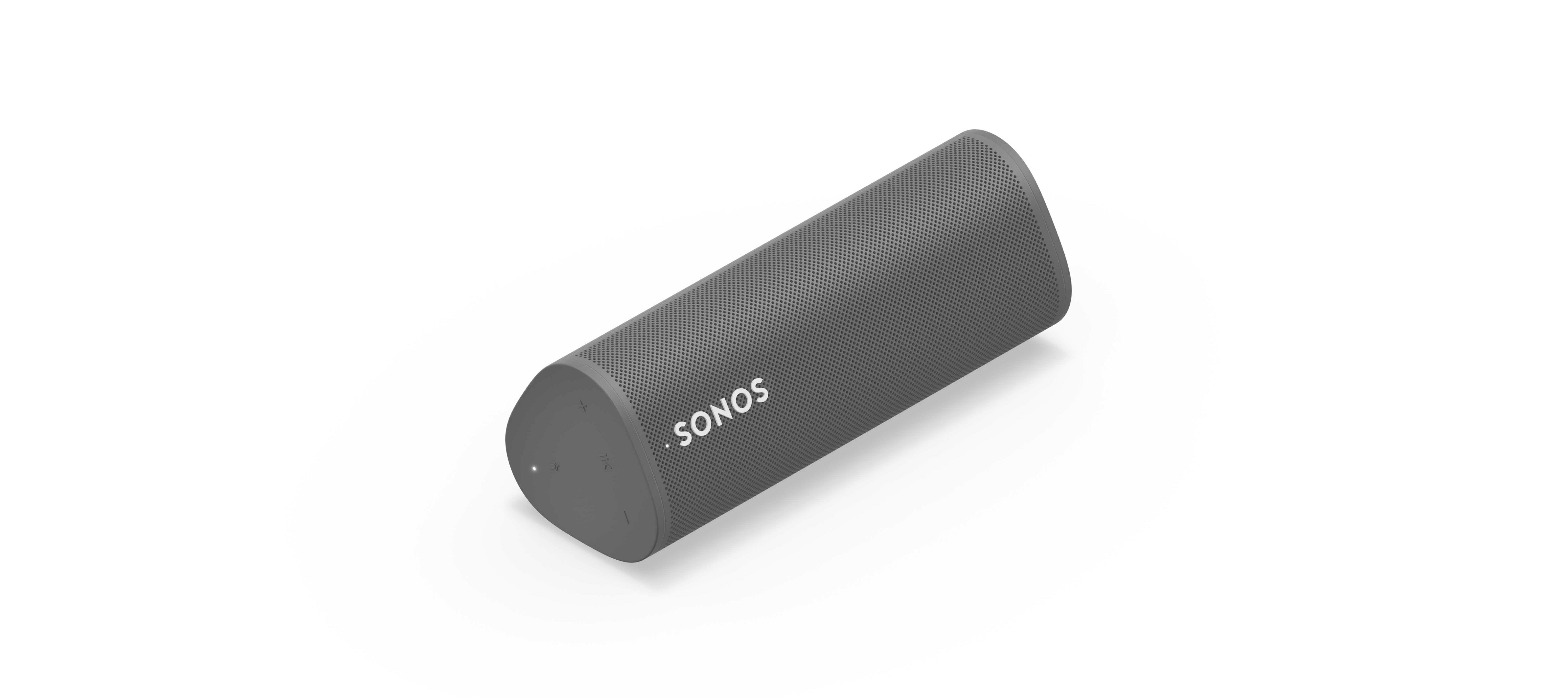
We’re happy to introduce you all to Sonos Roam, the ultra-portable smart speaker built to deliver great sound at home and on any adventure. Fully connected to your Sonos system on WiFi at home and automatically switching to Bluetooth when you’re on the go, Roam’s powerful, adaptable sound defies expectations for a speaker of its size. Effortless set-up and control and new smart features make it easier than ever to enjoy music and more from anywhere. Weighing less than a pound (450g), Roam’s elegant yet durable design is perfect for your home, the backyard, and wherever you go.

Get to know Sonos Roam

A simultaneous connection to both WiFi and Bluetooth makes streaming wherever you are seamless. When you’re listening at home Roam connects to your system and streams on WiFi, and when you leave it intuitively switches to Bluetooth and automatically re-pairs with your mobile device.

With an all-new feature called Sound Swap, you can hold the play/pause button on the speaker to switch the music to the nearest speaker on your system, making it easy to move music from room-to-room.
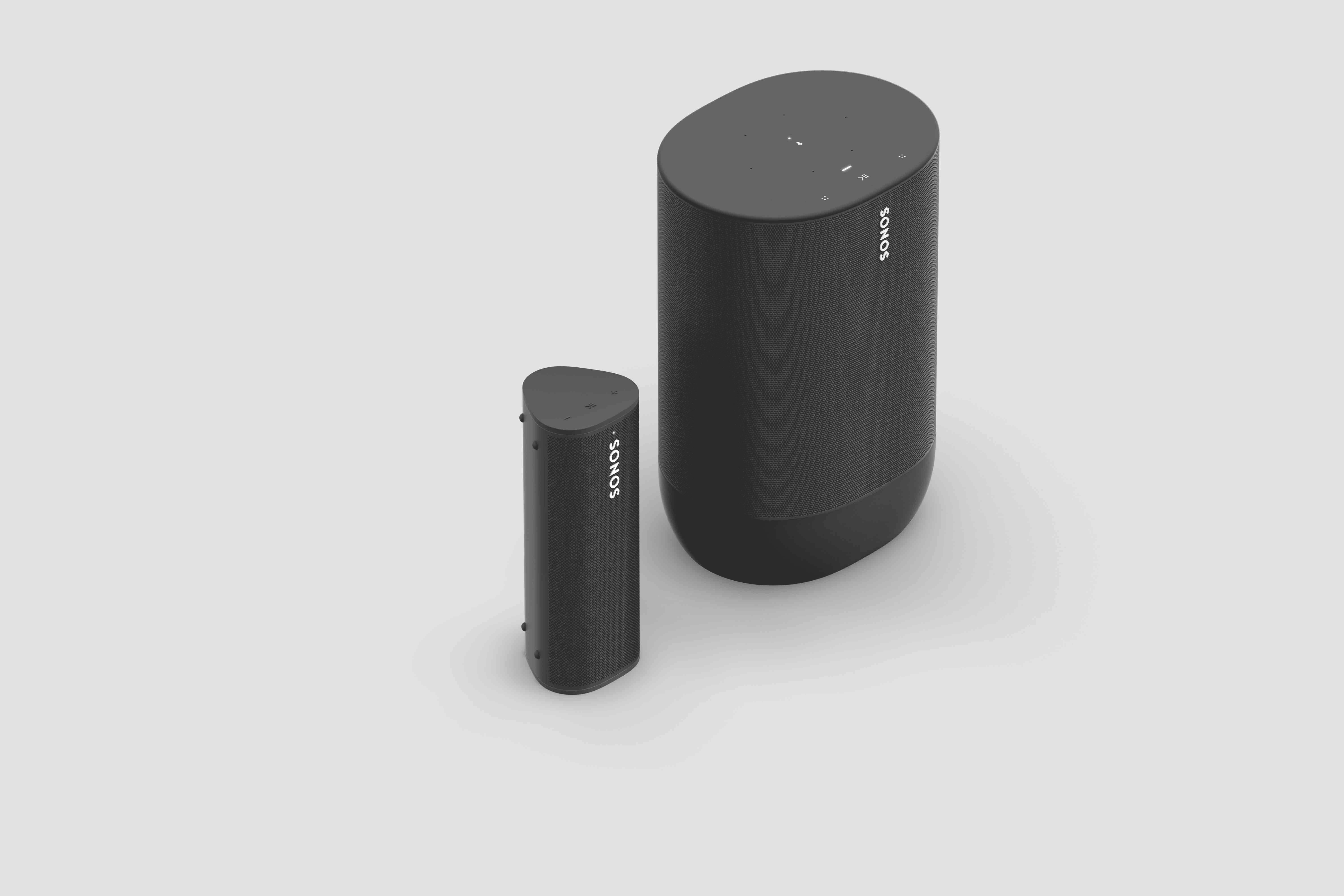
Sonos Roam (left) and Sonos Move (right)

Seamless connectivity also unlocks Bluetooth streaming for your entire system, with the Sonos app allowing you to group any of your Sonos speakers to Roam when streaming with Bluetooth. Roam works with more than 100 streaming services, including Sonos Radio, and is easily controlled with the Sonos app, your voice with Amazon Alexa or Google Assistant, Apple AirPlay 2, or directly from your favorite music service app.

Roam was created to deliver an incredible sound experience no matter where you are. Like all Sonos products, Roam was tuned by industry leaders across music and film to ensure the speaker reproduces content exactly how the creator intended. A carefully designed acoustic architecture delivers rich, detailed sound with the clarity, depth, and fullness you’d expect from a larger speaker.

Automatic Trueplay is now available when streaming via Bluetooth as well as Wi-Fi, and means Roam is always tuned for the best listening experience in any environment.

Available in shadow black or lunar white, Roam’s tactile triangular shape and soft profile is comfortable to pick up and looks great inside the home. Combining elegance and durability, Roam is dust proof and fully waterproof with a rigorously tested IP67 rating, and features silicone end caps and physical buttons to protect against drops or bumps.

Roam is ready for any adventure with up to 10 hours of continuous playback on a single charge and up to 10 days of battery life when not in use.

To recharge, Roam connects to a custom magnetic wireless charger from Sonos sold separately, any Qi wireless charger, or with the USB-C cable included in the box.

 

Sonos Roam

Roam’s compact size will fit into any bag or the smallest corner of your living space. Listeners can place Roam vertically for a smaller footprint or horizontally to provide added stability on uneven surfaces outdoors. Even the packaging leaves a light footprint, with a structure that is made of 100% sustainably-sourced paper, minimizes the use of inks, and includes no single-use plastics. 

Roam is available starting April 20 for $169, €179, £159, NOK1799, SEK1999, DKK1349. You can pre-order today on sonos.com.

This topic has been closed for further comments. You can use the search bar to find a similar topic, or create a new one by clicking Create Topic at the top of the page.

394 replies

melvimbe
April 21, 2021

The is pretty standard stereo pairing functionality for Sonos.  It’s not meant to be something you can do on the fly as you’re suggesting.  It’s not just a matter of changing from mono to stereo, but all other speakers and smart home devices in your home knowing how to reference your speakers.  As well, I would expect to see your 2nd speaker show up in the room list as ‘living room 1’ or something similar, rather than having to re-add it to the system.  Been a while since I’ve split a stereo pair though, so perhaps I’m misremembering or things have changed.


I may have spoken too soon regarding stereo pairing with the Roam.  I have several different stereo pairs of other Sonos speakers, and the behavior has always been the same.  The pair is created through the app.  If one of the pair leaves the network for whatever reason, the remaining speakers acts alone in mono, maintaining the same Sonos room.  When the other speakers gets powered on, back on, the speaker pair is reformed.

That’s not been my experiece with the Roam. I create the stereo pair and everything is great.  When one of the pair is removed (powered off or put in bluetooth mode), the remaining speaker plays alone, as I expected.  However, when the other speaker is back and fully available, the speaker pair isn’t automatically reformed...I now see 2 separate Roam rooms. 

Not sure if this is the expected functionality of Roam speaker pairs or not, as I really need to play with it some more, but I don’t like it.  I don’t want to have to do the speaker pairing setup, although it’s easy, and I don’t like the implications to all the smart home controls I have in place.  it also seems like I’m losing the Sonos room name I chose every time this happens.

I do get the complication of this though, considering Bluetooth functionality.  I mean, when I put a speaker in Bluetooth mode (and still connected to WiFi) the speaker pair has to be split up, since you can’t do a speaker pair in Bluetooth mode. There wouldn’t be a way for a speaker to share it’s bluetooth connection with the rest of your speakers if it remained as speaker pair.   Even if you could do a speaker pair in bluetooth mode, basically have a pair operating as a single entity in all cases, I would guess people would not want to always bring both speakers while using them away from home,  so it creates problems there too.

Unless I’m missing something, which is entirely possible, this issue is going to really deter me from using these outside of my home.  I really like them as pair, plugged in and used like any other Sonos speaker, but don’t want all my settings messed up when I start switching modes on one of them.  If I really want to use bluetooth extensively, either away from the home or as a source for my Sonos system, then a single Roam is a better option.

Danny
James L.
Retired Community Staff
April 21, 2021

The is pretty standard stereo pairing functionality for Sonos.  It’s not meant to be something you can do on the fly as you’re suggesting.  It’s not just a matter of changing from mono to stereo, but all other speakers and smart home devices in your home knowing how to reference your speakers.  As well, I would expect to see your 2nd speaker show up in the room list as ‘living room 1’ or something similar, rather than having to re-add it to the system.  Been a while since I’ve split a stereo pair though, so perhaps I’m misremembering or things have changed.


I may have spoken too soon regarding stereo pairing with the Roam.  I have several different stereo pairs of other Sonos speakers, and the behavior has always been the same.  The pair is created through the app.  If one of the pair leaves the network for whatever reason, the remaining speakers acts alone in mono, maintaining the same Sonos room.  When the other speakers gets powered on, back on, the speaker pair is reformed.

That’s not been my experiece with the Roam. I create the stereo pair and everything is great.  When one of the pair is removed (powered off or put in bluetooth mode), the remaining speaker plays alone, as I expected.  However, when the other speaker is back and fully available, the speaker pair isn’t automatically reformed...I now see 2 separate Roam rooms. 

Not sure if this is the expected functionality of Roam speaker pairs or not, as I really need to play with it some more, but I don’t like it.  I don’t want to have to do the speaker pairing setup, although it’s easy, and I don’t like the implications to all the smart home controls I have in place.  it also seems like I’m losing the Sonos room name I chose every time this happens.

I do get the complication of this though, considering Bluetooth functionality.  I mean, when I put a speaker in Bluetooth mode (and still connected to WiFi) the speaker pair has to be split up, since you can’t do a speaker pair in Bluetooth mode. There wouldn’t be a way for a speaker to share it’s bluetooth connection with the rest of your speakers if it remained as speaker pair.   Even if you could do a speaker pair in bluetooth mode, basically have a pair operating as a single entity in all cases, I would guess people would not want to always bring both speakers while using them away from home,  so it creates problems there too.

Unless I’m missing something, which is entirely possible, this issue is going to really deter me from using these outside of my home.  I really like them as pair, plugged in and used like any other Sonos speaker, but don’t want all my settings messed up when I start switching modes on one of them.  If I really want to use bluetooth extensively, either away from the home or as a source for my Sonos system, then a single Roam is a better option.

Hi @melvimbe,


I’ve checked with our engineering team, and they’ve confirmed that this is expected behaviour. Roam Stereo Pairs can be relatively fragile and are more susceptible to be being broken than that of stereo pairs of other players. Additionally, Roam Stereo pairs don't automatically recreate after being broken.

There are three main reasons why a stereo pair of Roams can be broken:

  • If one targets a member of a Roam stereo pair via bluetooth it will break the pair
  • If one member of the Roam stereo pair is physically moved elsewhere it will break the pair
  • If one member of the Roam stereo pair runs out of battery it will break the stereo pair

It seems like you’re hitting point number 2 which explains what you’ve written above. Currently, when a Roam stereo pair is broken, it has to be manually recreated in app. I understand that’s not the experience you’re looking for, and I’ve fed this back to the Product Development team for future consideration. If you have any other questions let me know.

Mark good posts by pressing the like button, and select the best answer on questions you've asked to help others find solutions.
melvimbe
April 21, 2021

Hi @melvimbe,


I’ve checked with our engineering team, and they’ve confirmed that this is expected behaviour. Roam Stereo Pairs can be relatively fragile and are more susceptible to be being broken than that of stereo pairs of other players. Additionally, Roam Stereo pairs don't automatically recreate after being broken.

There are three main reasons why a stereo pair of Roams can be broken:

  • If one targets a member of a Roam stereo pair via bluetooth it will break the pair
  • If one member of the Roam stereo pair is physically moved elsewhere it will break the pair
  • If one member of the Roam stereo pair runs out of battery it will break the stereo pair

It seems like you’re hitting point number 2 which explains what you’ve written above. Currently, when a Roam stereo pair is broken, it has to be manually recreated in app. I understand that’s not the experience you’re looking for, and I’ve fed this back to the Product Development team for future consideration. If you have any other questions let me know.


Thanks for this James.  That’s a good comprehensive answer.   I think I’ve experienced points 1 and 2.  It also seems like just powering off a speaker breaks the pair, but I suspect perhaps that’s a part of point 2 (or 3).  The result is that one of the speakers just isn’t ‘there’ to pair with, and therefore, the pair is broken.  I would like for the pair to reform when the missing speaker returns, but I can also see why that would be somewhat confusing since that’s not an option for point 1 (bluetooth).  I would guess that in normal everyday use, point 1 is what will break a pair most often...my random testing doesn’t reflect typical use.

While I’m talking about negatives, I also can’t seem to get the speaker swap function to work.  This is most likely is user error, as I’m not sure I’m holding and releasing the play/pause button with the right timing.  I personally would rather have an additional button for speaker swapping, rather than reusing the same buttons.  Same goes for the power/bluetooth mode button.

I really am pretty impressed with the sound quality.  It’s great for small spaces, and I don’t really feel like the bass is missing or doesn’t get loud enough.  Also tried it on my android with both speakers connected via bluetooth (mono) and thought it was pretty impressive,   And I am surprised how much I like it in lunar white.


Danny
James L.
Retired Community Staff
April 21, 2021

While I’m talking about negatives, I also can’t seem to get the speaker swap function to work.  This is most likely is user error, as I’m not sure I’m holding and releasing the play/pause button with the right timing.  I personally would rather have an additional button for speaker swapping, rather than reusing the same buttons.  Same goes for the power/bluetooth mode button.

The timing for Sound Swap is something that took me a bit of practice too. You’re listening for the third, higher pitched chime when holding the Play/Pause button down. The only way I can describe the sound pattern is like this:

First chime - immediately upon button press - bleep
Second chime - approx 1 second later - bloop (lower than bleep)
Third chime - approx 1 second later - blipblip (this one is quieter than the other two)
Release

I found it easier to try “pulling” audio from another speaker to Roam to hear the chimes a bit clearer.

Mark good posts by pressing the like button, and select the best answer on questions you've asked to help others find solutions.
Contributor I
April 21, 2021

Bought the Roam as a bathroom speaker and really happy with it for that purpose. One issue I am noticing is that I can manually turn the speaker off, but opening the Sonos app will awaken it - and keep it awake. This means the battery is draining much faster than I would like it to, is there a way to prevent it doing this? Or have it go to sleep? I access the Sonos app a fair amount for using other speakers.

Lyricist I
April 21, 2021

Feature set seems complete except for one that exists in competitor's products - the ability to group speakers over bluetooth (like PARTYUP on UE products or JBL Connect+). The Roam product page states that grouping can only be accomplished via WiFi. 

I hope that is not a hardware limitation and can possibly be enabled via software at some point. I pre-ordered two Roams and would love to have two or more of these bad boys working in concert wherever I decide to setup camp this summer!

This was one reason I bought two.

Any chance there will be an update that will allow a Roam stereo pair to connect to a Bluetooth device?  Especially an LG webOS TV.

Contributor II
April 22, 2021

Nice thing :-)
I would like to be able to set the speaker to WiFi under my home profile via BT, for example at a friend's home or vacation, and run all the set services where I will be.
Without a phone and its BT connection. Is there any way to do this?
When I connect to Roam via BT - it doesn't allow me to set up WiFi ..

HIFIpartner (CZ)

Contributor I
April 22, 2021

Bought the Roam as a bathroom speaker and really happy with it for that purpose. One issue I am noticing is that I can manually turn the speaker off, but opening the Sonos app will awaken it - and keep it awake. This means the battery is draining much faster than I would like it to, is there a way to prevent it doing this? Or have it go to sleep? I access the Sonos app a fair amount for using other speakers.

Apologies if covered previously but answering my own question a little here...found the following article: https://support.sonos.com/s/article/5029?language=en_US#:~:text=To%20place%20your%20Roam%20into,last%20up%20to%2010%20days.


Long press will prevent it waking up.

JCR28
Trending Lyricist I
April 22, 2021
I have just bought a Sonos Roam, and I  would like to know if the Trueplay of the Roam coupled to my stereo pair of Play 5 in the same room, can also calibrate all 3 Sonos…..?
(I have no apple devices only android)


Prodigy I
April 22, 2021

Bought the Roam as a bathroom speaker and really happy with it for that purpose. One issue I am noticing is that I can manually turn the speaker off, but opening the Sonos app will awaken it - and keep it awake. This means the battery is draining much faster than I would like it to, is there a way to prevent it doing this? Or have it go to sleep? I access the Sonos app a fair amount for using other speakers.

Apologies if covered previously but answering my own question a little here...found the following article: https://support.sonos.com/s/article/5029?language=en_US#:~:text=To%20place%20your%20Roam%20into,last%20up%20to%2010%20days.


Long press will prevent it waking up.

There should be a sleep mode button in the app itself.  The power button on the back is kind of dodgy -- since it has to be flat for waterproof purposes.  So it can be difficult to tell when you get a good press.  Or, if you use the app, it should ONLY power on the Roam if you target music to the Roam (not just generally turning on the app) -- I realize this can be difficult to implement, since if the speaker is offline, you can’t target it.  But there has to be a more efficient way to do this.  Maybe a wake/sleep button in the app itself.