
Ryan S
Retired Sonos Staff
September 5, 2019

Introducing Sonos Move, Brilliant Sound Anywhere
Related content:Hardware
Introducing Sonos Move, Brilliant Sound Anywhere
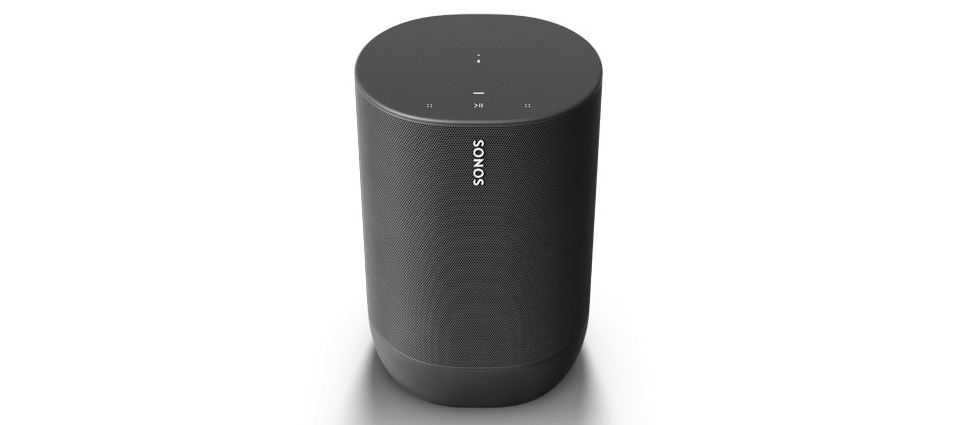
Introducing Sonos Move, the durable, battery-powered smart speaker for outdoor and indoor listening. Powerful and versatile with smart, adaptable sound, Sonos Move is available starting September 24th.


Sonos Move delivers surprisingly deep bass, an ultra-wide soundscape, and Automatic Trueplay tuning that perfectly balances the sound for where you are and what you're listening to.

Move features two Class-D digital amplifiers perfectly tuned to match the speaker drivers and acoustic architecture. It also has one downward-firing tweeter into a custom-designed waveguide that disperses sound evenly, along with one mid-woofer integrated into the cabinet for deep, rich bass.

Connect Move to the rest of your Sonos system at home on WiFi to stream music in one room or in sync with other speakers throughout your home. Play music, check news, set alarms, get your questions answered, and more, completely hands free with Alexa and the Google Assistant built right in. Switch to Bluetooth when you’re away from home or on the go and play music directly from your mobile device.


Details on Sonos Move:
  • Move slides seamlessly into the included charging base and features an ergonomic handle, making it easy to pick up and carry.
  • Move has a tough durable shell and an IP56 rating, meaning it can stand up to falls, bumps, humidity, rain, dust, UV rays, and extreme heat and cold.
  • Responsive touch controls on the top of the speaker makes it easy to play, pause, skip, adjust the volume, and group rooms when on WiFi. There's also a mic button that can easily turn the microphones on or off.
  • Move also has a join button, power button, and WiFi/Bluetooth mode button on the back, just under the handle.
Power and battery:
Move’s battery will last for up to 10 hours of uninterrupted playback. If left off the charging base and unused, Move will automatically go into suspend mode to reserve battery for up to 5 days. The battery is rechargeable with an included indoor charging base or with any USB-C charger with the following output levels: 12V/3A, 15V/3A, or 20V/2.25A. After about three years, or 900 charges, Move’s battery can easily be replaced so you can keep listening for years to come.

Pre-order today on Sonos.com in shadow black for $399 US (€399 EUR), available worldwide starting September 24.
This topic has been closed for further comments. You can use the search bar to find a similar topic, or create a new one by clicking Create Topic at the top of the page.

237 replies

Contributor II
October 17, 2019

Well, I would prefer a dropout instead of having to change the move to bluetooth, when I use it in the backyard. With the power that nowadays  processors have, Sonos should do better. I don’t believe that’s not doable.


What other Sonos products do you have?  Your profile says that you have a Connect and Move, but I’m guessing you have others since you’re using Sonosnet.

As for now only the Connect and the Move. I used to have 2 Play 5 before. I’m planning to get Playbar, Sub and Sonos Sl to create a 5.1 system. (Once Sonos decide to update the Playbar :sunglasses: )  I use the Sonosnet as in the immediate neighborhood there are more Sonos devices that used to interfere.

Have you considered upgrading your WiFi router?  I’m not trying to suggest you spend more money, but if the Move can’t access WiFi, then it’s likely your phone/tablet isn’t either, and you wouldn’t be able to control the Move anyway.  As you stated, tech has improved, and you might find upgrading the router to have a lot of benefits.

That will be my next “move”. I would have preferred to purchase a Sonos Boost instead.


Lyricist I
November 11, 2019

This is definitely an interesting product in terms of having it in rooms with lack of sockets (for instance in the bathroom). However, I will not buy it unless they produce it in white

binh25
Avid Contributor I
November 14, 2019

Just got the move, not bad unit, price is a little steep

and the extra charging station, someone need to work on the number it seem a little out of this world $120 AUD for a charging stand?

Enthusiast II
December 2, 2019

Not sure if this has already been asked but here goes.. why does the battery get used so much even when the Move is turned completely off?


jgatie
December 2, 2019

Not sure if this has already been asked but here goes.. why does the battery get used so much even when the Move is turned completely off?


Because “completely off” is a misnomer unless you are toggling the On/Off button on the back.  Unless you use the button to turn it off, the unit is still drawing power.  

Enthusiast II
December 3, 2019

Not sure if this has already been asked but here goes.. why does the battery get used so much even when the Move is turned completely off?


Because “completely off” is a misnomer unless you are toggling the On/Off button on the back.  Unless you use the button to turn it off, the unit is still drawing power.  


I don’t own one of these myself but from what I’ve read from others testing this, they did turn the unit of completely by using the button.


Lyricist II
December 3, 2019

PLEASE RELEASE THE MOVE IN WHITE! I’LL BUY TWO IMMEDIATELY! 

Enthusiast I
December 12, 2019

i bought today a sonos move, great value

just one question about battery life : Can we let the move on his charge stand like one month or two without having issues with the battery capacity trough thé time ?

Contributor I
December 12, 2019

This decision was made based on several factors. Largely, SonosNet was designed for players in a fixed configuration, always on, and continuously connected to a home network. It wasn't designed to handle players moving around the house. Introducing our first portable speaker meant adding new features and hardware for a flexible listening experience, including Bluetooth mode and suspend mode. In order to ensure a smooth experience for customers with these additional features, Move directly connects to the access point or WiFi network.

Among many concerns, there are basic networking issues, such as if it were part of SonosNet, other players connecting to it may suddenly lose their streams if it dropped offline due to going into suspend mode.

If you're looking to use a Move out where you don't have wifi, and don't want to use Bluetooth, you could also use a wireless extender, wired into the nearest Sonos player if you wanted, and have that extend your wireless range.

I’ve just spent hours trading emails with the Sonos support team on trying to get my Move to act like a normal Sonos speaker when having a range extender in my network.  The range extender is causing problems.  Nobody on the support team mentioned wiring the extender to a speaker.  Will this work only if that speaker is on Sonosnet or would it work also when that speaker is on WiFi?  Thanks

Ryan S
Ryan SAuthor
Retired Sonos Staff
December 12, 2019

Can we let the move on his charge stand like one month or two without having issues with the battery capacity trough thé time ?

Absolutely! The Move is designed to be left on the charging base all the time when not being taken on the go.

This decision was made based on several factors. Largely, SonosNet was designed for players in a fixed configuration, always on, and continuously connected to a home network. It wasn't designed to handle players moving around the house. Introducing our first portable speaker meant adding new features and hardware for a flexible listening experience, including Bluetooth mode and suspend mode. In order to ensure a smooth experience for customers with these additional features, Move directly connects to the access point or WiFi network.

Among many concerns, there are basic networking issues, such as if it were part of SonosNet, other players connecting to it may suddenly lose their streams if it dropped offline due to going into suspend mode.

If you're looking to use a Move out where you don't have wifi, and don't want to use Bluetooth, you could also use a wireless extender, wired into the nearest Sonos player if you wanted, and have that extend your wireless range.

I’ve just spent hours trading emails with the Sonos support team on trying to get my Move to act like a normal Sonos speaker when having a range extender in my network.  The range extender is causing problems.  Nobody on the support team mentioned wiring the extender to a speaker.  Will this work only if that speaker is on Sonosnet or would it work also when that speaker is on WiFi?  Thanks

It’s best to have an extender wired back to the main network. If all of your Sonos speakers are on wireless and you wire one to the extender, they will go off of wifi and onto SonosNet mode, getting a network connection from the one wired to the extender. If your extender has a WAN port which you wire to the Sonos speaker, if all of the rest are wireless, the ethernet port would be disabled and wouldn’t give the extender network connectivity at all, which could cause all sorts of trouble.

Without looking at your case, my first advice is to make sure that your extender is configured to pass multicast traffic to the main network and that its connection back to the router is good. But if you’re working with the team already, I don’t want to step on any toes.

Mark good posts by pressing the like button, and select the best answer on questions you've asked to help others find solutions.