
Ryan S
Retired Sonos Staff
August 29, 2018

Introducing Sonos Amp
Related content:Hardware


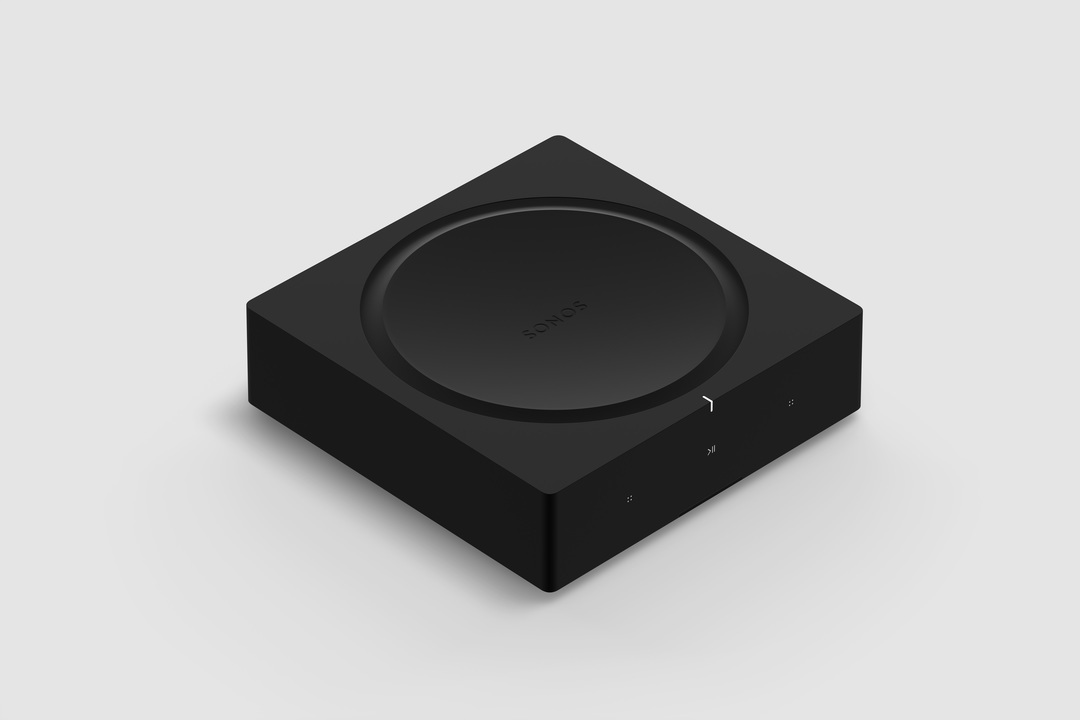
Available starting February 2019, Sonos Amp is the all-new, versatile amplifier to power all your entertainment and bring the sonic content you love to every room of your home. The Amp has been redesigned with more than twice the power of the original Connect:Amp, with more versatility, and will enable new experiences through the platform.

Play your favorite streaming content on Sonos, connect to your TV through HDMI-ARC, or plug into any audio device, including a turntable to power your vinyl collection.

Sonos Amp will fit in any home environment, whether as a compact and elegant solution for in-rack AV installations, wall mounted, tucked under furniture, or on display in a room.

Details and Specs
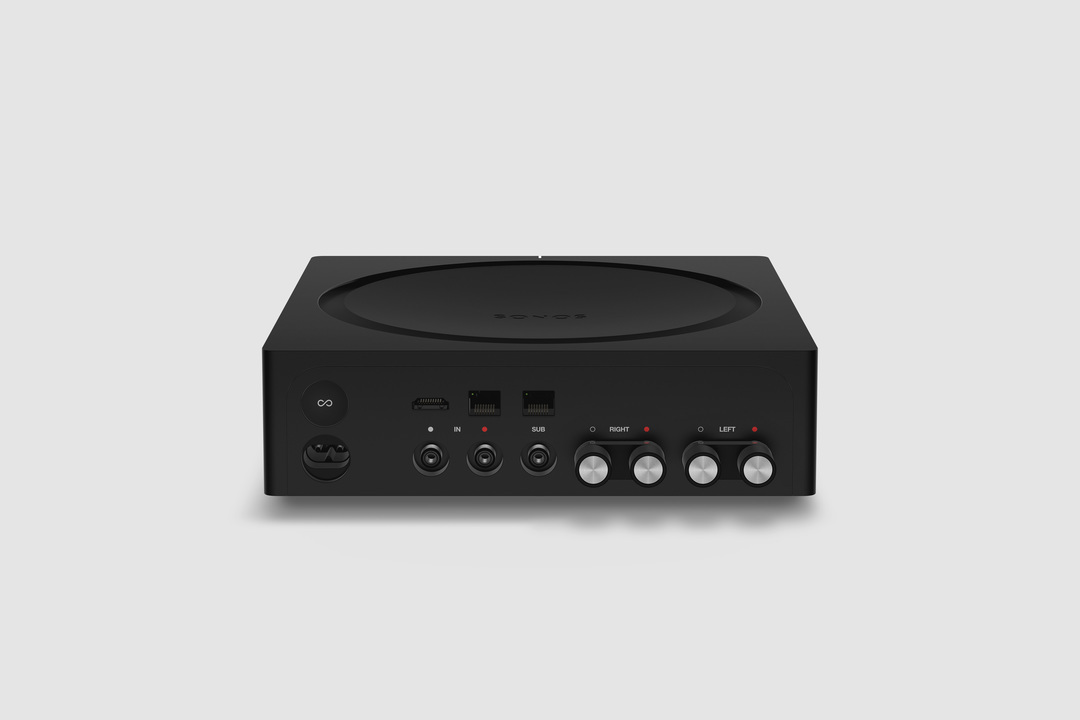


Physical Specs Amp comes in Matte black with black and silver banana plugs all in a standard rack fit size. The dimensions are 8.54 x 8.54 x 2.52 in. (217 mm (w) x 217 mm (d) x 64 mm (h)) and it weighs 4.6 lbs. (2.1 kg). Custom banana plugs that accept 10 - 18 AWG speaker wire and the Class-D digital amplifier sends a maximum of 125W per channel at 8 Ohms.

The subwoofer output is auto-detecting RCA with adjustable crossover (50 to 110Hz).

Capable of using two line-in sources, analog RCA audio input, and HDMI-ARC inputs. Amp plays Dolby Digital 5.1 or PCM stereo sound over HDMI-ARC.

Versatile Design


Use Sonos Amp to power your installed speakers as a separate Sonos room, or bond it with a pair of Sonos Ones, Play:1s, Play:3s, or Play:5s to become a surround sound setup that you can use with your TV. You can also use Amp to add your speakers as rears to a Sonos home-theater setup (by wirelessly bonding an Amp with Beam, Playbar, or Playbase) or use two Sonos Amps (one for the front right and left channels, the other for the rear channels) for surround sound.

The Sonos Amp drives left and right speakers, and it will create a phantom center channel when sent discrete audio for that channel.

Sonos Amp has all the features of Sonos in a powerful package:
  • Sonos supports over 100 services. Choose the ones you want and listen to music, podcasts, radio, and audiobooks. You can also play all the music stored on your computer or other devices.
  • Sonos has built a software platform that enables hundreds of partners and gives our customers unparalleled freedom of choice. Amp features AirPlay 2, access to home automation partners, and voice control when wirelessly connected with Amazon Echo or Alexa-enabled devices, including Sonos One and Beam.
  • Use the Sonos app on your phone or tablet, your TV remote, keypads, AirPlay 2, or your voice with Amazon Echo and Alexa-enabled devices.
  • New APIs and deeper integrations with our platform partners let you create seamless smart home control.
  • Sonos is a system. Start with Amp and expand into more rooms with additional speakers through WiFi.
  • Sonos regularly updates with new features, voice services, and API integrations, so your options are always up to date and improving.


Availability


General availability on February 5, 2019 for $599 USD (£599 GBP, €699 EUR). Early access for installed solutions professionals on December 1 in the United States and Canada. Sign up to be notified of availability on Sonos.com.

For more details, check out our blog post on the Sonos Amp here.

This topic has been closed for further comments. You can use the search bar to find a similar topic, or create a new one by clicking Create Topic at the top of the page.

364 replies

melvimbe
February 8, 2019
Thanks Ryan. Pretty much the answers I thought, but worth asking to clarify.
Danny
February 11, 2019
A question for first adopters: Some reviews claim/criticise a sound signature for the amp, which surprises me because I see no reason, including that of incompetence, for any well made solid state amp to have it unless the tone controls are away from centre positions; the Connect Amps I use definitely have none such and faithfully hew to the good amp design philosophy of providing "straight wire with gain" - all both do is amplify the signal without adding anything else to it.

So, apart from additional connectivity features and higher gain via more power, does the Sonos Amp do anything else that isn't welcome?
Trending Lyricist I
February 12, 2019
Dear Sonos reps,

Now that Amp is released to the general public does anyone know when the optical to HDMI-ARC adapter will be available in the Australian store. I can currently only see it in the US store. My TV only has optical out and I don't want to buy a new TV with HDMI-ARC unless the current one dies.

Once I can get the adapter I'll order the Amp but it's pointless until then.
Lyricist III
February 12, 2019
EDIT: I found some additional settings under the EQ that seem to do what I want...I'm going to leave my original post below in case anyone else finds it useful.

On the apple mac client, the settings are under "EQ settings" for the amp. There's tabs for "EQ", "Sub" and "Surrounds". "Surrounds" is what you're looking for.

On the Android app, the above settings can be found under "Room settings" for the amp, then "Advanced Audio" and "Surround Settings". I switched "Music Playback" to "Full".

I don't have any Apple devices, I'm sure the settings could be found somewhere similar to the android app.

-----------------------
Received my amp and set it up today; it's fantastic.

A couple of very minor quibbles, but these don't spoil things for me.

1. I have two play:1 speakers as rear surrounds. If streaming music rather than watching TV, it'd be nice to be able to configure the rear two as a stereo pair.
2. Again, when playing music, the rear play:1 speakers seem a bit on the quiet side. It'd be nice to be able to adjust the volume separately - though I guess if (1) above was ever possible, this issue would probably be solved.

I understand the need to bind the speakers as surrounds for the amp, but depending on context (i.e. streaming music), it'd be nice to be able to see the rear speakers as a stereo pair.

However, as I say, these are really minor things for me and I love the amp. Nice work!
Ken_Griffiths
February 12, 2019
Received my amp and set it up today; it's fantastic.

A couple of very minor quibbles, but these don't spoil things for me.

1. I have two play:1 speakers as rear surrounds. If streaming music rather than watching TV, it'd be nice to be able to configure the rear two as a stereo pair.
2. Again, when playing music, the rear play:1 speakers seem a bit on the quiet side. It'd be nice to be able to adjust the volume separately - though I guess if (1) above was ever possible, this issue would probably be solved.

I understand the need to bind the speakers as surrounds for the amp, but depending on context (i.e. streaming music), it'd be nice to be able to see the rear speakers as a stereo pair.

However, as I say, these are really minor things for me and I love the amp. Nice work!
Go to Settings/Room Settings in the Sonos App and select the room that relates to your Amp. Then goto 'Advanced Audio/Surround Settings' and switch music playback from 'Ambient' to 'Full' ... then try playing some music again to the Amp. I think you will be pleasantly surprised..!!
Lyricist III
February 12, 2019
Thanks so much @Ken_Griffiths!

I did some digging end edited my post around the same time you were replying :D

Appreciate it.
Lyricist I
February 12, 2019
Very Interesting & generally positive review of the Sonos AMP - https://www.whathifi.com/reviews/sonos-amp

I'm a long time SONOS user (10 zones over two houses), and am considering using the new AMP with Sky Q & HDMI to TV...

Reading various posts, there looks to be potential issues with Lip Sync, and this is even mentioned in the WhatHiFi review which was a SONOS led demo session. Quote "It’s going to be interesting to put this ‘phantom centre’ approach to further testing, and also find out if we experience the lip-sync issue that was evident in this demo, which Sonos assures us was down to the somewhat convoluted setup for the demo and won't be an issue with review samples or purchased Amps"

Can SONOS comment on this?
buzz
Grand Maestro
February 13, 2019
I understand that things are a little different in Europe, but in the US lip-sync is a game of chance. There can be lip-sync issues with the cable box directly connected to a TV and these issues can change from channel to channel and program to program. Yes, AMP does insert a short latency, but this is usually constructive, at least in the US. AMP can insert additional delay if necessary. Unfortunately, I have encountered a few situations where video leads audio. No amount of audio delay can fix this.
Nefastos
Lyricist I
February 14, 2019
Just my two cents on the lip-sync issue: received my Amp this Monday and have had absolutely no lip sync problems. No need even to adjust the audio delay, everything's working perfectly straight out of the box. My setup: Apple TV 4K -> LG B8 TV -> HDMI ARC to Sonos Amp -> passive speakers (Penaudio Rebel2).
A.M.S.G.
Lyricist III
February 14, 2019
same as @nefastos. no problems out of the box.

another question from me.

night mode is very handy - we live in a victorian terrace, bass is fine but when it starts getting late, it's considerate to turn down the bass for the neighbours.

any way or any plans by sonos to be able to configure this on a schedule? I'm fine with activating manually, but my wife doesn't like learning tech or messing about with settings, she just wants to use the tv remote, and THAT'S IT 😃