
Ryan S
Retired Sonos Staff
August 29, 2018

Introducing Sonos Amp
Related content:Hardware


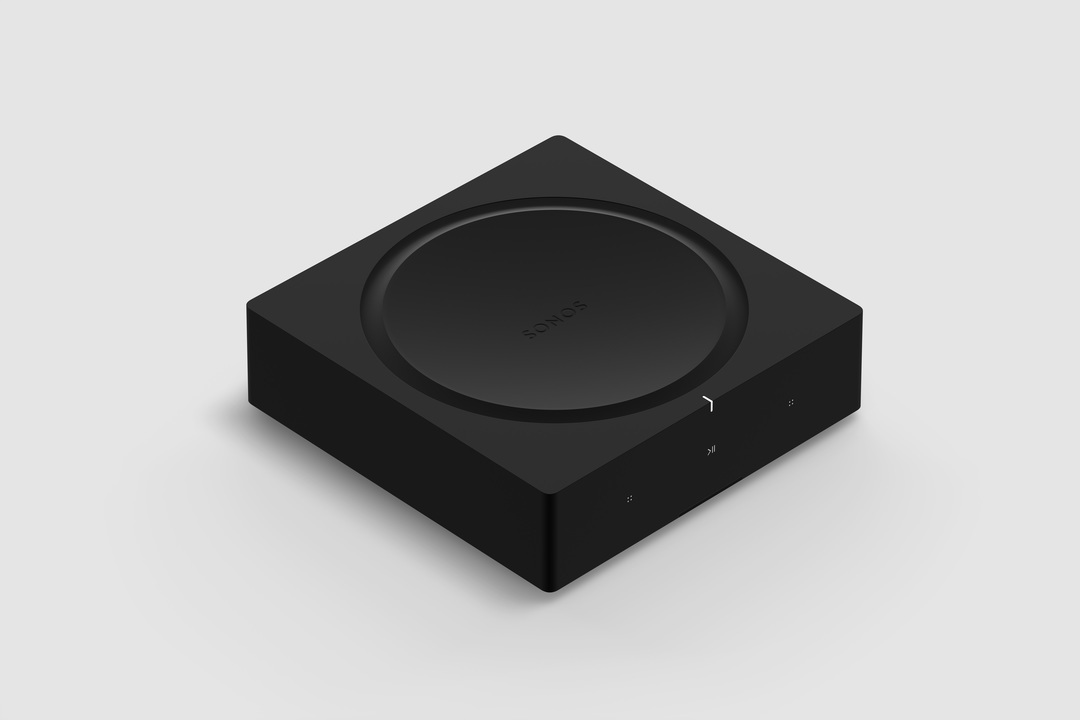
Available starting February 2019, Sonos Amp is the all-new, versatile amplifier to power all your entertainment and bring the sonic content you love to every room of your home. The Amp has been redesigned with more than twice the power of the original Connect:Amp, with more versatility, and will enable new experiences through the platform.

Play your favorite streaming content on Sonos, connect to your TV through HDMI-ARC, or plug into any audio device, including a turntable to power your vinyl collection.

Sonos Amp will fit in any home environment, whether as a compact and elegant solution for in-rack AV installations, wall mounted, tucked under furniture, or on display in a room.

Details and Specs
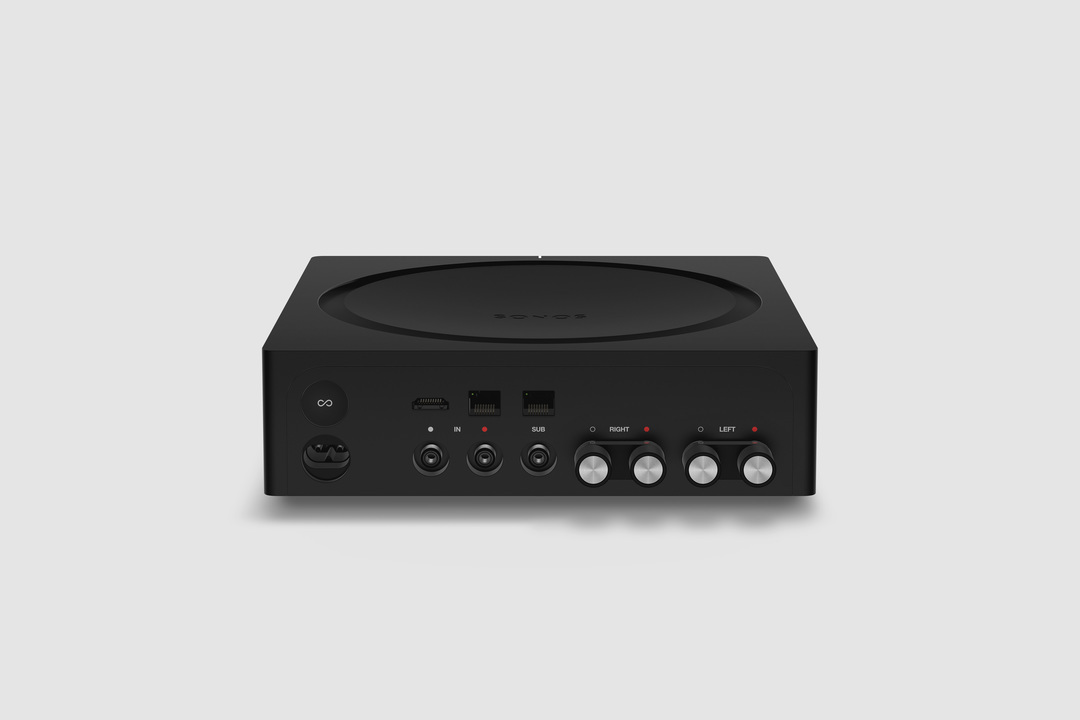


Physical Specs Amp comes in Matte black with black and silver banana plugs all in a standard rack fit size. The dimensions are 8.54 x 8.54 x 2.52 in. (217 mm (w) x 217 mm (d) x 64 mm (h)) and it weighs 4.6 lbs. (2.1 kg). Custom banana plugs that accept 10 - 18 AWG speaker wire and the Class-D digital amplifier sends a maximum of 125W per channel at 8 Ohms.

The subwoofer output is auto-detecting RCA with adjustable crossover (50 to 110Hz).

Capable of using two line-in sources, analog RCA audio input, and HDMI-ARC inputs. Amp plays Dolby Digital 5.1 or PCM stereo sound over HDMI-ARC.

Versatile Design


Use Sonos Amp to power your installed speakers as a separate Sonos room, or bond it with a pair of Sonos Ones, Play:1s, Play:3s, or Play:5s to become a surround sound setup that you can use with your TV. You can also use Amp to add your speakers as rears to a Sonos home-theater setup (by wirelessly bonding an Amp with Beam, Playbar, or Playbase) or use two Sonos Amps (one for the front right and left channels, the other for the rear channels) for surround sound.

The Sonos Amp drives left and right speakers, and it will create a phantom center channel when sent discrete audio for that channel.

Sonos Amp has all the features of Sonos in a powerful package:
  • Sonos supports over 100 services. Choose the ones you want and listen to music, podcasts, radio, and audiobooks. You can also play all the music stored on your computer or other devices.
  • Sonos has built a software platform that enables hundreds of partners and gives our customers unparalleled freedom of choice. Amp features AirPlay 2, access to home automation partners, and voice control when wirelessly connected with Amazon Echo or Alexa-enabled devices, including Sonos One and Beam.
  • Use the Sonos app on your phone or tablet, your TV remote, keypads, AirPlay 2, or your voice with Amazon Echo and Alexa-enabled devices.
  • New APIs and deeper integrations with our platform partners let you create seamless smart home control.
  • Sonos is a system. Start with Amp and expand into more rooms with additional speakers through WiFi.
  • Sonos regularly updates with new features, voice services, and API integrations, so your options are always up to date and improving.


Availability


General availability on February 5, 2019 for $599 USD (£599 GBP, €699 EUR). Early access for installed solutions professionals on December 1 in the United States and Canada. Sign up to be notified of availability on Sonos.com.

For more details, check out our blog post on the Sonos Amp here.

This topic has been closed for further comments. You can use the search bar to find a similar topic, or create a new one by clicking Create Topic at the top of the page.

364 replies

Renowned Enthusiast I
October 24, 2018
Something just occurred to me...for music I would want to use the attached speakers and sonos sub for music but not the rear speakers or the phantom center channel. Will this be possible?.
Ken_Griffiths
October 24, 2018
SOCalistic,

Obviously there will not be a front phantom center channel for music as no such channel exists. I'm sure it will be pure stereo and if it works the same as the new Beam (I think it will) ...then you can choose to play the audio through front stereo speakers with the sub, or through both front and rear surround speakers with sub.
Avid Contributor I
October 24, 2018
Ryan S or someone else from Sonos, could you please address the questions in my post on page 8 of this thread?

Thanks.
Renowned Enthusiast I
October 24, 2018
SOCalistic,
Obviously there will not be a front phantom center channel for music as no such channel exists. I'm sure it will be pure stereo and if it works the same as the new Beam (I think it will) ...then you can choose to play the audio through front stereo speakers with the sub, or through both front and rear surround speakers with sub.


Where do you choose this with the Beam.
Lyricist II
October 24, 2018
hello ryan, i just read all post and replys, I was wondering if you can help me figure this out.
I have 19 speakers total at my house( in-ceillings, standings, and outdoors) and I really like loud music.
How many amps do you think i need? i forgot to tell you that i wish to have 5 zones
Ryan S
Ryan SAuthor
Retired Sonos Staff
October 24, 2018
@adam2434, the replies from the community here have been spot on. The HDMI-ARC input on the new Amp will support Dolby Digital 5.1 and Stereo PCM (16-bit). The main screen won't show what format is playing, but you can see that in the Settings > About Sonos. And the details on the phantom center is the same as above, it's only going to show up when there is a center channel that's looking to be played. It can't be "turned off", but music won't have it, neither will stereo signals.


hello ryan, i just read all post and replys, I was wondering if you can help me figure this out.
I have 19 speakers total at my house( in-ceillings, standings, and outdoors) and I really like loud music.
How many amps do you think i need? i forgot to tell you that i wish to have 5 zones

At a minimum, you need 5 of them in order to have 5 zones. Each Amp can put one pair of 4 Ohm speakers, or 2 pairs of 8 Ohm. If you're using 2 pairs each, you could get a total of 4 speakers on each unit, and 5 will get you 20. That said, if the speakers in your house are set up as stereo pairs, and not mono speakers, you'll likely need to have more Amps there.

The requirements of what speakers you need will come down to the specifications of those speakers you have.
Mark good posts by pressing the like button, and select the best answer on questions you've asked to help others find solutions.
Renowned Enthusiast I
October 24, 2018
SOCalistic,

Obviously there will not be a front phantom center channel for music as no such channel exists. I'm sure it will be pure stereo and if it works the same as the new Beam (I think it will) ...then you can choose to play the audio through front stereo speakers with the sub, or through both front and rear surround speakers with sub.


Since my source is only an Apple TV 4K and nothing else and the Apple TV is set to 5.1 it's not obvious at all that the Amp won't try to split everything out to 5.1 including a phantom center channel. I play Pandora and Apple Music from my Apple TV. I also do Siri voice commands to stereo paired Homepods connected to the Apple TV by Airplay, Alexa to the Beam, and Airplay to both.
One of the main reasons I want the amp is to have true stereo separation on the front using only the two passive speakers and sub so if I can't do that it really reduces my motivation to buy the amp.
Is the manual for the Amp available yet?
Avid Contributor I
October 24, 2018
@adam2434, the replies from the community here have been spot on. The HDMI-ARC input on the new Amp will support Dolby Digital 5.1 and Stereo PCM (16-bit). The main screen won't show what format is playing, but you can see that in the Settings > About Sonos. And the details on the phantom center is the same as above, it's only going to show up when there is a center channel that's looking to be played. It can't be "turned off", but music won't have it, neither will stereo signals.

Ryan S, thanks for the reply.

Since the Amp only supports 16 bit PCM, I presume that a 24 bit PCM stereo soundtrack from a Blu-ray would simply not play or would show an error, right?
melvimbe
October 24, 2018

Since my source is only an Apple TV 4K and nothing else and the Apple TV is set to 5.1 it's not obvious at all that the Amp won't try to split everything out to 5.1 including a phantom center channel. I play Pandora and Apple Music from my Apple TV.


Setting your Apple TV doesn't mean that at Apple TV up converts all of the content to 5.1 before sending to the Amp (pretty sure it doesn't anyway, don't have an Apple TV). If your Pandora or Apple music is recorded in stereo, the Apple TV will send it to the amp as stereo.


I also do Siri voice commands to stereo paired Homepods connected to the Apple TV by Airplay, Alexa to the Beam, and Airplay to both.
One of the main reasons I want the amp is to have true stereo separation on the front using only the two passive speakers and sub so if I can't do that it really reduces my motivation to buy the amp.


I'm not quite sure the phantom center channel would effect stereo separation, but again, I doubt stereo sources will be up converted to 5.1.


Is the manual for the Amp available yet?

I doubt that will be released before the product is.
Danny
Renowned Enthusiast I
October 24, 2018
Thanks for the reply. I usually only play music from Apple TV to twoHomePod speakers connected to it by airplay and of course that works well.
I thought I had seen mention of the manual floating around but could be mistaken.