

Mike H
Retired Sonos Staff
March 7, 2023

Introducing Era 300

Related content:Hardware
Introducing Era 300

Hi all,

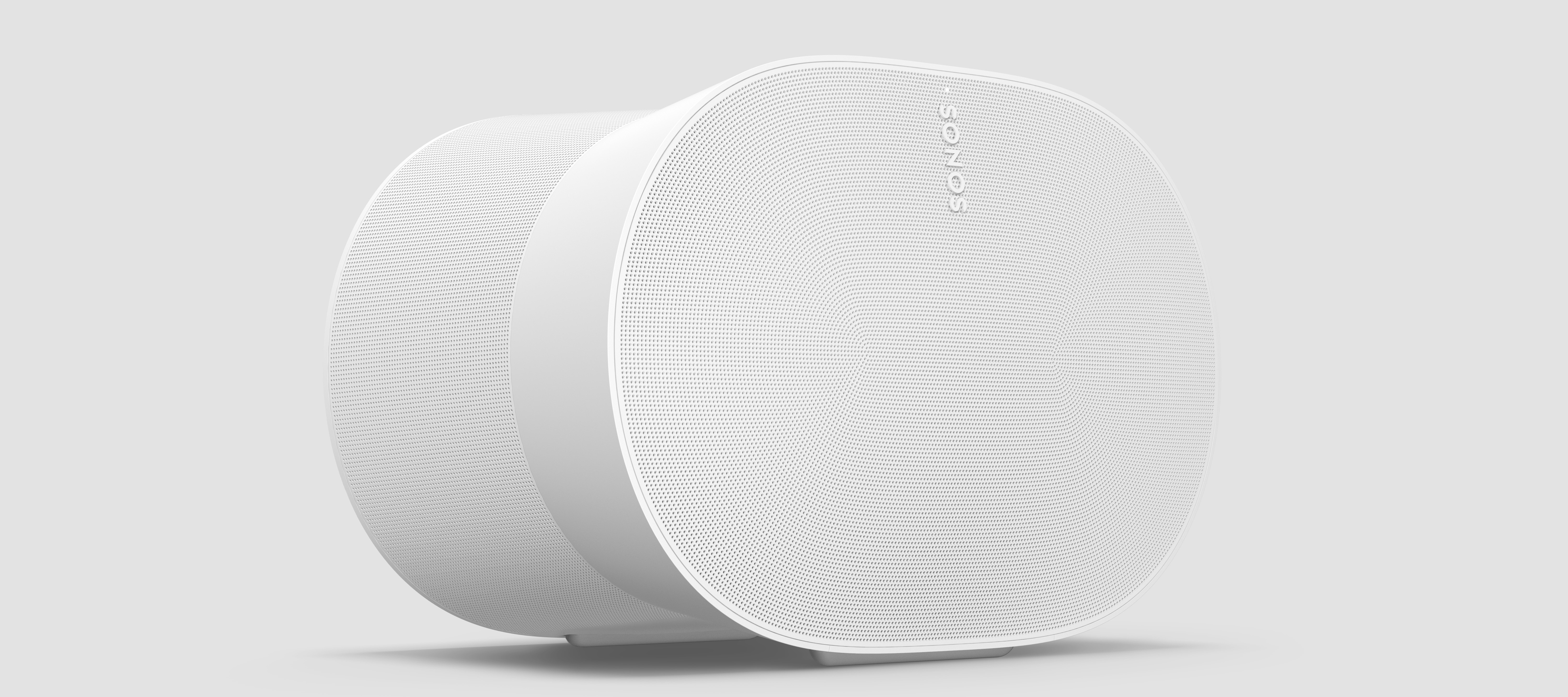
Today we introduce Era 300: an unmatched spatial audio experience with Dolby Atmos for listeners and creators alike.
Era 300

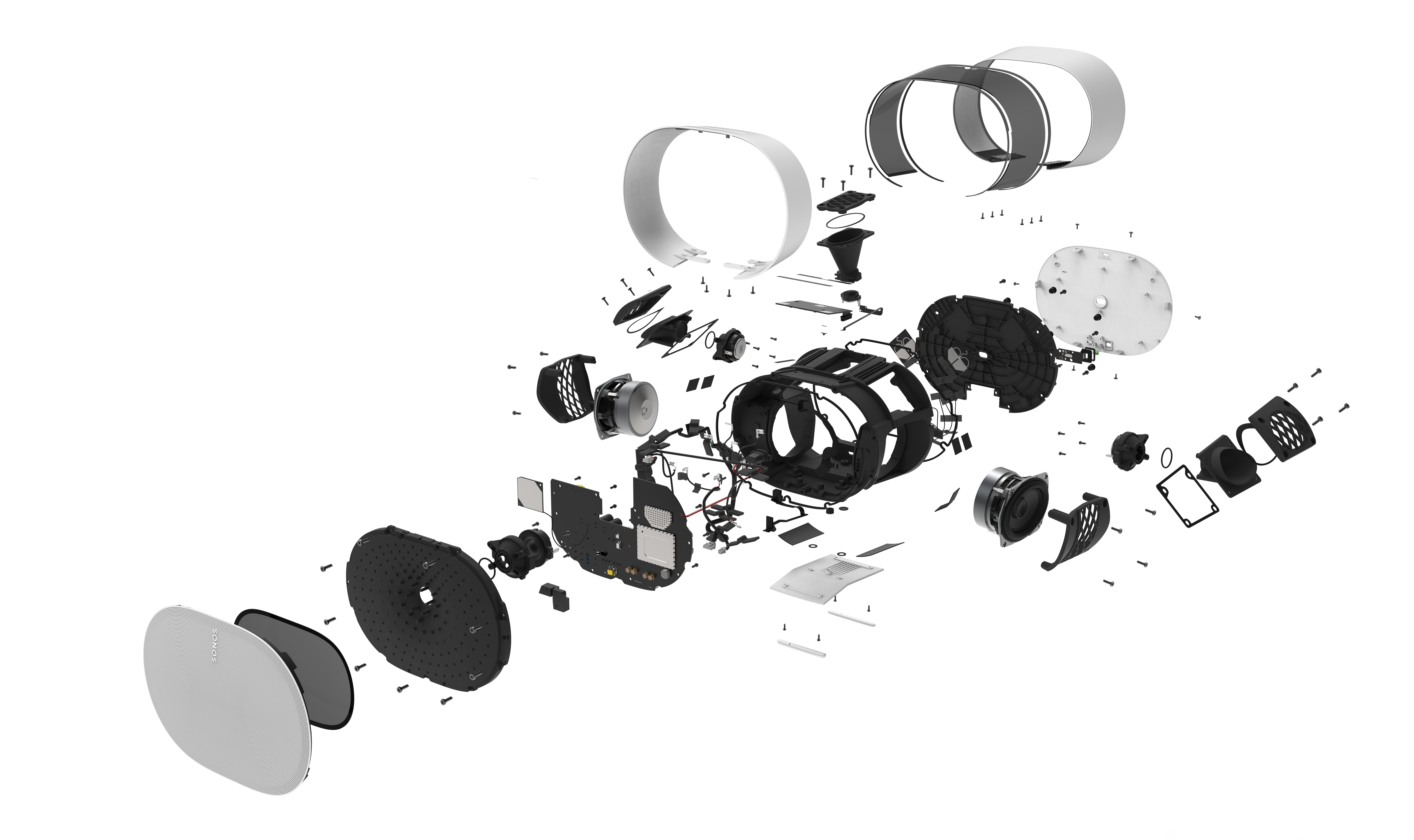
Unprecedented for a single compact speaker, Era 300 boasts six powerful drivers that direct sound left, right, forward and upward, delivering a breakthrough audio performance featuring Dolby Atmos that places listeners at the very heart of their movies and music.

  • Designed for spatial: Era 300 wraps its beautifully complex acoustic architecture in an elegantly cinched hourglass design, with every angle, proportion and perforation enhancing the direction and dispersion of sound to truly surround you.

  • Surreal surround sound: Era 300 is the brand’s first speaker that delivers multi-channel surround sound when used as home theater rears. Movie fans can pair two speakers with Arc or Beam (Gen 2) to create a supercharged Dolby Atmos experience that draws them deeper into the action.

  • Deep music industry collaboration: Sonos worked closely with its community of leading artists and creators - including Sonos Soundboard members - to meticulously fine-tune Era 300 so listeners can enjoy sound straight from the studio that’s true to the artist’s intent. 
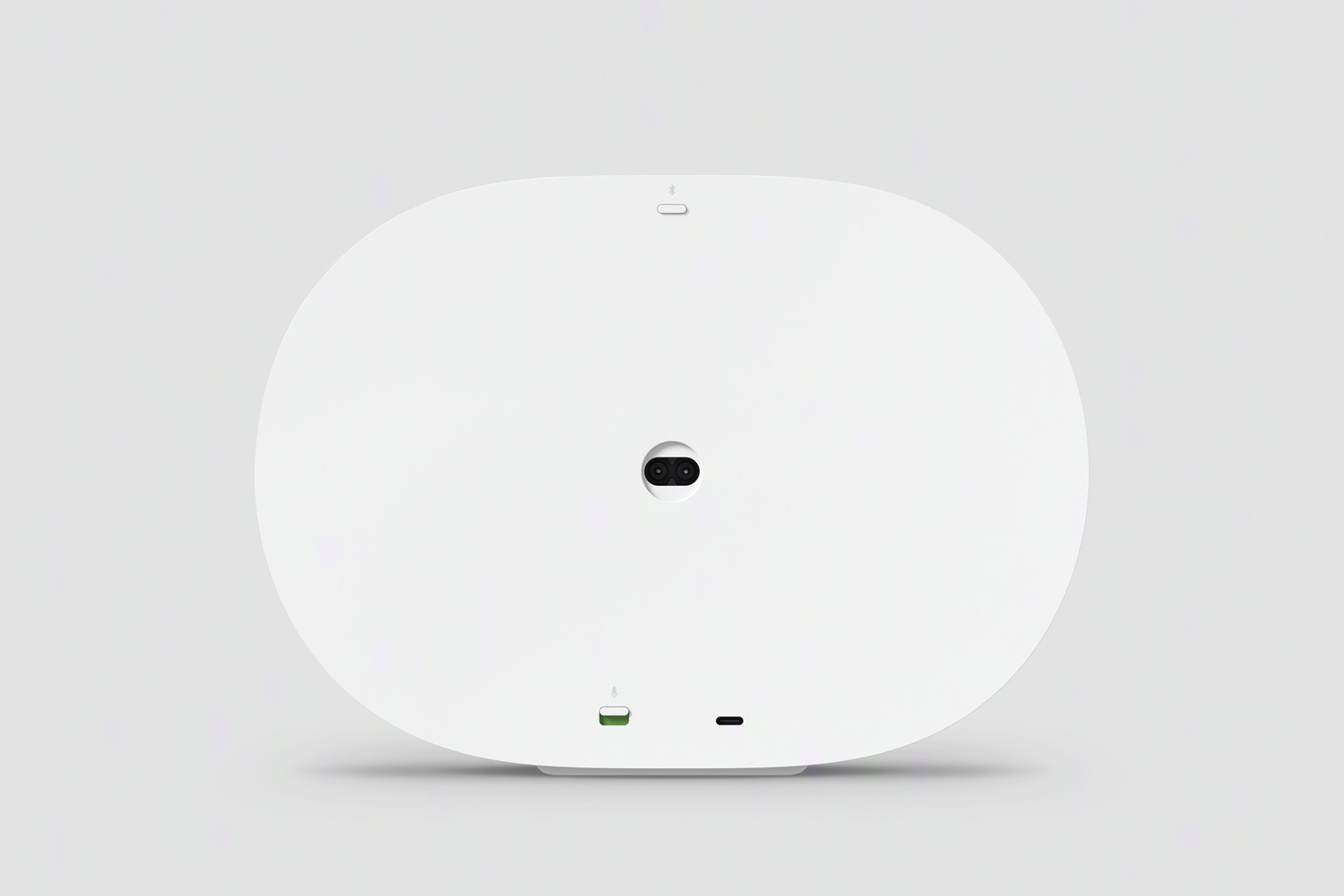
Era 300 from the back


Premium, responsible design that keeps everyone in mind

Building on Sonos’s timeless acoustic-driven design aesthetic, Era 100 and Era 300 are responsive to the challenges facing our environment—and better for everyone who interacts with our designs, featuring a bold new UI and innovations that will help them last longer, use less energy and make use of recycled materials in each product. 

  • More sustainable sound: Era 100 and Era 300 are made with post consumer recycled (PCR) plastic and packaged in 100% sustainably sourced paper, while also engineered to reduce power consumption with under two watts idle power consumption and a new advanced sleep function.

  • Built to last: Designed to live in your home for years, both speakers are built for serviceability by reducing the use of adhesives and transitioning to screws for easy disassembly and repair.

  • Bold, new UI: Era 100 and Era 300 feature an intuitive new user interface, including a new capacitive volume slider for simple control that complements quick and private control of your music with Sonos Voice Control, the Sonos app, Apple AirPlay 2 and Bluetooth®.

  • Upgraded connectivity: Stream all the audio you care about using WiFi or Bluetooth, and directly connect other audio devices such as a turntable using an auxiliary cable and the Sonos Line-In Adapter.

  • Expanding Trueplay to more listeners: Using the microphone array in Era 100 and Era 300, Trueplay optimizes the sound for the unique acoustics of your space with just a tap in the Sonos app. Available to both Android and iOS users.

Era 300 will be available for pre-order on sonos.com today, and globally starting March 28 2023 for $449USD, £449, €499 and $749 AUS. For more information, please visit Sonos.com

Read the full press release for Era 100 and Era 300 here.

This topic has been closed for further comments. You can use the search bar to find a similar topic, or create a new one by clicking Create Topic at the top of the page.

122 replies

Corry P
Sonos Staff
March 28, 2023

Hi @BrianBosch 

Fantastic! Thanks for the feedback!

"Common sense is the collection of prejudices acquired by age eighteen." - Albert Einstein
Lead Maestro
March 30, 2023

@Corry P Some users on Reddit have noticed that when the 300s are used as surrounds, they don’t hear any audio playing out of the front-facing drivers. Is this how it is supposed to function?

"Receive with simplicity everything that happens to you." - Rashi
Corry P
Sonos Staff
March 30, 2023

Hi @GuitarSuperstar 

Yes, this is by design when Era 300s are configured as surround speakers.

"Common sense is the collection of prejudices acquired by age eighteen." - Albert Einstein
Contributor I
April 4, 2023


Is it also possible to only select the Era 300's as a stereo sound set for e.g. streaming music Spotify/Apple Music. So not using the Beam? 

Once you set it up as a home theater configuration you can not select only the Era 300’s for music listening. You would have to reconfigure and unbond them from the Beam and sub mini to use only the Era’s for music.

So you say when you set it up as a home theater, the Era 300’s only can use with the Soundbar? 
 

I hace the same problem, I have an ARC. I want to add two speakers as rear speaker of my home theatre. But I want to use the speakers with my home theatre and also individually. Its not possibe?

BrianBosch
Lyricist III
April 4, 2023


Is it also possible to only select the Era 300's as a stereo sound set for e.g. streaming music Spotify/Apple Music. So not using the Beam? 

Once you set it up as a home theater configuration you can not select only the Era 300’s for music listening. You would have to reconfigure and unbond them from the Beam and sub mini to use only the Era’s for music.

So you say when you set it up as a home theater, the Era 300’s only can use with the Soundbar? 
 

I hace the same problem, I have an ARC. I want to add two speakers as rear speaker of my home theatre. But I want to use the speakers with my home theatre and also individually. Its not possibe?

Indeed. Not when you have them integrated as surround speakers. Only ‘solution’ is to delete the surround setup in the S2 app and create a stereo pair. Would be nice (if technically possible?) this would be a sort of  slider funtion’ in the app.  

jgatie
April 4, 2023

Indeed. Not when you have them integrated as surround speakers. Only ‘solution’ is to delete the surround setup in the S2 app and create a stereo pair. Would be nice (if technically possible?) this would be a sort of  slider funtion’ in the app.  


It’s not possible to instantly toggle from one configuration to another.  Switching between the two requires reconfiguring the radios from a standard 2.4 GHz mode to a 5 GHz direct parent/child mode.  Each new configuration requires a series of handshakes to get the connection correct, which is why setting up surrounds takes a bit of time.  This configuration time is not convenient for those wanting an instant toggle between surrounds and standalone stereo.

Contributor III
April 5, 2023

Indeed. Not when you have them integrated as surround speakers. Only ‘solution’ is to delete the surround setup in the S2 app and create a stereo pair. Would be nice (if technically possible?) this would be a sort of  slider funtion’ in the app.  


It’s not possible to instantly toggle from one configuration to another.  Switching between the two requires reconfiguring the radios from a standard 2.4 GHz mode to a 5 GHz direct parent/child mode.  Each new configuration requires a series of handshakes to get the connection correct, which is why setting up surrounds takes a bit of time.  This configuration time is not convenient for those wanting an instant toggle between surrounds and standalone stereo.

Can you not set the surround Audio Music Level to + (pick a level) and Music playback to Full to get full audio out of the Arc and Era 300s ?


Words like violence, break the silence
Contributor III
April 5, 2023

Connecting Era 300 to a Turntable

I understand this can be done via the Line in Adapter (USB C to 3.5mm) , £19.95 and out of stock until June. Could I use any USB C to 3.5mm cable i.e this one from amazon . Also would a USB C to 2 x RCA work ?

https://www.amazon.co.uk/MOSWAG-Headphone-Adapter-Dongle-Samsung-Black/dp/B0BHST4CDY/ref=sr_1_1_sspa?crid=1IV0Q1SFKZ0FL&keywords=usb+c+to+line+in&qid=1680686585&sprefix=usb+c+to+line+in%2Caps%2C183&sr=8-1-spons&sp_csd=d2lkZ2V0TmFtZT1zcF9hdGY&psc=1

Words like violence, break the silence
melvimbe
April 5, 2023

Connecting Era 300 to a Turntable

I understand this can be done via the Line in Adapter (USB C to 3.5mm) , £19.95 and out of stock until June. Could I use any USB C to 3.5mm cable i.e this one from amazon . Also would a USB C to 2 x RCA work ?

https://www.amazon.co.uk/MOSWAG-Headphone-Adapter-Dongle-Samsung-Black/dp/B0BHST4CDY/ref=sr_1_1_sspa?crid=1IV0Q1SFKZ0FL&keywords=usb+c+to+line+in&qid=1680686585&sprefix=usb+c+to+line+in%2Caps%2C183&sr=8-1-spons&sp_csd=d2lkZ2V0TmFtZT1zcF9hdGY&psc=1

 No. The Sonos dongle is 3.5m  to USB C, not USB C to 3.5mm.

Danny
melvimbe
April 5, 2023

Indeed. Not when you have them integrated as surround speakers. Only ‘solution’ is to delete the surround setup in the S2 app and create a stereo pair. Would be nice (if technically possible?) this would be a sort of  slider funtion’ in the app.  


It’s not possible to instantly toggle from one configuration to another.  Switching between the two requires reconfiguring the radios from a standard 2.4 GHz mode to a 5 GHz direct parent/child mode.  Each new configuration requires a series of handshakes to get the connection correct, which is why setting up surrounds takes a bit of time.  This configuration time is not convenient for those wanting an instant toggle between surrounds and standalone stereo.

Can you not set the surround Audio Music Level to + (pick a level) and Music playback to Full to get full audio out of the Arc and Era 300s ?


Yes, but the question answered was about playing the surround speakers as a pair without including the soundbar.

Danny