

Inside the Amp Multi: GaN Technology, 8 Channels, Up to 4 Zones
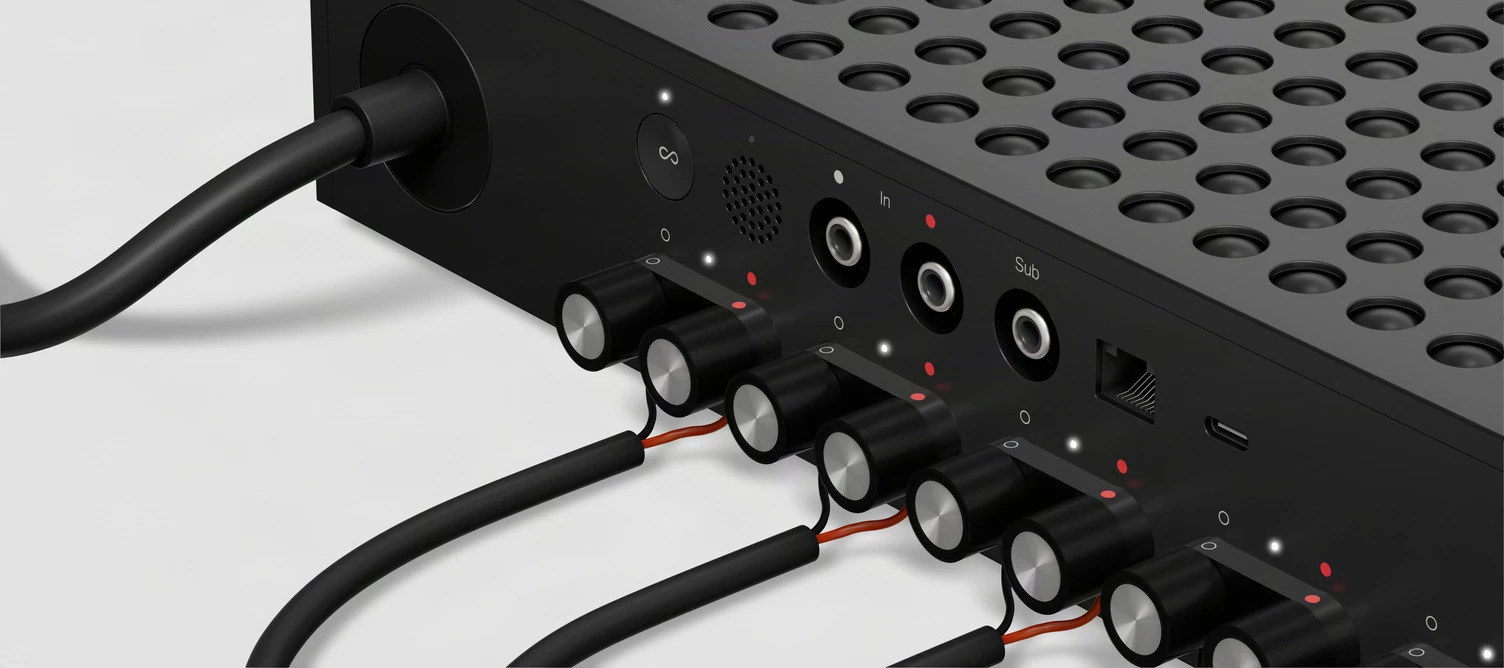
Hi everybody! 👋 The day is finally here - today is officially the general release and shipping day of Sonos Amp Multi.
Let me be up front: Amp Multi is built specifically for professional installation, which means it isn't sold directly to end-users. I know this may lead to some frustration for my fellow DIY enthusiasts who want to rack this up themselves, and we hear you. But for those looking to build their custom-integration rack room, let’s get into the product specs, technical details, and what it's actually like to use.
Basics
Amp Multi features:
- 8 amplified outputs delivering 125W per channel @ 8Ω (all channels driven)
- 4 configurable zones per unit
- GaN and PFFB technology
- Fanless design
- 2U rack mountable with a custom space-saving mount
- WiFi 6 and Ethernet connectivity
Audio & Tech
As a science and chemistry nerd, the internal components are what I found most exciting. Amp Multi uses Gallium Nitride (GaN) technology in its Class-D amplifiers. GaN is a major step up from traditional silicon, providing over 95% power efficiency and drastically reducing heat generation.
Because of this efficiency jump, Amp Multi uses passive convection cooling instead of fans, consuming less than 5.5W at idle. The top and bottom plates feature a dimpled textured design to maximize surface area and passive cooling.
It also incorporates post-filter feedback (PFFB) to reduce distortion (0.005% THD) and deliver cleaner audio, aiming for analog-like performance while keeping the low weight of a digital design.
Since I was testing with a variety of speakers…some Sonos Architectural speakers and a range of passive speakers from various brands I’ve collected over the years...I really tried to listen for signs of distortion across each configuration. I’m happy to say that I came up empty handed in that search.
Mine lives out in the open, so I'm following the off-rack rules: horizontal, level, 4 inches (101 mm) of clearance on all sides including above, and nothing on top. That last one is not a suggestion; blocking the top grille is exactly how you'd cook it.
The new CPU is also notable. It features a Quad Core 4xA55 1.9GHz processor, which gives it the overhead needed to handle high-quality streaming across multiple independent zones reliably. In practice, this meant I could easily listen to 4 different stereo streams (one in each zone), and the Amp Multi handled it like a champ.
Flexibility & Setup
One of the most practical features for my setup is the flexibility. Because the minimum impedance drops down to 2.67Ω when using Sonos Architectural speakers, you can run up to three of those speakers in parallel on a single output. Since a single Sonos system supports up to 32 Amp Multis, that scales up to 768 Sonos Architectural speakers (or up to 512 3rd-party passive speakers) if you're dealing with a massive deployment. That’s an insane number of speakers for one Sonos system!
I wish I could say that I’ve tested this myself…let us know in the comments if you plan on giving it a shot, I’d love to see it in action.
In my own home, I've used this to consolidate four separate Sonos Amps down into one centrally-located Amp Multi on my credenza. I'm currently running 4 "stereo pair" zones in different rooms around the house, and it significantly reduces the cable clutter.
Other tidbits
Fun facts ⬇️
- ProTune: This feature isn’t for the amateurs - it gives you manual control over each output, including a 10-band parametric EQ, gain trim (-15 to +5 dB), high-pass filters (15-100Hz), and delay offsets (0 - 50ms) to align audio in large open-concept spaces. ProTune is cumulative with the standard Sonos App EQ, so both can be applied independently.
- Multiple Zones: You can assign any output to any zone dynamically within the Sonos app. Two outputs auto-pair as stereo and can be flipped to mono afterward.
- Sub Support: You can wirelessly bond one Sonos Sub per zone directly through the app. Just note that the zone can only contain outputs from a single Amp Multi.
- Stacking: When rack-mounted, you can generally stack two units on top of each other without needing active cooling (though we recommend 1U of active cooling per three units if you are maxing out).
- Unused Outputs: You can hide unused outputs temporarily so they aren't distracting during setup.
Limitations
To keep this post transparent, here are a few real-world limitations you should know before dealing with this unit:
- Not a Home Theater Device: There are no HDMI ports (no ARC or eARC). The Amp Multi is strictly designed for distributed audio. It cannot act as a primary home theater player, nor as surrounds for another product.
- No Touch Controls: The front panel is completely flush with just a status light. Setup requires pressing the Join button on the back of the unit.
- Dust considerations: I suspect that most of these will be installed in clean-room like environments, with a bunch of other high-tech equipment. But for those using it in a smaller home (like me) or commercial buildings, or any environment where dust accumulates fairly consistently, be aware that you’ll want to clean Amp Multi regularly. That means a soft, dry cloth only - no cleaners or solvents.
Wrap-Up
The Sonos Amp Multi is a serious piece of hardware. Bringing GaN technology, high speaker density, and parametric tuning into a silent, 2U chassis is a significant step up for architectural setups. Being able to clean up my messy rack and replace four Amps with one consolidated unit has been a great upgrade for my space.
Let us know what you think in the comments! I'll be around to join in on the discussion, and any questions I can’t answer now, I’ll dig into them and follow up with the details.
Cheers!