

Shaun O
Sonos Staff
July 14, 2026
News

14th July 2026 - New Sonos App & Player Updates Now Available!
Related content:Software
  • July 14, 2026
  • 78 replies
  • 2603 views
Stay cool!

Howdy y’all! We have a new Sonos App update releasing today and it’s a big one. This update brings the ability to try out Tab Navigation, introduces speaker/room sorting, and adds a Dynamic Volume Slider for iOS (coming soon to Android!). 
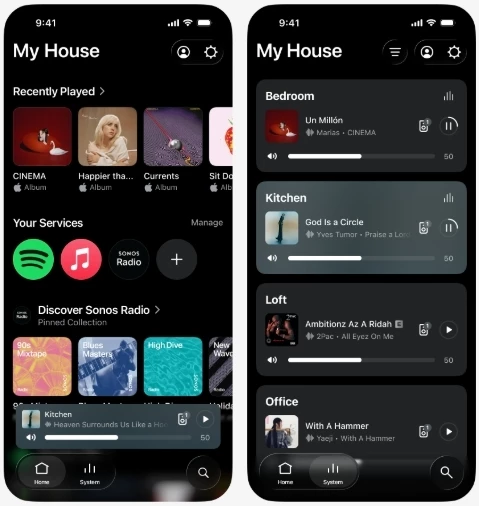
 

Tabs at the bottom leave so much room for activities

This update is rolling out in phases, so it may take up to two weeks to reach your device. No action is needed - it will install automatically once it's available to you and automatic updates are enabled.

iOS users: You can check availability early by opening the App Store, tapping your account icon, and pulling down to refresh. If it's not there yet, that means the update hasn't reached your device in the rollout. It's on the way.


Tab Navigation uses a layout familiar to many of us - the buttons across the bottom of the app are now clear buttons that show what’s selected. Home, System, and Search are now easy to find and easier to see what’s selected. To enable Tab Navigation, look for Enable Improved Navigation in the Sonos App Settings.
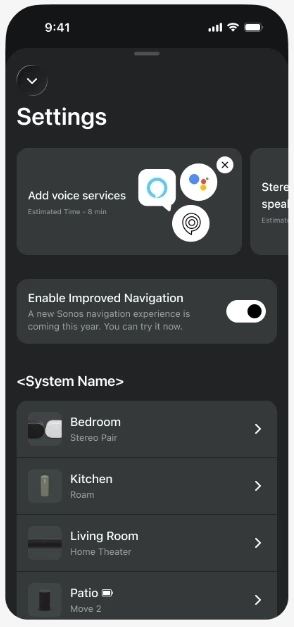
Toggle means you can try it out and if you don’t like it, go back

Sort Order is here! You can now choose how your speakers show up in the Sonos app on the System tab. You can also choose to pin specific speakers to the top, or pin all your speakers in a specific custom order. 
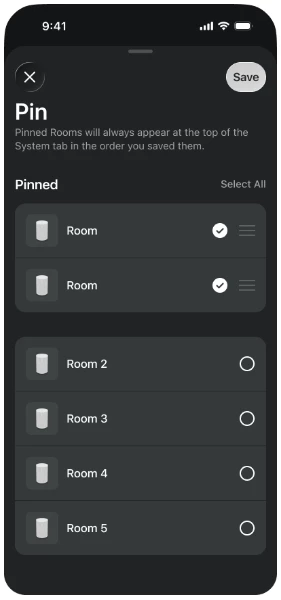
Want to pin your most used speakers in the app? Now you can.

We’ve got a lot of new things in this update that we’re excited to talk about. Please let us know with a reply below if you have any questions or feedback. And as usual, the technical details:

App Update details

iOS - 87.00.36

Android - 87.00.35

Player Update details

Modern Players - 96.0-78270

Legacy Players - 86.8.78270


New app features with the usual bug fixes and improved performance

  • Familiar tabbed navigation. 
  • New volume interface on iOS. 
  • Product sorting and orientation
  • Now Playing background colors update with album art
  • Swipe to delete from Sonos Favorites


Want to check out our previous or current App and Player Release Notes? We got you covered: here’s the App and Player release notes.


This topic has been closed for further comments. You can use the search bar to find a similar topic, or create a new one by clicking Create Topic at the top of the page.

78 replies

AjTrek1
July 18, 2026

Glad the new app interface is now active. I guess my needs are a lot less simpler/involved (whichever term you like) than most as the improved UI is nice but not something I feel the need to write home about. I’m still an avid Sonos fan but to me the improvements as they are, are more evolutionary vs revolutionary. However, for everyone else I hope the new features are a step in the right direction to if not satisfy; but at least meet some of your expectations of what the app should be.

Together Everyone Achieves More = T.E.A.M.
Stanley_4
Grand Maestro
July 18, 2026

Finally got my update active and while there are many nice improvements the one that really matters here is the fixing of the Room order. Having the spouses TV Room come to the top of the list, along with the "touch the wrong spot to sroll and maximize volume instead" problem had risen to the point of "I want a non-Sonos soundbar next time you blast me." due to past incidents here.

I wouldn't say no to having a "hide Room" option as well, but this is really great.


Enthusiast II
July 19, 2026

One of the pleasing things about the pinning of the rooms for me is that it is per controller device.

This means that on my phone I can have the first room different to the one on my ipad. This is great because I mainly use the ipad in the lounge and my phone in my office room.


Airgetlam
July 19, 2026

I found that an odd feature, as well, since that suggests that data is stored at the controller level, rather than at the system level on the speakers. But I suppose it’s a display issue, so it makes sense, but there still is very little data saved by the controller itself. It may become a ‘thing’ we have to concern ourselves with in our responses to those seeking assistance. 

Bruce
Stanley_4
Grand Maestro
July 19, 2026

The per-controller is handy for me, mostly a tablet user as I can set each tablet to match the room/Room it is used in/with.

Media Room tablet gets the Arc first then the other four Rooms in that room. Computer Room gets the CR 300 Pair, then the CR Beam and my small bath at the top of the list.

Every device does have the spouse's Beam dead last.

AjTrek1
July 19, 2026

All good, the home button is welcomed.

My experience. 

Following the player update last night, the app couldn't find my system many times, it struggled a bit last night, however eventually all was well.

This morning the same with the new app update, check WiFi settings etc.

However again after a number of app restarts no issues so far. 


My network equipment is fine, plus I use decent hardware not cheap rubbish , Sonos never has network issues and is rock solid mostly. 

Maybe it was a glitch, if this happens again, more than once, I will call support. 


Great idea to call Tech Support. Be sure to run a diagnostic if possible within 10 minutes of the occurrence. Make note of the Reference ID; but do not publish it in the community. By doing so you may help Sonos uncover a potential bug in the software.

FYI, I have 32 units active at all times out of a total of 36. Each time there is a hardware update I have a few units that don’t process the update on the first pass. Thankfully the App recognizes that and informs me of which units were left out. In previous versions (way back when) the app didn’t do so. I just routinely ran the update a second time. My point is that units missing the update on the first pass is not uncommon (IMO) if you have multiple units of a significant number.

On the other hand the App not seeing your system points to a network glitch. Calling Tech Support is the right decision. Just remember not to perform a Factory Reset on any of your Sonos units unless directed to do so.

Together Everyone Achieves More = T.E.A.M.
Contributor I
July 19, 2026

​@Airgetlam The Music Library issue has been resolved for me after opening and closing the app twice. (Apple iPadOS 26.5.2, Sonos App 86.01.5)

kdowling
July 19, 2026

​@Airgetlam The Music Library issue has been resolved for me after opening and closing the app twice. (Apple iPadOS 26.5.2, Sonos App 86.01.5)

You may want to check for Sonos App updates. That isn’t the current version nor the one this topic is discussing.

Stanley_4
Grand Maestro
July 22, 2026

After using the new tabbed design for a few days I really like it. One tweak I'd like to see is on the tab icons/labels, they take up a lot of screen height and I'd like to see that reduced.

Moving the labels from under to beside the icons would save some, reducing icon size to closer to the text size some more. Pulling them lower on the screen, if possible would be good too.

Making room for a larger track image would be good too. Just slide the other controls a bit right and you could have it double the size it is now.


A bit of rearranging on the full-screen display in landscape mode, portrait is fine, to show a larger track image would be nice.


Still over all this is a huge improvement in usability.

Stanley_4
Grand Maestro
July 22, 2026

Do we need or want the Now Playing bar on the search screen?