

Shaun O
Sonos Staff
July 14, 2026
News

14th July 2026 - New Sonos App & Player Updates Now Available!

Related content:Software
  • July 14, 2026
  • 78 replies
  • 2603 views
Stay cool!

Howdy y’all! We have a new Sonos App update releasing today and it’s a big one. This update brings the ability to try out Tab Navigation, introduces speaker/room sorting, and adds a Dynamic Volume Slider for iOS (coming soon to Android!). 
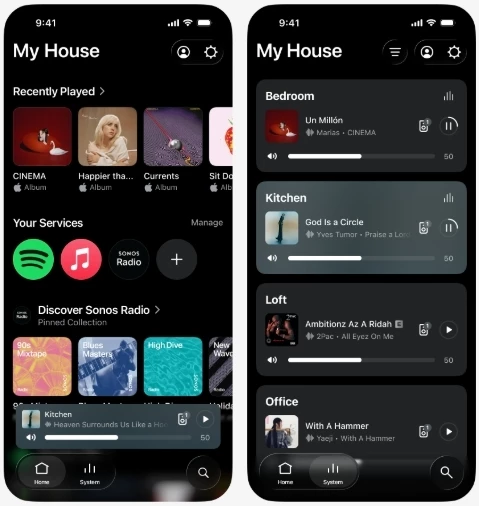
 

Tabs at the bottom leave so much room for activities

This update is rolling out in phases, so it may take up to two weeks to reach your device. No action is needed - it will install automatically once it's available to you and automatic updates are enabled.

iOS users: You can check availability early by opening the App Store, tapping your account icon, and pulling down to refresh. If it's not there yet, that means the update hasn't reached your device in the rollout. It's on the way.


Tab Navigation uses a layout familiar to many of us - the buttons across the bottom of the app are now clear buttons that show what’s selected. Home, System, and Search are now easy to find and easier to see what’s selected. To enable Tab Navigation, look for Enable Improved Navigation in the Sonos App Settings.
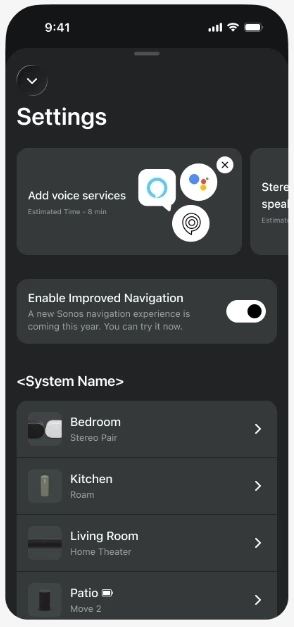
Toggle means you can try it out and if you don’t like it, go back

Sort Order is here! You can now choose how your speakers show up in the Sonos app on the System tab. You can also choose to pin specific speakers to the top, or pin all your speakers in a specific custom order. 
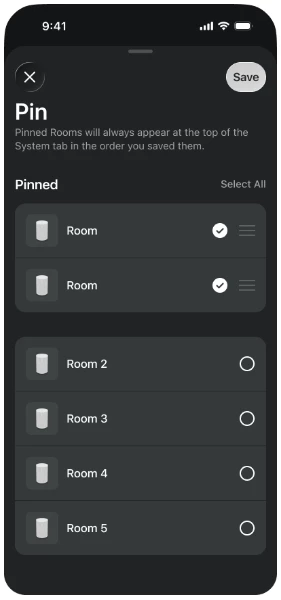
Want to pin your most used speakers in the app? Now you can.

We’ve got a lot of new things in this update that we’re excited to talk about. Please let us know with a reply below if you have any questions or feedback. And as usual, the technical details:

App Update details

iOS - 87.00.36

Android - 87.00.35

Player Update details

Modern Players - 96.0-78270

Legacy Players - 86.8.78270


New app features with the usual bug fixes and improved performance

  • Familiar tabbed navigation. 
  • New volume interface on iOS. 
  • Product sorting and orientation
  • Now Playing background colors update with album art
  • Swipe to delete from Sonos Favorites


Want to check out our previous or current App and Player Release Notes? We got you covered: here’s the App and Player release notes.


This topic has been closed for further comments. You can use the search bar to find a similar topic, or create a new one by clicking Create Topic at the top of the page.

78 replies

106rallye
July 16, 2026

Reserving judgement on th new interface. First impressions:

  • app seems to lose connections to the speakers more when the new interface is turned on - I never get this on the old interface, but had it on my iPhone and iPad immediately after turning on the new interface;
  • i seem to get more lag when changing volume, grouping speakers and looking for music on Spotify .

This could all be on my system or set up, but for the time being I'm back to the old interface 

Airgetlam
July 16, 2026

I’d suggest sending in a diagnostic when this happens, so Sonos has something to look at when you call in. 

Bruce
SKATEATROUND
Contributor I
July 16, 2026

I just have to say it: the "new" app has finally arrived on the right track. The latest updates have brought noticeable improvements in handling and daily use. The new opt-in feature is a great idea, and I've already activated it. I think the new layout is absolutely fantastic!

Keep it up, and things are definitely looking up! Thanks to the Sonos team!!

106rallye
July 16, 2026

I’d suggest sending in a diagnostic when this happens, so Sonos has something to look at when you call in. 

I’ll try again in a couple of weeks. If troubles persist I will call in.

kdowling
July 16, 2026

It looks like today’s update (16 July) iOS 87.00.37 and Android 87.00.38 may have fixed the no/slow Music Library on the home screen. At least it hasn’t happened yet today.

Local Superstar
July 16, 2026

​​Please let us know with a reply below if you have any questions or feedback.

​@ShaunFromSonos can I request a ‘Sync App Options’ toggle in the App, to sync Sonos App settings across multiple controllers. eg sort order, search history, etc.

Also I would have expected the toggle for ‘Improved Navigation’ to be in ‘App Preferences’, not in ‘System Settings’.

Trending Lyricist I
July 16, 2026

Part of the ‘update the speakers’ process is reconnecting the Sonos devices to your router following a reboot, to load the new OS properly. It certainly could expose  wifi interference or other issues, no matter what hardware you use for your network. Especially due to how much outside impact there can be on a network, things you have little to no control over. I recall having to change my broadcast channel once, due to neighbors ‘stomping’ on the frequency I had been using for my own network. 

My issue resolved itself, instant response on startup all is well no can't find Wi-Fi etc, God knows why it happened , anyway I'm happy. 

kdowling
July 16, 2026

My issue resolved itself, instant response on startup all is well no can't find Wi-Fi etc, God knows why it happened , anyway I'm happy. 

I’ll guess it’s because there was an update today.

Prodigy III
July 16, 2026

I’d suggest sending in a diagnostic when this happens, so Sonos has something to look at when you call in. 

I’ll try again in a couple of weeks. If troubles persist I will call in.

Maybe try it again with today’s update?

Trending Lyricist I
July 16, 2026

My issue resolved itself, instant response on startup all is well no can't find Wi-Fi etc, God knows why it happened , anyway I'm happy. 

I’ll guess it’s because there was an update today.

Oh thanks I didn't know there was an update today.