Contributor I
Aug 29, 2023 5:39 PM UTC
Answered

Sonos Roam & Windows 11 - Speaker Connected BT but no audio

I have a Sonos Roam and I am able to connect it to my Windows 11 PC and see that audio is being transmitted to it, however no audio comes out of the speaker. 

I have tried unpairing and re-pairing, a factory reset, etc… 

I confirmed that the issue is not the speaker itself, it connects to my Win10 laptop and my Pixel 7 (Android) via bluetooth with no issue. I’m also able to connect my Sony XM5 headphones via bluetooth and a cheap bluetooth speaker to my Win11 PC. 

I am able to stream audio to the Sonos speaker via the Sonos App but this is clunky and I just want to connect it via BT directly to my computer. 

I ended up contacting Sonos support who told me it must be a Windows issue so I reached out to Microsoft support and we confirmed the device is detected and the drivers are all setup correctly. Next I tried reaching out to ASUS to check and see if there was a driver update and they pointed me back to Sonos. 

I got into a remote session with Sonos support and they were unable to figure out the issue other than to say that “Sonos Roam” is not compatible with Windows 11. Surely this cannot be correct? 


Again, the speaker shows as connected and setup properly in Windows 11 - device manager shows no issues with the device, the output device is set as Sonos Roam and you can see in the bluetooth settings that it is in fact connected and on the volume mixer you can see the audio levels bouncing indicating there is a signal being sent. 

Looking for anyone who has encountered this issue and knows the resolution, or confirmation that Sonos Roam is not compatible with Windows 11. 

Thank you

This topic has been closed for further comments. You can use the search bar to find a similar topic, or create a new one by clicking Create Topic at the top of the page.
Corry P
Corry PAnswer
Sonos Staff
Aug 30, 2023 4:05 PM UTC

Hi @brookesrook 

I suppose an option would be to buy a USB Bluetooth adaptor and test it, but you shouldn’t need to spend any more money here - it should be working!

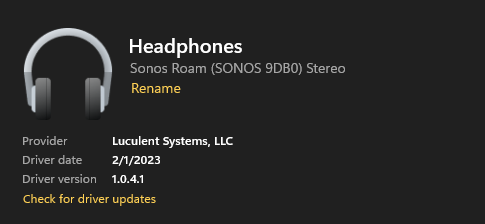
This, to me, is a bit concerning:

Namely, the provider details. I searched for them, and the top result on Google is a CNET page, and their link to Luculent’s homepage is dead. It does look like they provide drivers for Bluetooth devices, but I’d only expect to see Microsoft listed in that entry. I recommend scanning your computer for any and all Luculent software and removing it from your computer to see if it helps. If you are not familiar with the name or their products, I recommend you keep them uninstalled. A virus/malware scan may also be in order.

I don’t know for sure, but I imagine that if you were to escalate your case and speak to our L3 engineers, they might be able to garner more developer-level logging from the Roam to help decipher what’s going wrong.

I hope this helps.


"Common sense is the collection of prejudices acquired by age eighteen." - Albert Einstein

11 replies

Lyricist I
Dec 1, 2023 11:36 PM UTC

I also could not hear any music on either my Sonos Roam or Move, when playing music on my Win11 desktop (using Windows Media Player), after successfully connecting via Bluetooth and selecting the Roam or Move using the speaker output selector (Airpods worked/connected via Bluetooth as expected, no problem).

I read all the blog posts, verified all the Win11 settings, allowed everything possible...no luck. Eventually, I realized that my Realtek external speakers were plugged into the speaker jack, and Realtek driver/speaker was hijacking the output. I unplugged the external speakers, and then immediately the Roam (or Move) could play music. Good. 

In the end, I only wasted an hour figuring out that issue (much less time and effort spent than the bloggers above...kudos to you), but glad I finally got it resolved. Otherwise, I was out of ideas.  Hope this helps someone.

Translate