
Trending Lyricist I
February 27, 2025
Answered

Roam Trueplay microphone issue

Hi. I am trying to Trueplay-tune my Roam which I use alone in one of my rooms.  But the app asks me to turn on the mic, which is on, and then there is no way to procede further from that screen.. I have tried turning the mic off then on, doing that also before starting the tuning etc etc ....every variation possible! Still get stuck on that mic request screen

I tuned all my other speaker setups in various rooms without an issue.  

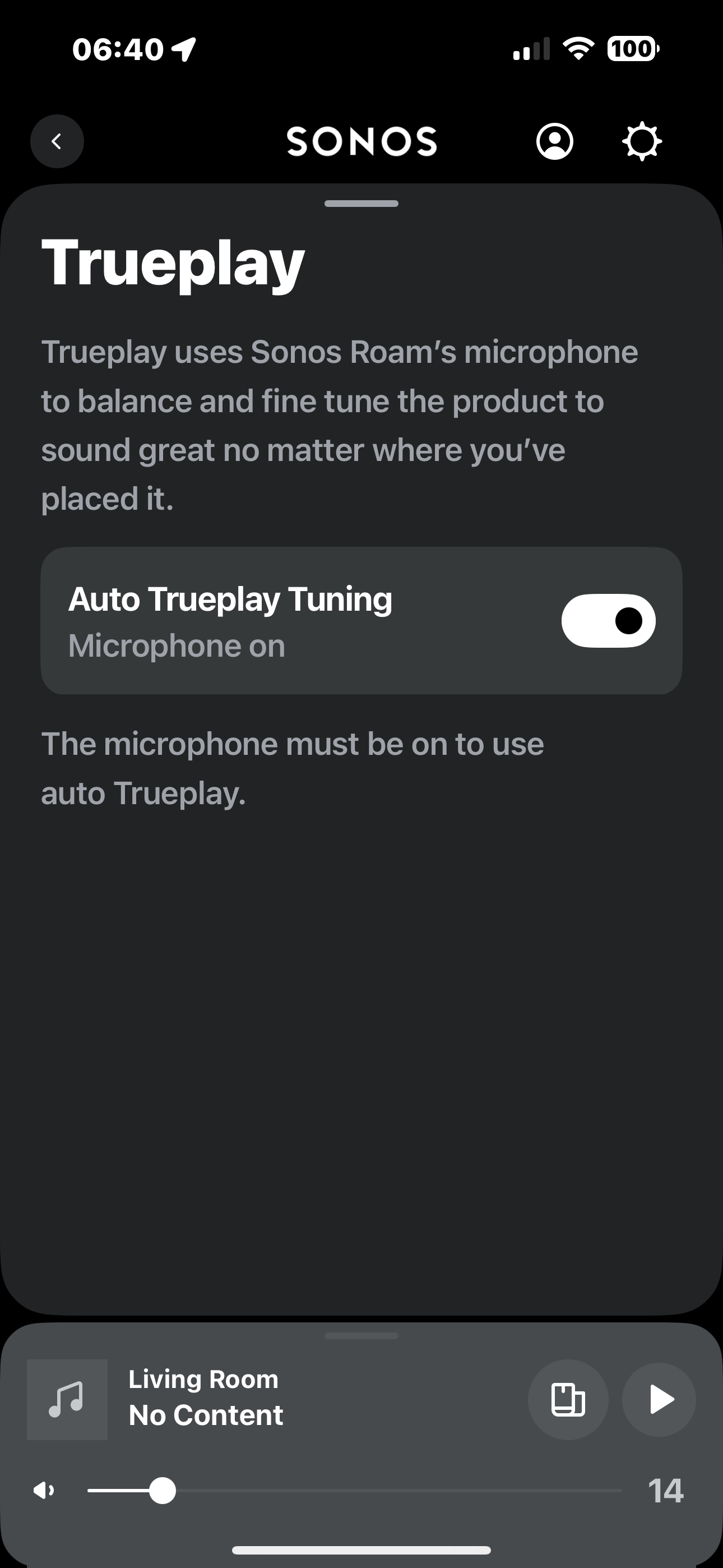
Am attaching a screenshot of where I get stuck
 

This topic has been closed for further comments. You can use the search bar to find a similar topic, or create a new one by clicking Create Topic at the top of the page.
Corry P
Corry PAnswer
Sonos Staff
February 27, 2025

Hi ​@fnegrin 

Welcome to the Sonos Community!

I at first had some trouble understanding what the issue was, but I think I now understand the misunderstanding.

Roam will tune itself automatically - when the setting shown in your screenshot is on (as it is there), you need do nothing else. Tuning is not performed in the app or with the app’s assistance. Roam will detect when it has moved, wait for the movement to stop, then automatically retune itself, even whilst playing. There is nowhere in the app for you to go to proceed with tuning.

As a result of this, I do not recommend that you reset your Roam, but if you already have, then you already have - no real harm done.

I hope this helps.


"Common sense is the collection of prejudices acquired by age eighteen." - Albert Einstein

15 replies

Corry P
Sonos Staff
February 27, 2025

Hi ​@fnegrin 

Please press the Back button marked here with a red box to go back to the previous page in the app.

I hope this help.

"Common sense is the collection of prejudices acquired by age eighteen." - Albert Einstein
fnegrinAuthor
Trending Lyricist I
February 27, 2025

yes thanks! i had figured that much out. I just was expectong a  more final  "done" button confirming the process was ended , while this way it seemed I would just reverse back one  step

 In UI design going  “back” is not an intuitive way to conclude  a process and is not consistent with the UI of the rest of this app.…   Now that you guys explained the  process for a roam is different from other speakers it makes  sense that turning the mic on is all there is to it ,  but  the interface is unclear about that


also, toggling the button on the screen does not turn the micon or off.  it just tells the system to use it for trueplay which again is a UI desigb flaw.  To turn on the mic i  have to do it in the roam itself.  that contributed to me assuming something was wrong


anyway, issue resolved. Sonos nees to work on the app design though!  


thanks to all!

Corry P
Sonos Staff
February 27, 2025

Hi ​@fnegrin 

To be fair on our app team, I think there may have been a bit of (understandable) misinterpretation on your part.

The page of the app shown is much like all the other pages that only have settings on them - you see the settings and most are either a switch or a link to a new page. They don’t require saving, and are consistent. If you compare this page with the page for one of the other methods of TruePlay, you will see that the in-app TruePlay process - much like the other processes such as adding a WiFi network or creating a stereo pair - open in a half-screen window which is lighter in colour (when using dark mode - I don’t even remember what light mode looks like!), prevents navigation elsewhere, and closes automatically at the conclusion of said process.

In fact, the reason why I could not at first understand your initial description of the problem you were having is because it was so at odds with the functioning of the page you indicated.

It’s not that I blame you, of course - due to your earlier experience of the TruePlay process, you were expecting something to happen in the app as part of it. But, if you have a look around the UI of the rest of the app, with the understanding that the Auto-Trueplay process does not involve the app, you will I am sure see that the app UI is consistent in this regard.

I agree that this page could have a control setting for the microphone as it would save having to go to the speaker to do it, but I think this may be deliberate behaviour relating to privacy concerns and not having a remote control for the microphone (which we went further with on later speaker models with a physical mic switch that cannot possibly be controlled by software). You may have a hard time convincing those who make these decisions to change this particular one.

Having said that, we do value your feedback, so if you feel that the page could be improved - even if it is just in some of the wording - please let me know how.

I am glad to hear that it’s all sorted out now! Thanks for coming back and updating the thread. Enjoy!

I hope this helps.


"Common sense is the collection of prejudices acquired by age eighteen." - Albert Einstein
Corry P
Sonos Staff
February 27, 2025

Hi ​@nik9669a 

Ah - I missed the sub-text of “Microphone on” under the main text “Auto True Play Tuning”.

You are correct - that is indeed confirmation of the current microphone state, but please note that it is not updated in real-time. I had to not only exit the page, but exit the Roam’s settings pages to get this to update. It seems that the app polls the current status from the Roam when you tap on the Roam’s room in the main Settings page. I am not sure if this is intended or not, and whether or not the polling can be done on this particular page more frequently, but it seems to me a good idea for it to so I will report this behaviour and see if I can get it at least looked at.

"Common sense is the collection of prejudices acquired by age eighteen." - Albert Einstein
fnegrinAuthor
Trending Lyricist I
February 27, 2025

thanks for the explanation!   it makes total sense… but only because you know true play works differently on a roam and because uou did not arrive there just sfter true play tuning 4 other tooms in a row!!  There is no indication of this difference in what true play tuning means in the Roam’s case for normal users, other than the word  “auto”.  


All that is needed for all to be clear  is to change that "microphone on” text by the  button to : “ activate” 

and the text below that,  about the mic needing to be on,    to something  like : " please make sure the mic is on on you roam for the activation to be complete"
