Roam audio drop-out when grouped to Beam (TV)
Hi All,
I am having a problem with audio drop-out when my Roam is grouped to my Beam (TV).
The system is:
3 x Play 3
1 x Beam
1 x Sonos One
1 x Roam
Controller on smart phone Sonos S2
All are WM:1 (WiFi, nothing wired).
Network shows SonosNet Channel 6 (greyed out)
WiFi is old-ish, 2.4 GHz only
Nothing is in surround sound or stereo pair set-ups.
TV is a Sony Bravia. HDMI / ARC connection to Beam
No voice control or services in use
I have used the system for several years without hitch. The Sonos One and Roam are new additions. Set-up went as expected and these 2 new units work normally when playing music from my Laptop / Music Library and from mobile phone “On this mobile device” and from mobile phone “BBC Sounds”. (I don’t have any music streaming accounts)
The main use of my Sonos system is to hear whatever is playing on the TV throughout the house. Mainly Digital Freeview TV / Radio by aerial and BBC iPlayer via internet. Our family demographic is one where everybody can use the TV remote to select Radio / DVD/ Hard Disk recorder, but not everybody can work a smart phone / navigate apps, so grouping the Sonos speaker system to the TV /Beam is important. This has always worked very well in the past.
My new problem is when I group to the “TV : Everywhere”, all the speakers are working as expected except for the Roam , which suffers from audio “drop-out” such as to make it un-listenable. The drop-out is always present and has silent periods ranging from a few tens to a few hundreds of milliseconds in a random way.
I have read several community references to this problem, stuttering and skipping etc., and have tried some of he recommendations, such as moving the Roam next to the WiFi router, near the Beam, resetting the Roam, pressing pause then run on the Roam, turning off the other Play 3 speakers but to no avail. Our house is quite remote so no neighbours WiFi intrusion, no doorbell cameras or much other load on the WiFi. I am somewhat reluctant to tweak anything in the (rented) WiFi Router settings as this is outside of my comfort zone.
I have tried adjusting the Beam “Group Audio Delay” (GAD), as recommended by Ken_Griffiths in a similar problem report from BenDrieze.
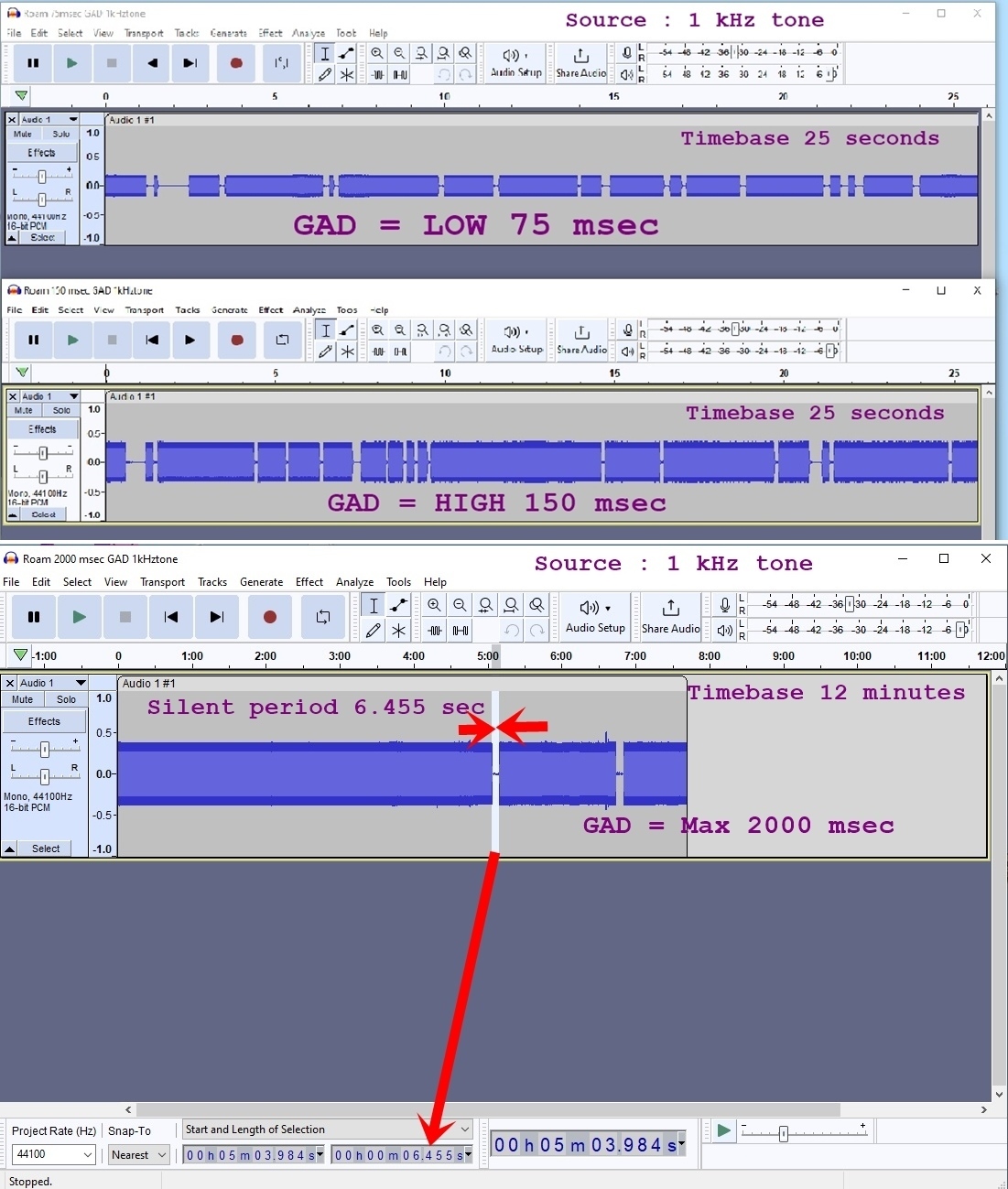
Default 75 msec and 113 msec and 150 msec all show the same drop-out problem. When set to “Max” 2000 msec, the dropouts do indeed stop but they are replaced by a long silent period of 6.45 seconds which shows up randomly after anytime from 1 to 25 minutes, yes, very infrequently but annoying. Unfortunately using the Max Group delay of 2.000 seconds does not work in our household set-up as the long pre-echo / delay heard as people move to and from the TV room to other parts of the house causes confusion.
Tried the TV Dialog Sync, but no effect here.
For interest, I checked the duration of the dropouts by setting the TV to play a YouTube video called 1kHz Sinus tone and placing a microphone next to the Roam and capturing the signal on a Laptop using Audacity. This displays the dropout / silent periods to good effect. On the shorter GAD settings the Roam sounds like a morse code signal; all other speakers give the constant 1 kHz tone. The puzzle is the 6.45 second silence which shows up on the Max GAD setting during several test runs; why such a fixed and repeatable value? I have tried to attached a couple of screen shots showing the Audacity display.
If anyone can make any suggestions as the why the Roam is not correctly picking up the TV / Beam audio when all the other speakers are happy , yet the Roam is working just fine when playing the Music Library, I am keen to listen.
Thanks !