
Trending Lyricist I
July 10, 2021
Answered

Why is Dolby Atmos content playing on Arc in stereo through Tidal app on LG TV?

Hi,

I have an LG OLED GX TV connected to a Sonos Arc via HDMI with a Tidal HiFi subscription running on the LG Tidal app. However Tidal Dolby Atmos content plays on the Sonos Arc as “Dolby Multichannel PCM 2.0” instead of “Dolby Atmos”, according to the Sonos app.

My expectation that this set-up should result in Dolby Atmos output from the Arc is based on information from the Tidal website (here) and LG website (here)

This is what I see on the Sonos app when playing Atmos content on the LG Tidal app:
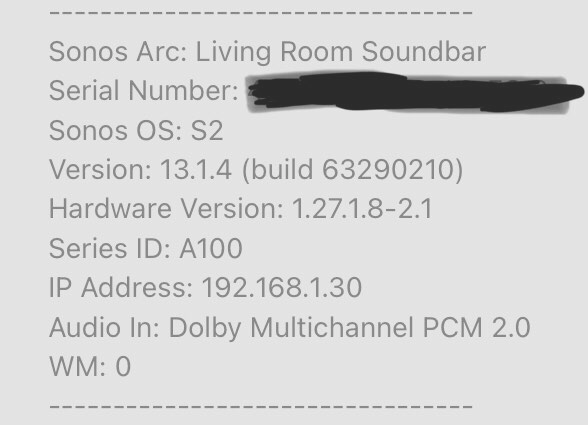


And this is what I see when running Dolby Atmos content on the LG Netflix app (and what I was hoping to see for Tidal too):
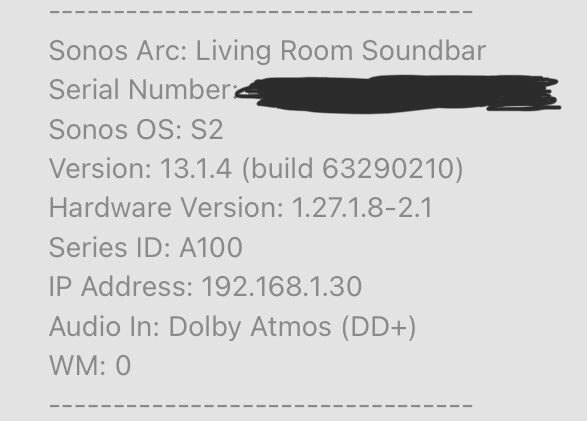


Has anyone managed to get Tidal Atmos content working on a Sonos Arc through an LG TV running the Tidal app? And does anyone have any suggestions as to what I might change to make this set-up work?

TIA.


Simon

This topic has been closed for further comments. You can use the search bar to find a similar topic, or create a new one by clicking Create Topic at the top of the page.
Lead Maestro
July 10, 2021

I’m just trying to exhaust all possible solutions.

What other options do you have under DTV Audio Setting?

Some LG TV’s have a Dolby Atmos setting you can enable/disable. I guess your model doesn’t have this setting.

Power cycling the TV and Arc can fix A LOT of problems. It wouldn’t hurt to see if it fixes your problem.

One other solution you can try is deleting the Tidal app and reinstalling it.

If none of these work, then I’m out of ideas.

"Receive with simplicity everything that happens to you." - Rashi

12 replies

Lead Maestro
July 10, 2021

I’m just trying to exhaust all possible solutions.

What other options do you have under DTV Audio Setting?

Some LG TV’s have a Dolby Atmos setting you can enable/disable. I guess your model doesn’t have this setting.

Power cycling the TV and Arc can fix A LOT of problems. It wouldn’t hurt to see if it fixes your problem.

One other solution you can try is deleting the Tidal app and reinstalling it.

If none of these work, then I’m out of ideas.

"Receive with simplicity everything that happens to you." - Rashi
Simon_6Author
Trending Lyricist I
July 10, 2021

So I tried a power cycle of the TV and Arc and it ONLY BLOODY FIXED IT!

After restarting the TV I had to log into my account on the Tidal app again and when I did that it showed a message about supporting Dolby Atmos content that I don’t remember seeing the first time I logged in. After that when I played Atmos content in the app it showed as Dolby Atmos on Sonos.

Thanks very much for your help GuitarSuperstar and I’m sorry I doubted your “turn it off and on again” solution :^) 

Simon