
Trending Lyricist I
August 17, 2020

Unable to use Sonos app on Android after latest update
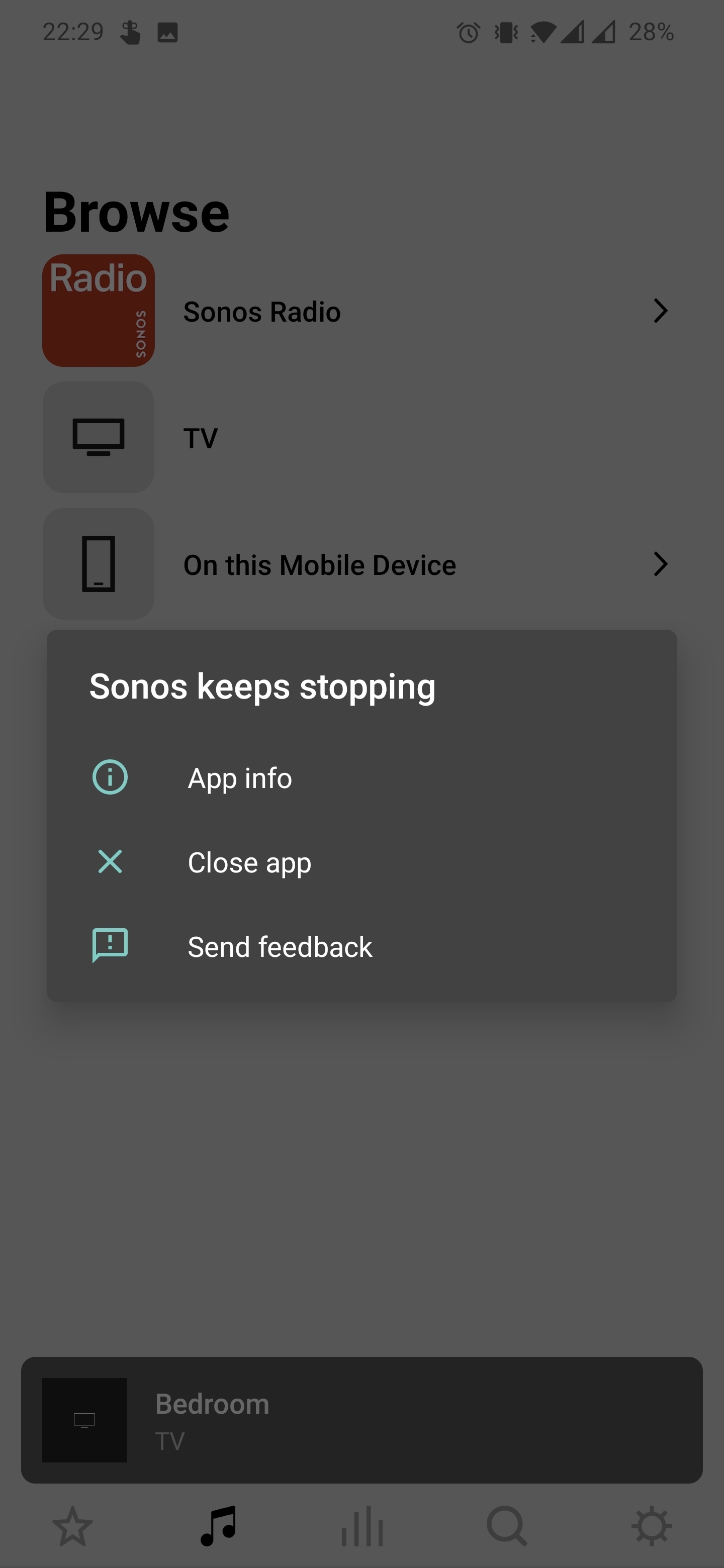
 

This is what I'm greeted with every time I try to use the Sonos app. I'm currently on Android app version 12.0.4. I've tried uninstalling and reinstalling 12.0.3 which worked fine before this update but I'm having the same issues with that. I've completely reset all my speakers and set them up again this time using an iPhone.

Everything works fine from the iPhone app.

I have a 5.1 setup, 2 Ones, a sub and an arc. Turning the arc off and back on again allows me in as far as the main Sonos app screen but if I try to select any sound source e.g. Sonos Radio, TV etc. the app force closes and I am greeted with the 'Sonos keeps stopping' window every time I try to open it.

This has made my almost €2000 setup impossible to use/control. Very disappointed.

I'm using a OnePlus 7 Pro on Android version 10.


I feel like I've tried everything and only an update to the so Sonos app might fix this but any help would be greatly appreciated as this has been going on for close to a week now. Thanks!

This topic has been closed for further comments. You can use the search bar to find a similar topic, or create a new one by clicking Create Topic at the top of the page.

49 replies

controlav
Lead Maestro
September 3, 2020

Android platform fragmentation. Love it.

Author of the leading independent Sonos apps for Android, MacOS, iOS, Windows and Xbox.
Lyricist I
September 5, 2020

Hi Kyle,

Diagnostics send on my working Sonos controller on a Samsung Galaxy Tab S5e: 48160312

Also Android 10, One UI 2.1, security patch 1st June.

On my OnePlus 8 Pro the controller app crashes at opening, immediately crashes and sometimes I've got the menu as mentioned in the start screen, where you can close the app or send feedback to Google.

Version of Android: 10 - oxygen os 10.5.12.IN11BA

Thanks for the reply,

Kind regards,

Yves


I have same issue on oneplus8 pro

Lyricist I
September 5, 2020

Hi all, @Kyle A @Feesh @ConOne 

I received wonderful news from Tim W. at “Sonos Customer Care” today about a valid workaround for the OnePlus 8 PRO on Android 10.5.12.IN11BA

Just turn of the notifications for the Sonos App:

Settings -> Apps & Notifications -> Sonos ->Notifications -> Show Notifications -> Off 

This works for me :)

Hoping to receive a definite fix soon….

Kind regards,

Yves

That worked for me for now with the oneplus8 pro.  Thanks

Lyricist I
September 7, 2020

Hi all, @Kyle A @Feesh @ConOne 

I received wonderful news from Tim W. at “Sonos Customer Care” today about a valid workaround for the OnePlus 8 PRO on Android 10.5.12.IN11BA

Just turn of the notifications for the Sonos App:

Settings -> Apps & Notifications -> Sonos ->Notifications -> Show Notifications -> Off 

This works for me :)

Hoping to receive a definite fix soon….

Kind regards,

Yves

That worked for me for now with the oneplus8 pro.  Thanks

I can also confirm that it works. I dont want notifications from Sonos app anyways 😂👍🏼

Lyricist I
September 10, 2020

Same problem here (immediate crash when opening the app). But I managed to fix it with this: I put a widget of the sonos s2 app on my startscreen and voila, no more crashes, a smoother way to work the app and suddenly the app appears in the drop-down menu! Plus I didn't need to shut off my notifications.

My setup: OnePlus 8 pro, sonos one sl, playbar, sub gen 3.

randman01
Lyricist III
September 10, 2020

I just updated to version 12.0.6 of the Sonos app, this was published in the Google play store today. This has fixed my issue with my One+8 Pro where Sonos was crashing every time I opened it.

I'm too old to be a good guitar player, just playing to have fun...
randman01
Lyricist III
September 11, 2020

I just updated to version 12.0.6 of the Sonos app, this was published in the Google play store today. This has fixed my issue with my One+8 Pro where Sonos was crashing every time I opened it.

I might also mention now that I’ve been using the 12.0.6 version app for a bit, performance improvements (for me anyway) seem to be in place. Some of the lagginess that we were seeing in app really seem to have improved. I’ll keep an eye on it. The other issue I’m looking to be fixed is the alarm functionality. I’ll check on that too.

I'm too old to be a good guitar player, just playing to have fun...
Lyricist I
November 2, 2020

I am having the same issue of the app crashing. I have tried all the suggested things above as well as contacted Microsoft to get a solution to the problem. Microsoft told me to reset my Wi-Fi network uninstall the app reset my phone and then reinstall the app and then log into the network. This also did not work. I'm also using Android 10 with no beta versions. I have a new Microsoft Surface Duo and the app has not worked since I purchased the phone. It is the only app on the device that does not function 

randman01
Lyricist III
November 2, 2020

I am having the same issue of the app crashing. I have tried all the suggested things above as well as contacted Microsoft to get a solution to the problem. Microsoft told me to reset my Wi-Fi network uninstall the app reset my phone and then reinstall the app and then log into the network. This also did not work. I'm also using Android 10 with no beta versions. I have a new Microsoft Surface Duo and the app has not worked since I purchased the phone. It is the only app on the device that does not function 

I would reach out to Sonos tech support directly. They may want you to perform a debug on the app and send them the file. They’ll prioritize it in their backlog accordingly. 

I'm too old to be a good guitar player, just playing to have fun...