
Trending Lyricist I
August 17, 2020

Unable to use Sonos app on Android after latest update
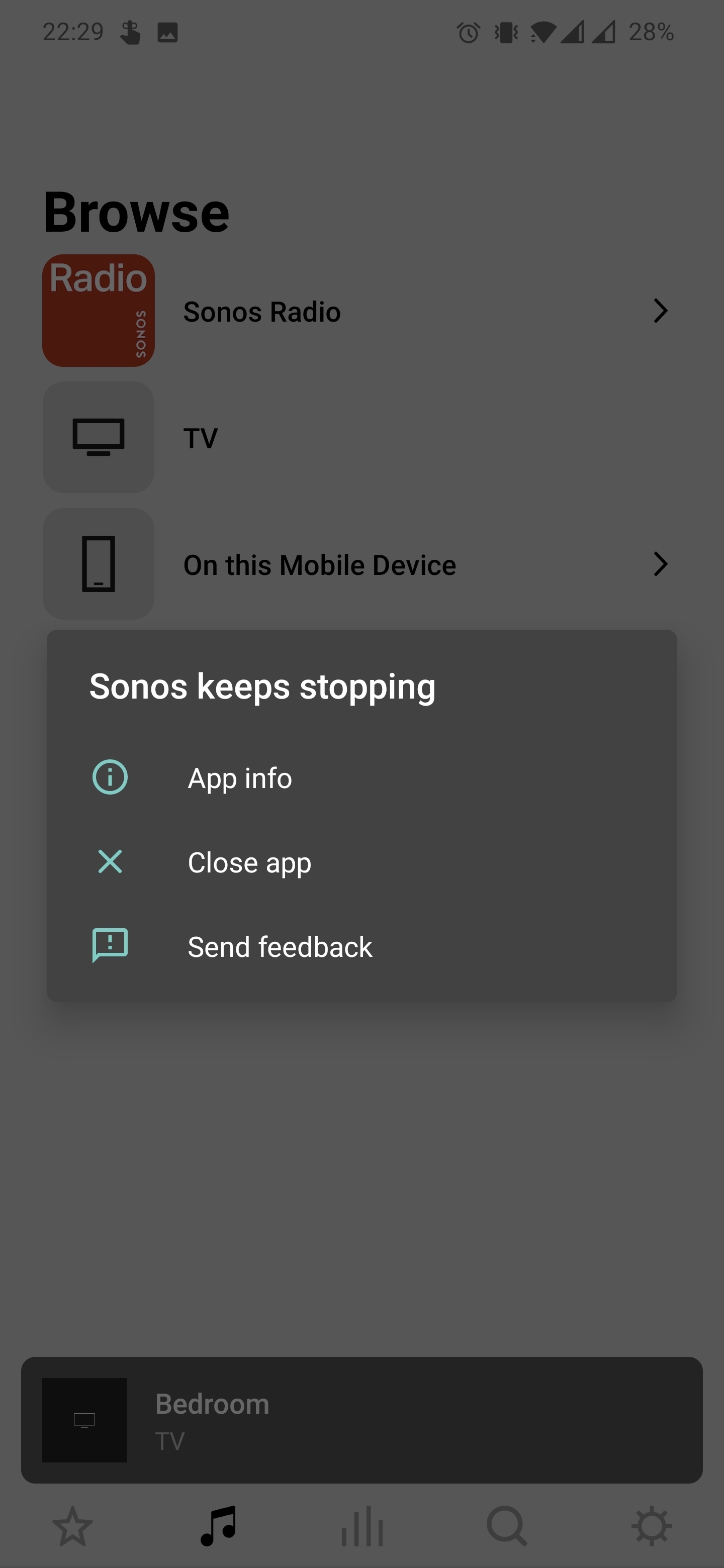
 

This is what I'm greeted with every time I try to use the Sonos app. I'm currently on Android app version 12.0.4. I've tried uninstalling and reinstalling 12.0.3 which worked fine before this update but I'm having the same issues with that. I've completely reset all my speakers and set them up again this time using an iPhone.

Everything works fine from the iPhone app.

I have a 5.1 setup, 2 Ones, a sub and an arc. Turning the arc off and back on again allows me in as far as the main Sonos app screen but if I try to select any sound source e.g. Sonos Radio, TV etc. the app force closes and I am greeted with the 'Sonos keeps stopping' window every time I try to open it.

This has made my almost €2000 setup impossible to use/control. Very disappointed.

I'm using a OnePlus 7 Pro on Android version 10.


I feel like I've tried everything and only an update to the so Sonos app might fix this but any help would be greatly appreciated as this has been going on for close to a week now. Thanks!

This topic has been closed for further comments. You can use the search bar to find a similar topic, or create a new one by clicking Create Topic at the top of the page.

49 replies

Kyle A
Retired Sonos Staff
August 17, 2020

Hi @ConOne, thank you for reaching out and getting our attention to this.

I would like you to uninstall the Sonos App from your phone then Restart the Phone (full shutdown is recommended).

Once it fully boots up, reinstall the Sonos App then test.

If it still persists, check the phone for any software updates.

Update us on how the suggested troubleshooting goes.

Help others find useful content by clicking the like button and selecting the best answer to your question
ConOneAuthor
Trending Lyricist I
August 17, 2020

Hi Kyle,

I gave that a go but I'm still having the exact same issues. I'm on the latest beta version for the OnePlus 7 Pro, however there were no software updates between when version 12.0.3 of the Sonos app was working and when it stopped working in version 12.0.4 so I don't think the phones software is causing any issues.

Airgetlam
August 17, 2020

Sonos doesn’t support, and honestly, frequently doesn’t run, on Beta OS’s. Try installing an older, supported OS, and see if the app runs then. 

Bruce
Lyricist III
August 17, 2020

Same on Android 10, Sonos app keeps crashing on OnePlus 8 PRO. Uninstall several times - clean cash - clean memory, nothing seems to work. The app works on Android 10 Samsung tablet S5e.

Frustrating!

ConOneAuthor
Trending Lyricist I
August 18, 2020

Sonos doesn’t support, and honestly, frequently doesn’t run, on Beta OS’s. Try installing an older, supported OS, and see if the app runs then. 

I get you. I'd understand if I was on a beta version of Android that Sonos didn't support yet. This beta is for new software exclusive to OnePlus devices and shouldn't effect how apps run on the device. For the 3+ years I've owned Sonos products I've almost constantly been on a beta version of the OnePlus software and have never had any issues until this latest update to the Android app. The strange thing is that even going back to the previous version or the version before that results in the same problem.

ConOneAuthor
Trending Lyricist I
August 18, 2020

Same on Android 10, Sonos app keeps crashing on OnePlus 8 PRO. Uninstall several times - clean cash - clean memory, nothing seems to work. The app works on Android 10 Samsung tablet S5e.

Frustrating!

Are you using beta software on your OnePlus 8 pro? My brother has the same phone. He isn't on the OnePlus beta and can control his Playbar and Move with no issues.


I'm going to connect to my brother's speakers later and see if I have the same issues.

August 18, 2020

@ConOne : ‘This beta is for new software exclusive to OnePlus devices and shouldn't effect how apps run on the device.’

Evidently not so, as nobody with other brands seems to be experiencing this issue.  I think you should follow @Airgetlam ‘s advice and run a supported OS / firmware.  I wouldn’t expect Sonos to do anything about this.

Lyricist III
August 18, 2020

Same on Android 10, Sonos app keeps crashing on OnePlus 8 PRO. Uninstall several times - clean cash - clean memory, nothing seems to work. The app works on Android 10 Samsung tablet S5e.

Frustrating!

Are you using beta software on your OnePlus 8 pro? My brother has the same phone. He isn't on the OnePlus beta and can control his Playbar and Move with no issues.


I'm going to connect to my brother's speakers later and see if I have the same issues.

No BETA software on my OnePlus 8 PRO, just the latest official update of August.

ConOneAuthor
Trending Lyricist I
August 18, 2020

Evidently not so, as nobody with other brands seems to be experiencing this issue.  I think you should follow @Airgetlam ‘s advice and run a supported OS / firmware.  I wouldn’t expect Sonos to do anything about this.

Sorry, I could have explained myself better. I’m using Android 10, which isn’t a beta version of android. The Sonos app targets different versions of Android, not specific software on different devices (e.g. it doesn’t target One UI on Samsung devices, or Oxygen OS on Oneplus devices. It targets Android 9, 10 etc). So really it should be working. I’d understand if I had recently updated to new OS software on my device but I haven’t. This only started after the last Sonos update on Android. Unfortunately as soon as I opened the app after updating it this started happening, and hasn’t worked since.

ConOneAuthor
Trending Lyricist I
August 18, 2020

No BETA software on my OnePlus 8 PRO, just the latest official update of August.

Interesting. What products do you have connected to your app? Is it a similar setup to my own?

Another thing I should add is that I can scroll through different menu's in the app when I'm not connected to my system without it force closing, it's only when I'm on my home network connected to the speakers that it stops working.