Trending Lyricist I
August 13, 2024
Answered

Two pairs of surround

Hi all, 


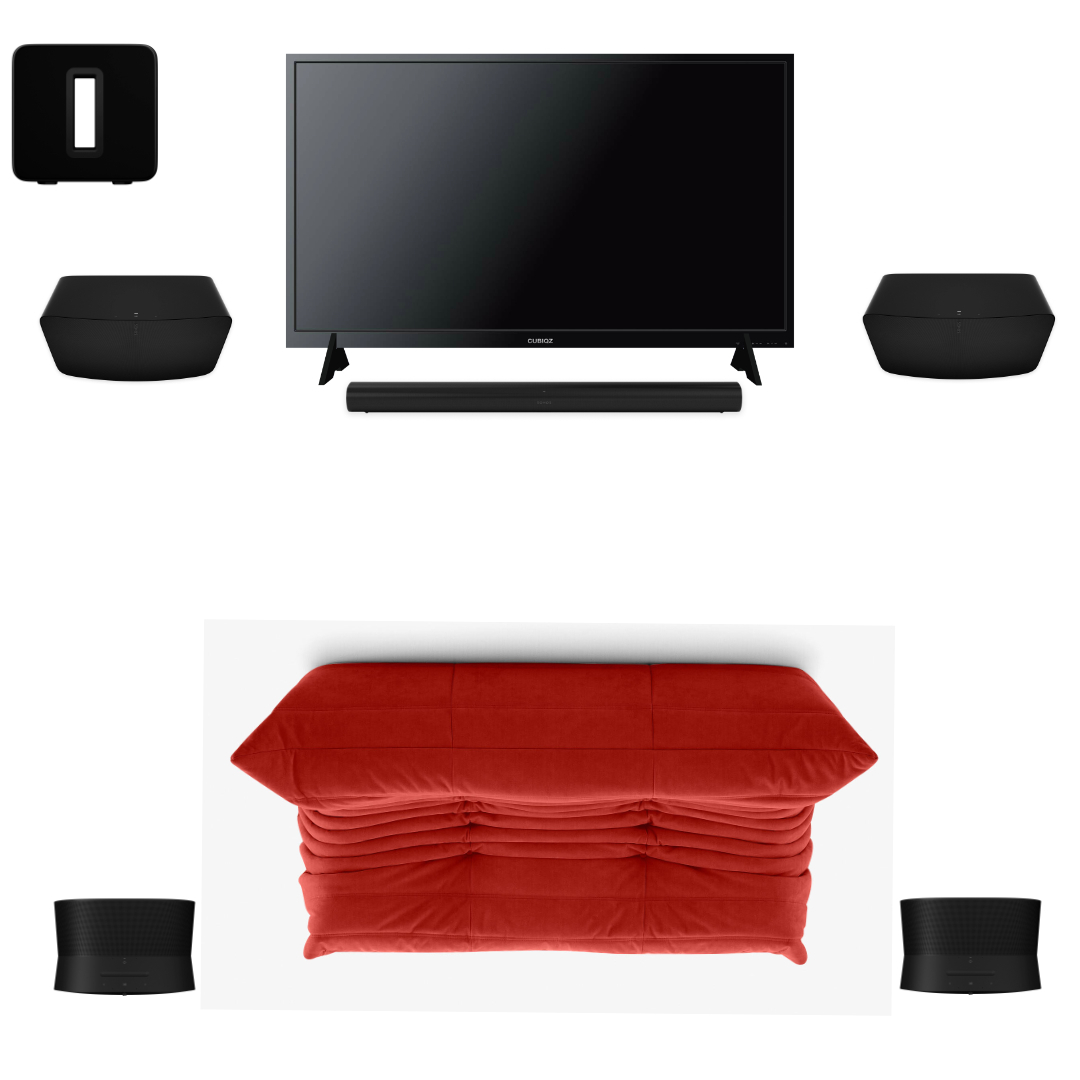
I have a Arc soundbar, two Era 300 and a Sub Gen 3, I feel missing something in front like no power or big sound, is it a good idea add one or two Sonos Five in front and is it possible ? Thanks for your advice.


This topic has been closed for further comments. You can use the search bar to find a similar topic, or create a new one by clicking Create Topic at the top of the page.
RhonnyAnswer
Prodigy III
August 13, 2024

No, you can’t add two lots of surrounds, the function doesn’t exist. The only additional speaker you can add to the home theatre setup would be another sub.

You could add two paired speakers at the front, and group them with your home theatre setup, but that will completely ruin any surround sound work your other speakers are doing, as those two extra speakers will just play all your TV’s sound in stereo - plus they will add a 75ms delay to the sound, creating an echo. (Correctly-added surrounds are bonded to the soundbar via its own 5ghz network to keep the surrounds in sync - adding extra speakers will be outside of that, creating a lack of sync.)

So in short - no.

52 replies

jnelly
Enthusiast I
August 30, 2024

Man, Atmos mixes must be, generally, kind of sucky with compressed Atmos (if that is what I'm hearing from Netflix, Max et al). I have the height channel, perennially on +10, and yeah, there are some atmospherics, but nothing worth all the Atmos hype.

So, if I’m understanding things.

  1. You have to have a disk player, that does Atmos TrueHD/or uncompressed.
  2. Otherwise, one has a sucky Atmos source signal
  3. Is this a fair statement?

Just to mention, I believe that +10 doesn’t necessarily equate to the greatest perception of height. This perception will also depend on the height of your ceiling and if there are any ceiling lights/fans in the way. Sometimes setting it to +10 could send it up at such an acute angle that it reflects down in front of you instead of where you’re sitting. A lower number could in fact send the sound up at an angle that bounces down right at you, making the perception of height that much better. 

The other thing about Dolby Atmos in TV and movies is you get so used to it that the best and only way to really demonstrate how atmospheric and enveloping it is would be to suddenly not have it, then listen for a minute, and then have it come back. This would show just how amazing it is (with the right content of course). This isn’t really possible in practice though, so there is often a feeling of being underwhelmed because you’ve become attuned to it all, when what you are experiencing is actually pretty incredible. 


Oh, ok then. I will now play with backing down the height add, per your logic above, @Rhonny! Thank you!

jnelly
Enthusiast I
September 1, 2024

One more thread hijack, since we have such informed, experienced users here:

  1. When playing Apple Music, through S2, is there a way I’m not seeing to, save a favorited track to an Apple Music Playlist or to Apple Music, so I can use that saved song in Apple Music, when away from Sonos?
  2. Right now, I can only make said track a “Sonos Favorite”, which limits my use of the save.  This has me ignoring using the streaming service connects in S2, because logically, I’d want to use that build-out everywhere, not just at home with Sonos. 
  3. This also applies to other functions, like previously played tracks in Apple Music.
  4. And, if I’m understanding streaming quality formats, by not using the Apple Music connect in S2, I’m giving up the ability to play Atmos/Spatial audio on Sonos, because when I AirPlay it to my Sonos Room from my phone or desktop, I don’t see the “...Atmos” label in the trackPlayingDescription?


This seems either, a very poor UI attempt to keep me in the Sonos-ecoSys., poor UX/UI design, or my ignorance in how to use streaming services in S2?

Thanks!

jnelly
Enthusiast I
September 1, 2024

Man, Atmos mixes must be, generally, kind of sucky with compressed Atmos (if that is what I'm hearing from Netflix, Max et al). I have the height channel, perennially on +10, and yeah, there are some atmospherics, but nothing worth all the Atmos hype.

So, if I’m understanding things.

  1. You have to have a disk player, that does Atmos TrueHD/or uncompressed.
  2. Otherwise, one has a sucky Atmos source signal
  3. Is this a fair statement?

Just to mention, I believe that +10 doesn’t necessarily equate to the greatest perception of height. This perception will also depend on the height of your ceiling and if there are any ceiling lights/fans in the way. Sometimes setting it to +10 could send it up at such an acute angle that it reflects down in front of you instead of where you’re sitting. A lower number could in fact send the sound up at an angle that bounces down right at you, making the perception of height that much better. 

The other thing about Dolby Atmos in TV and movies is you get so used to it that the best and only way to really demonstrate how atmospheric and enveloping it is would be to suddenly not have it, then listen for a minute, and then have it come back. This would show just how amazing it is (with the right content of course). This isn’t really possible in practice though, so there is often a feeling of being underwhelmed because you’ve become attuned to it all, when what you are experiencing is actually pretty incredible. 


Oh, ok then. I will now play with backing down the height add, per your logic above, @Rhonny! Thank you!

Haven't really noticed a difference with the height at 0, but haven’t done a mindful “test”, either. It’s sitting at 0 now!

Schlumpf
Virtuoso
September 1, 2024

One more thread hijack, since we have such informed, experienced users here:

  1. When playing Apple Music, through S2, is there a way I’m not seeing to, save a favorited track to an Apple Music Playlist or to Apple Music, so I can use that saved song in Apple Music, when away from Sonos?
  2. Right now, I can only make said track a “Sonos Favorite”, which limits my use of the save.  This has me ignoring using the streaming service connects in S2, because logically, I’d want to use that build-out everywhere, not just at home with Sonos. 
  3. This also applies to other functions, like previously played tracks in Apple Music.
  4. And, if I’m understanding streaming quality formats, by not using the Apple Music connect in S2, I’m giving up the ability to play Atmos/Spatial audio on Sonos, because when I AirPlay it to my Sonos Room from my phone or desktop, I don’t see the “...Atmos” label in the trackPlayingDescription?


This seems either, a very poor UI attempt to keep me in the Sonos-ecoSys., poor UX/UI design, or my ignorance in how to use streaming services in S2?

Thanks!

Apple does not support Atmos music via Airplay. 
The options you mentioned to manage your content from within Sonos in sync with Apple music app isn‘t supported by the new Sonos app yet as far as I know. And when it is, imo Apple on the other hand also has to support the option via Sonos API. So we will have still to wait for that coming. 

Ralf
Prodigy III
September 1, 2024

@jnelly 

You can make tracks favourites directly in the Apple Music app and then access those favourites via the Sonos app.

But you can’t impact/add/change your Apple Music playlists using the Sonos app. I’m pretty sure that has never been possible with the Sonos app, which has access to your streaming service but can’t make changes to it. 

Schlumpf
Virtuoso
September 1, 2024

@Rhonny 

I think it was possible with the old S2 app for services to use some options directly affecting the service as the Sonos API supports that. The music services were able to use it if they want to. 
E. g. with Deezer I was able to add a song from within Sonos app to one of my Deezer playlists. 
 

Ralf
jnelly
Enthusiast I
September 2, 2024

Thanks everyone, for the Apple Music answers!

Contributor I
September 7, 2024

Actually,  you can add a stereo pair, in a group with the Arc system, to the front (this is not a surround pair, technically).

My set up:

  1. Arc / Sub3 / Pair OneSLs: “Main Room”
  2. Era 300 Stereo Pair Front: “Stereo Pair Front Room”
  3. You then group 1 and 2, above. There isn’t much echo or delay,  both for TV or music, which can be controlled with the room volumes, but
  4. Turning the TV dialog sync to +2 or +3 in the “Main Room” or Arc system does trim this considerably.

This YouTuber lays it all all out in an S2 App view, at the below video #1, with #2 for additional context:
 

#1


#2

Thank you so much for this tip, i just tried it with my set up and it works perfectly, i experienced no delay and now i can hear clearer the front left and right 

My set up:

  1. Beam gen 1/sub mini/ pair one as surround
  2. Pair Five/ sub mini as front left and right

so i feel more bass cause there are 2 sub mini in the system. 

MoPac
Headliner III
September 7, 2024

 Cool idea!  How does it sound with Atmos music?  If Sonos wasn’t having so many issues with the 80.x app maybe they could program a way to steer the proper channels to the front L-R speakers and just use the soundbar as the center channel.

jgatie
September 7, 2024

 Cool idea!  How does it sound with Atmos music?  


Quite frankly, it sucks with Atmos, or any other multi-channel source.  The grouped Era 300’s in the front aren’t playing Atmos, they are playing all channels; surrounds, Atmos, fronts, and center, downmixed to stereo and played out of the front facing drivers.  Which means the actual surround and Atmos signals are compromised, ruining any positional/directional queues and screwing up the Atmos effect.  In addition, the soundbar is still playing the front L/C/R, along with the downmix in the “front” Era 300’s, muddying up the front soundstage that is already messed up because sounds meant for the rear and above are mixed in with the sounds meant to come from the front.

Also, no matter how you adjust it, you are going to have a delay, or lip sync problems.  In short, that video was made by someone who knows nothing about how a proper home cinema is meant to sound.