
Apr 17, 2023 4:51 PM UTC
Answered

Surround speaker has started to disconnect frequently

My Beam Gen 2 / Sub Gen 3 / Sonos One Gen 2 setup has been pretty much rock solid since it was set up. However over the last week I’ve started to see problems with my Right Surround speaker disconnecting several times a day. I can only get it to reconnect by restarting the speaker.

All devices on my network have fixed IP address, and I’ve kept a close eye on my router to ensure nothing else is sneakily connecting to the same IP as my speaker. I haven’t added any new devices to my network for months.

I also powered off every network device and restarted my router an hour ago, and the surround has already dropped off again.



My Beam is hard-wired to the router, with the surrounds and sub connected via SonosNet.


Here’s my network matrix when everything is connected:
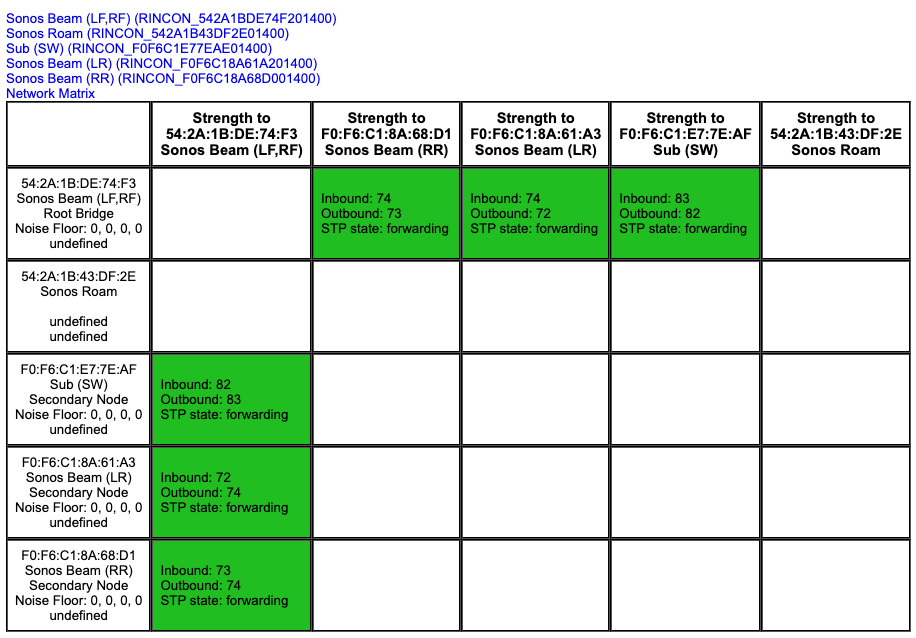
Working

and here’s my network matrix when the right surround has dropped off:

Not Working


I’ve just submitted diagnostic 522827366 - would it be possible for somebody to take a look to see if there’s anything obvious happening? Thanks.


This topic has been closed for further comments. You can use the search bar to find a similar topic, or create a new one by clicking Create Topic at the top of the page.
Lead Maestro
Apr 17, 2023 5:08 PM UTC

Try removing the Ones as surrounds in the Sonos app, swapping the Ones (left speaker is now the right speaker, right speaker is now the left speaker), and re-add them as surrounds.

If this doesn’t work, disconnect the Beam from ethernet and see if a wireless setup makes a difference.

"Receive with simplicity everything that happens to you." - Rashi

13 replies

Corry P
Sonos Staff
Apr 19, 2023 8:38 AM UTC

Hi @pjn 

Thanks for your post!

I can’t verify directly, because the same speaker was missing from both diagnostics, but the fact that the same physical speaker dropped off after swapping them round certainly suggests there’s something going on with it. There’s an amount of transmission errors between the Beam and the surrounds, so I would like to see the electromagnetic environment improved a little, but your tests, I think, have revealed something else going wrong.

I recommend you get in touch with our technical support team who will go through some real-time troubleshooting with you and get a diagnostic from the affected speaker which should identify which direction to move in from here.

I hope this helps.

Translate
"Common sense is the collection of prejudices acquired by age eighteen." - Albert Einstein
Apr 19, 2023 6:54 PM UTC

Thanks for your response and initial observations, Corry. In hindsight I should have sent another diagnostic with everything working for comparison - sorry!

First thing this morning, I disconnected the ethernet cable from the Beam and rebooted everything so that SonosNet isn’t being used any more. This was approximately 13 hours ago, and so far everything has stayed connected. Now I’ve said that, it’ll probably break within a minute of me sending this post 😀

Anyway, I’m going to give it another 24 hours or so before calling the technical support team, as I’m pushed for time today and tomorrow, plus I’m interested to see if the problem reoccurs using normal wi-fi. Then at least we’ll have a complete list of scenarios when it happens.

Thanks again for everyone’s suggestions.

Translate
Apr 20, 2023 10:26 PM UTC

OK, final update just to put a tidy close to this!

It’s now been over 40 hours since I stopped using SonosNet and swapped to using my router’s Wi-Fi for all devices. In that time I haven’t noticed a single disconnection and everything seems to be working fully again.

I’ve no particular reason to return to the SonosNet configuration, so more than happy to remain on my router’s wi-fi as long as everything keeps working 🙂

Thanks again for everyone’s input and suggestions over the last few days.

Translate