
Contributor I
April 11, 2026
Answered

Sub Gen 2 cross over keeps default to zero
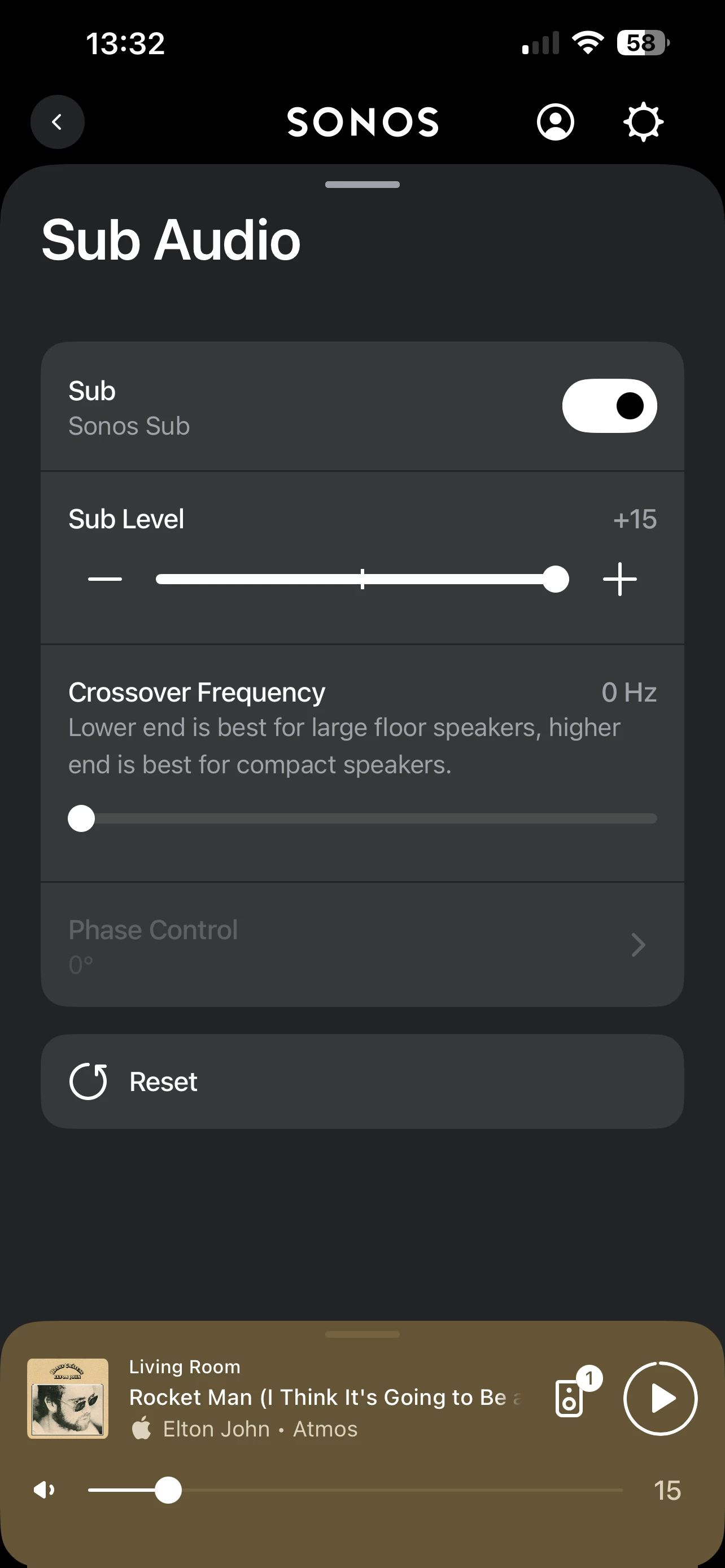
I can’t get my sub to hold the setting I set it to. Each time it defaults to zero for cross over. And regardless of what I set. It does not sound any better. 
 

I have unplugged and powered my amp up. I have done the same to my sub. 
 

I have run true play again. 

All the equipment is up to date and has most recent updates  


This topic has been closed for further comments. You can use the search bar to find a similar topic, or create a new one by clicking Create Topic at the top of the page.
Airgetlam
AirgetlamAnswer
April 11, 2026

That’s odd that it isn’t keeping your settings. 

I would recommend that you submit a system diagnostic within 10 minutes of experiencing this problem, and call Sonos Support to discuss it. Don’t post the resulting diagnostic number here.

There may be information included in the diagnostic that will help Sonos pinpoint the issue and help you find a solution.

When you speak directly to the Support staff, they have tools at their disposal that will allow them to give you advice specific to your network and Sonos system.

Bruce

26 replies

Lyricist III
June 18, 2026

​@AjTrek1 Den setup is sonos Amp, sub mini, and B&W CCM664 in ceiling speakers.

AjTrek1
June 18, 2026

OK...thanks for the update on the Den setup…

You are correct that Crossover frequency is not expressed in terms of zero “0”. Crossover is expressed as Hertz (Hz).

Did you convey the above to Sonos Tech Support as they may not have understood if you mentioned reverting to Zero. Sonos Tech Support may have assumed (without confirming) that you were referring to the Phase Control which is either 0 degrees or 180 degrees.

No offense intended but hopefully you’re not confusing Crossover adjustment with Phase Control? 😊


Together Everyone Achieves More = T.E.A.M.
Lyricist III
June 18, 2026

​@AjTrek1 all good. thanks for double checking, but no, not a phase control issue.

Sonos tech support has been silent since Sunday, but perhaps my current thread with them is with their weekend personnel or something, but i think they understood my scenario, which I believe is similar to the original post on this thread. 

My app screen looks just like the original post’s screenshot, with “0 hz” for crossover frequency. 

AjTrek1
June 18, 2026

OK…

I want to direct your attention to my screen shots below.

I’m using iOS and App build 80.00.41.

What I want you to notice is the Sub Identification (wording) to the left of the on/off button.

In the first screen shot using NO Sonos Amp the wording is “Sonos Sub”.

In the next two screen shots USING Sonos Amps the wording is Sonos and 3rd Party Subs (even though the subs used are Sonos). Go Figure…

My point here….is your App and system up-to-date as well as the OS on your device?

The apps on your device should look the same.

Sonos_Five Stereo Pair and Sub 3


Sonos_Amp & Turntable with Def Tech Bookshelf Speakers and Sub Mini


Sonos_Amp & Def Tech Floor Speakers and Sub 3


Together Everyone Achieves More = T.E.A.M.
AjTrek1
June 18, 2026

One more point…

In the App where an Amp is the main component (such as in your Den) make sure All Home Theater options are tuned off.

Together Everyone Achieves More = T.E.A.M.
Lyricist III
June 18, 2026

​@AjTrek1 really appreciate the thorough detail on your helpful reply. 

Sonos app and system update are all up to date to the one you listed, and have been since I discovered the issue.

Upon review, the Den seems to be working fine for crossover frequency. Either the glitch was fixed, or it was a mistake on my end (let’s assume the latter).

The crossover frequency issue still persists from my Family Room setup (Sonos sub gen 3, Arc, Sonos Amp, (2) sonos architectual speakers). The crossover frequency shows “0 hz”. I can adjust the slider, but when I return to that submenu, the crossover frequency returns to “0 hz”.  Sub level and phase are unaffected by the issue. 

It seems possible that Sonos is overriding the crossover frequency since, like in your case, the sonos system could be taking the wheel on the crossover freq. since the system is all Sonos, and so therefore the glitch is more of a UI thing, where in reality the app shouldn’t let me be able to adjust the slider. Hard to say at this point.

I’ve also played around with deleting my Trueplay, turnining it on / off, and trying it over again, but the crossover issue persists.  

I would be curious if others with Arc + Sub Gen 3 have had similar issues as ​@Zac8311 and I have. 


AjTrek1
June 18, 2026

OK…

Hmmm…if the screenshot in your last post is that of the room with the Arc you should not have the screen that is showing.

Are the speakers connected to the Amp acting as surrounds? I’ve never had a system wherein an Amp with wired speakers acting as surrounds was bonded to a Sonos soundbar. Therefore, I can’t provide a credible reponse.

Make sure Sonos tech support fully understands your setup.

FYI, I and others had the issue in the post below. It took me a while to get the point across to Sonos. The issue has been resolved but not without a lot of back n’ forth 😂


Together Everyone Achieves More = T.E.A.M.
kdowling
June 18, 2026

I think that is an app problem. The crossover shouldn’t be showing as available at all in that situation. The crossover for sonos subs is determined by the system and not settable. Usually 80hz. The crossover setting is supposed to be for third party powered subs attached to the amp sub output. At least, that’s my understanding. Someone correct me if I’m wrong.

Edit: And sonos subs on the amp, if the amp is not part of a home theater setup?

Zac8311Author
Contributor I
June 18, 2026

Sorry, I’m just coming back to this now.
 

I appreciate other people chiming in. I think what I want to express here is I shouldn’t have to make it look like it’s a third-party component. When everything is Sonos.


The other thing I wanna see this for three years I’ve had all of this equipment and it worked the way that I expressed, and only since changed, and if it was really a matter of the other component is controlling and looking after that crossover frequency hertz why would you even let me adjust it to attend and then when I go back, just keep it default it’s not even there my question 


Sorry for the rant I’m stuck in traffic. This is all voice to text.

AjTrek1
June 18, 2026

It’s an issue with the App on your device. I say your device because I can’t reproduce it on my device. Likely Sonos thus far can’t reproduce it either therefore you get the pushback.

As I provided the link to an issue I had it took quite awhile for Sonos to be able to reproduce it. That’s why diagnostics are so important and therefore factory resets are frowned upon as it erases useful data.

Sonos tech support had me to reconfigure my stytem too many times to count and run a diagnostic after each. Sometimes it takes that type of extensive hit and miss testing until the stars align correctly to reproduce the issue.

If the issue were wide spread Sonos could potentially arrive at an answer/solution quickly. As the issue seems to be isolated it will take longer. I’m sure Sonos will find a solution although it may cause you discomfort during the process. 

So in the interim keep Sonos Tech involved and ask for escalation to the next level. Be sure to keep the screen shot you published. As a picture is sometimes worth 1000 words.


Together Everyone Achieves More = T.E.A.M.