
Contributor I
February 4, 2025
Answered

Shut off Amp overnight

I don’t see a way to turn off music overnight.  I’ve left music on outside before and my neighbors didn’t appreciate it.


The best idea i have is to plug my Sonos amp into a timed outlet.  This will force the zone to be off during established quiet hours.  
 

is there a better way to do this?
This topic has been closed for further comments. You can use the search bar to find a similar topic, or create a new one by clicking Create Topic at the top of the page.
Contributor I
February 7, 2025
Desktop app


I’m aware of this.  It is a nice feature but does not meet my needs.  I want the system to not be able to have any music in the zone during a certain window.  The timer is nice, but can be overridden easily.  I’ve solved this issue with a simple Home Depot outlet timer.  The Sonos system is simply cut from power during the window.  It may be cludgey, but it works perfect.


9 replies

AjTrek1
February 4, 2025

Are you kidding me???

Anyway….Open the Sonos app on your device. Click the drop down arrow in upper left corner. Locate the room with the Amp. Open the room. Tap the square above the volume slider to stop the music.

Together Everyone Achieves More = T.E.A.M.
Enthusiast II
February 4, 2025

Are you kidding me???


Lol 🤡💀


 ​@Squarefeet i I think you could set an alarm to volume zero at the time you want it to go quiet and that might work. Otherwise timed outlet. 

Contributor I
February 4, 2025

Are you kidding me???

Anyway….Open the Sonos app on your device. Click the drop down arrow in upper left corner. Locate the room with the Amp. Open the room. Tap the square above the volume slider to stop the music.

Thanks for the humor.  I’m aware of how to adjust the volume, I was looking for a nighttime shutoff option.

Contributor I
February 4, 2025

Are you kidding me???

Anyway….Open the Sonos app on your device. Click the drop down arrow in upper left corner. Locate the room with the Amp. Open the room. Tap the square above the volume slider to stop the music.

Thanks for the humor.  I’m aware of how to adjust the volume, I was looking for a nighttime shutoff option.

Yes, I think a timed outlet is the only certain way to do do this.  My previous amp was controlled by an RTI system which was programmed to send a shutoff signal to that zone at night.

Pools-3015
Prodigy I
February 4, 2025

Are you kidding me???

Anyway….Open the Sonos app on your device. Click the drop down arrow in upper left corner. Locate the room with the Amp. Open the room. Tap the square above the volume slider to stop the music.

Thanks for the humor.  I’m aware of how to adjust the volume, I was looking for a nighttime shutoff option.

Yes, I think a timed outlet is the only certain way to do do this.  My previous amp was controlled by an RTI system which was programmed to send a shutoff signal to that zone at night.

What I did with mine, was to creat an alarm that sets the volume to zero. You can have it set for 5 or 10 minutes…  because who remember to shut the music off outside!.. lol. Mine is set for 10 pm

Contributor I
February 4, 2025

Are you kidding me???

Anyway….Open the Sonos app on your device. Click the drop down arrow in upper left corner. Locate the room with the Amp. Open the room. Tap the square above the volume slider to stop the music.

Thanks for the humor.  I’m aware of how to adjust the volume, I was looking for a nighttime shutoff option.

Yes, I think a timed outlet is the only certain way to do do this.  My previous amp was controlled by an RTI system which was programmed to send a shutoff signal to that zone at night.

What I did with mine, was to creat an alarm that sets the volume to zero. You can have it set for 5 or 10 minutes…  because who remember to shut the music off outside!.. lol. Mine is set for 10 pm

I’ll try that first, then.  Thanks!.

controlav
Lead Maestro
February 4, 2025

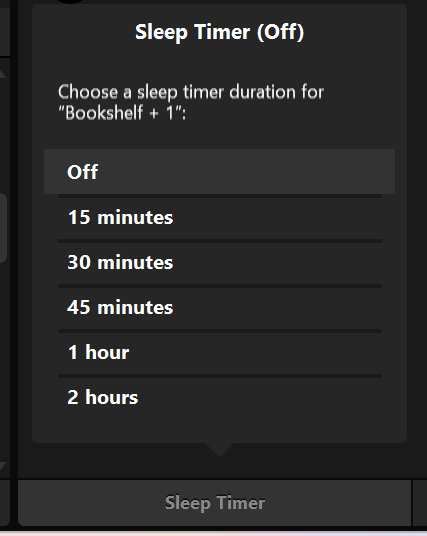
Sonos has a sleep timer built in. Well, the desktop app (and my Windows app) does. No idea if that feature is in the mobile apps.

Author of the leading independent Sonos apps for Android, MacOS, iOS, Windows and Xbox.
controlav
Lead Maestro
February 4, 2025
Desktop app


Author of the leading independent Sonos apps for Android, MacOS, iOS, Windows and Xbox.
SquarefeetAuthorAnswer
Contributor I
February 7, 2025
Desktop app


I’m aware of this.  It is a nice feature but does not meet my needs.  I want the system to not be able to have any music in the zone during a certain window.  The timer is nice, but can be overridden easily.  I’ve solved this issue with a simple Home Depot outlet timer.  The Sonos system is simply cut from power during the window.  It may be cludgey, but it works perfect.