Trending Lyricist I
November 8, 2021
Answered

Can't hear sound from surrounds when playbar is cabled

Hello,

I have a Playbar (wired) and a Sub (wireless), to which I want to add 2 Play:1s as surrounds.

When trying to add the Play:1s, the configuration always fails with message “There was a problem adding your surrounds...”: after the failure, the 2 Play:1s appear to be there (+Sub+LS+RS), their controls work correctly (eg: I can volume up or down the sound coming from the Playbar), but no audible sound is perceived from them. This happens ONLY when the configuration is started with the Playbar wired.

If I put the Playbar in wireless mode, the configuration succeeds and sound comes from the Play:1s: however, as soon as I put the Playbar back to wired mode, the Play:1s are silent again.

I tried everything: I reset the Play:1s to factory, reset the router, changed the SonosNet channel, but nothing works. If the Playbar is wired, the Play1:s are silent, no matter if I am playing homecinema or streaming music.

I submitted 2 diagnostics:

  • 1260792362, where all my tests described above are logged
  • 1698362511, where I succeeded to add the surrounds with wireless Playbar, and where they fail again when switching the Playbar back to wired mode.

Thank you in advance for helping,

Davide

This topic has been closed for further comments. You can use the search bar to find a similar topic, or create a new one by clicking Create Topic at the top of the page.
James L.
James L.Answer
Retired Community Staff
November 8, 2021

My question is this - how are you moving your Playbar from wired to wireless? What is the process you’re using to switch it over?

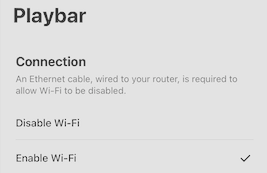
I just switch on and off this option:

while the network cable is always plugged in.

Yeah that’s the issue. When you disable Wi-Fi that essentially cuts off all communication between the wired Playbar and wireless surrounds. You need to have that enabled or have both surrounds wired (plus your Sub) if you wish to have the wireless card disabled on your Playbar.

Mark good posts by pressing the like button, and select the best answer on questions you've asked to help others find solutions.

15 replies

November 8, 2021

You need to have WiFi enabled on the Playbar Settings whether it is connected by Ethernet or not. If you disable WiFi then you turn off the Playbar 's wireless radio, making it impossible for it to communicate with the surrounds. 

You need to enable WIFi. The Playbar itself will still connect over Ethernet. 

davehenAuthor
Trending Lyricist I
November 8, 2021

Hello John,

Thank you for your answer, but I think that it is not correct. Indeed:

  • In the past my 2 Play1:s always worked as surrounds to a cabled Playbar with wireless disabled
  • In recent times, I had 2 Play5:s working as surround with the same configuration
  • As I said in my message above, I can control the system from the Play1:s (volume up/down, play/pause, etc), so it means they communicate with the cabled Playbar. The problem is that no sound come from them.
James L.
Retired Community Staff
November 8, 2021

Hey @davehen,


@John B is correct.

Looking at your diagnostic (specifically the first one), I can see that the WiFi has been disabled on your Playbar. Please try to enable WiFi while the Playbar is wired (Settings → System → Home Cinema → Playbar → Enable Wi-Fi) and let me know if that helps.


If not, please submit another diagnostic and reply with the number here.

Mark good posts by pressing the like button, and select the best answer on questions you've asked to help others find solutions.
davehenAuthor
Trending Lyricist I
November 8, 2021

Hello James,

That’s indeed something I did already: when the Playbar is wireless, the surrounds work.

But I want the Playbar to be on wire only, which is a perfectly legal configuration (see here): I can tell you for a fact, it always worked with this configuration in the past.

James L.
Retired Community Staff
November 8, 2021

Hello James,

That’s indeed something I did already: when the Playbar is wireless, the surrounds work.

But I want the Playbar to be on wire only, which is a perfectly legal configuration (see here): I can tell you for a fact, it always worked with this configuration in the past.

Yeah, I do know that having everything wired should work, but here’s the issue:


In your second diagnostic (1698362511) where you said the Playbar is wireless, I can for certain tell you that it’s not. It has an Ethernet cable connected in both cases, the only difference I can see between the diagnostic reports is that the wireless card is disabled on the first one (1260792362). I have yet to see a diagnostic where your Playbar is actually wireless. Disabling the WiFi in the app while having wireless surrounds connected is not a supported setup. You would need to either have the surrounds also wired, or enable the wireless card on the wired Playbar.


My question is this - how are you moving your Playbar from wired to wireless? What is the process you’re using to switch it over?

Mark good posts by pressing the like button, and select the best answer on questions you've asked to help others find solutions.
davehenAuthor
Trending Lyricist I
November 8, 2021

My question is this - how are you moving your Playbar from wired to wireless? What is the process you’re using to switch it over?

I just switch on and off this option:

while the network cable is always plugged in.

James L.
James L.Answer
Retired Community Staff
November 8, 2021

My question is this - how are you moving your Playbar from wired to wireless? What is the process you’re using to switch it over?

I just switch on and off this option:

while the network cable is always plugged in.

Yeah that’s the issue. When you disable Wi-Fi that essentially cuts off all communication between the wired Playbar and wireless surrounds. You need to have that enabled or have both surrounds wired (plus your Sub) if you wish to have the wireless card disabled on your Playbar.

Mark good posts by pressing the like button, and select the best answer on questions you've asked to help others find solutions.
davehenAuthor
Trending Lyricist I
November 8, 2021

James, I do really appreciate your help, but how do you explain that this setup always worked in the past?

Actually I had it working for months on end, with these very same Play1:s and even with 2 Play5:s.

jgatie
November 8, 2021

John B is most certainly correct.  If your surrounds are wireless, you cannot shut off the WiFi on the Playbar.  WiFi has to be enabled in order for the surrounds to get a signal from the Playbar.   Which makes sense - The Playbar decodes the optical input and sends the surround signal to the surround speakers.  If there is no physical connection to the surrounds, how is the Playbar supposed to get the signal to the surrounds?  They aren’t going to communicate via carrier pigeon.

November 8, 2021

@davehen . You need to do what I suggested. You are completely wrong in your understanding. You have never successfully run unwired surrounds with WiFi disabled on the Playbar.