

JMazio
Contributor I
November 21, 2022
Answered

Beam Gen2 possible speaker driver issue

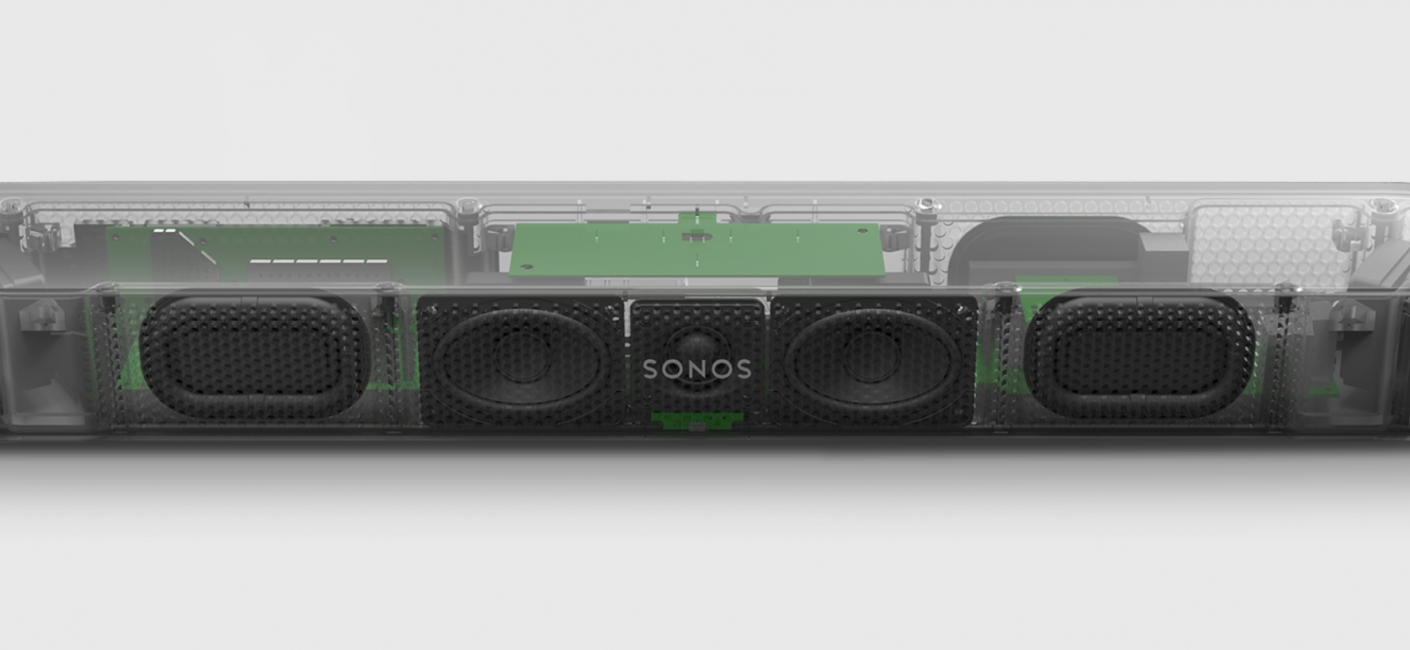
Hello,A few days ago I bought a Beam Gen2 bar, installed it and it's working ok. I've been reading about the product, and I found an image of the internal components and noticed that it has two side speakers, two central ones that are one on each side of the SONOS logo, and right behind the logo a tweeter. I put my ear close to the position of each speaker, and noticed that the center speaker just to the right of the SONOS logo is muffled and sounds completely different from the speaker on the left. This is normal? Or is it a problem with the product? It seems that these center speakers are reproducing different frequency ranges. Has anyone had this same question?



This topic has been closed for further comments. You can use the search bar to find a similar topic, or create a new one by clicking Create Topic at the top of the page.
Corry P
Corry PAnswer
Sonos Staff
November 22, 2022

Hi @JMazio 

Welcome to the Sonos Community!

Your being happy with the sound of your Sonos product is our main concern. If you feel there is an issue with the sound reproduction on your new Beam, I can only recommend you get in touch with our technical support team - if they agree, we’ll be happy to replace the product and cover shipping costs.

As they will no doubt include it as a troubleshooting step, you may as well try a factory reset of your Beam before getting in touch. As this looks like your only Sonos product, however, please be aware that all settings and services added will be lost. Once reset, set the Beam up again (choose Setup a New System after reopening the app) and if it has the same issue, please then get in touch via phone.

I hope this helps.

"Common sense is the collection of prejudices acquired by age eighteen." - Albert Einstein

18 replies

Airgetlam
July 27, 2023

Sonos employees are required to have that ‘tag’ on their accounts. So, no, @Vaco1604 is not a Sonos employee, but a user like most of us in these forums. 

Bruce
Contributor I
July 28, 2023

Thanks @Airgetlam 😀. apologies all round, Sonos support asked me on Tuesday for a link to this thread, which I sent. and I had also suggested an update. it’s just a coincidence.

I haven't yet had a solution suggested although it is being checked out. 

I’m hoping now to find a retailer nearby who has a Beam on display that I can listen to and compare :) 


Vaco1604
Lyricist I
July 28, 2023

Hello @Vaco1604 :)

Have you been in touch with Sonos tech support about your problem too?

or do you work with Sonos 🤔

Hello @CiaranP, I haven’t been in touch with Sonos tech support as I live in Perú where there is no official support at all. I just was wondering if you got a response and maybe a solution from Sonos 😊. Please let me know if they say they can fix the issue with an update, I’m thinking of sending my unit to a local technician in my country but I’m not pretty sure about it as it might get worse if a non-authorized Sonos technician tries to resolve the issue☹️.

Contributor I
July 28, 2023

Good Morning @Vaco1604 🙂,

I have had lots of communication with Sonos tech support over the past three months, but no solution yet; the case is still open and they are trying to recreate the issue..

The tech support is all via email, so it would be worth trying to get in touch :) 

I had returned my first Beam 2 to the retailer who replaced it with a brand new one, but the new one also has the same issue.  The retailer returned the first one to Sonos.

My driver/speaker (the fourth one from the left) does not have any sound, whether from a HDMI source (TV/ BluRay) or using Airplay, with or without surround speakers and with Trueplay on or off.

I will update you all here if that is ok? (hope I’m not taking over the topic 😯, I haven't been on a forum for decades 😊) 

Ciarán


Lyricist I
November 2, 2023
Hi, I noticed the same problem yesterday. I don't know if it was planned this way. Did you manage to get anything?
 
Contributor I
November 2, 2023

Hi @magellaner :) 

I didn't have any resolution, and I now assume that no noticeable sound is designed to come from that fourth speaker.

Initially, the dealer did arrange a replacement Beam for me, but that had the same issue.

I later contacted Sonos and they eventually arranged a second replacement, which also has the same issue. 

The sound from the Beam is perfect (as were the previous two), but I feel that a lot of emails, phone calls and shipping could have been avoided if Sonos had confirmed that that speaker does not output high/midrange sound!

I hope that helps :) 

CP

Lyricist I
November 2, 2023
I also thought that it only makes a bass sound… I can hear a sound from it, but maybe it's just a bass. Five amplifiers five speakers in Beam is interesting. Have you tried three beams and nothing got better?
Contributor I
November 2, 2023

yes, there are also two bass ports on the front and I too hear bass from near the fourth speaker but definitely no high or midrange.

Sonos did spend time with me via email and phone calls to make a diagnosis. I even made improvised baffles to isolate each speaker and record sound from each and there was (and still is) no mid sound from that speaker.

the issue was the same with the three Beam 2s that I have had.

so to sum up, the lack of sound is only noticeable with your ear to the speaker or when measured with a sound meter but at normal listening, it sounds fine. I just had expected the stereo separation to be a bit better! 

However my current TV has ARC and not eARC, and I assume the sound separation will be much better with eARC.