
Contributor I
Aug 9, 2021 5:26 AM UTC

Optical output not released by Samsung TV

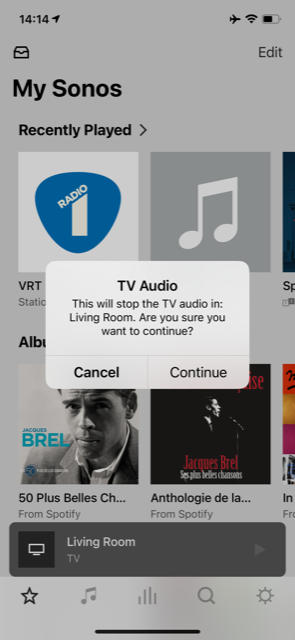
I just bought a new Samsung QLED 43Q64A TV (to replace a 5Y old Samsung). Connection through optical with my sonos playbase works fine. However I noticed that even when the TV is switched off, it keeps the optical connection. Hence I get the below message every time I want to use to sonos music App. Could we not just get rid of this message in the app ? If I switch on the App I know it will use the interface...no need to remind me or ask me “If I am sure”...Of course Samsung should release the port when the TV is off...(as it worked with the old TV)
 

This topic has been closed for further comments. You can use the search bar to find a similar topic, or create a new one by clicking Create Topic at the top of the page.

12 replies

Ken_Griffiths
Aug 9, 2021 10:49 AM UTC

I ‘sometimes’ see this message too (in similar circumstances) with an LG OLED C9 TV, but in the case here, it’s an HDMI-ARC/eARC cable connection.

I’m just pondering if this is perhaps ‘by design’ in the Sonos App and intended to give the user a ‘get out’ option to maybe not interrupt any potential playing TV audio, if the wrong room has been selected by mistake in the App by the user for music playback …(not sure🤔?)

Translate
ratty
Aug 9, 2021 11:05 AM UTC

Turn the TV off at the wall.

Translate
jw79900Author
Contributor I
Aug 9, 2021 11:11 AM UTC

This happens when the TV is set to “Off”. Once it has accessed the optical out, it does not seem to release it...

Translate
ratty
Aug 9, 2021 11:12 AM UTC

Not in standby. Actually powered off. The TV can't output an optical carrier if there’s no power. Some devices keep the optical alive (a red light shows at the end of the cable) when in standby.

Translate
jw79900Author
Contributor I
Aug 9, 2021 12:20 PM UTC

got it, unfortunately modern TVs do not allow complete power off anymore apparently. At least i do not see this option on my Set (unless unplugging power which is not an option)

Translate
buzz
Grand Maestro
Aug 9, 2021 12:32 PM UTC

Fully OFF implies that the TV could not respond to remote control commands.

I think that the assumption here is that TV is the most important function and if TV watching is interrupted, domestic unrest will follow.

Translate
jw79900Author
Contributor I
Aug 9, 2021 12:39 PM UTC

A simple “do not show this message in the future” toggle in the sonos app would solve the annoyance :-) 

Translate
ratty
Aug 9, 2021 12:42 PM UTC

You’ve presumably tried powering the Playbase off for 30 secs and restarting it.

Translate
jw79900Author
Contributor I
Aug 9, 2021 12:53 PM UTC

no haven’t tried that. I did not touch playbase. Just swapped the TVs. 

Translate
jw79900Author
Contributor I
Aug 16, 2021 7:59 AM UTC

I noticed that after roughly 10min the TV releases the optical output, so in practice this <problem> is not a big issue…. Case closed. 

Translate