
Contributor I
Aug 28, 2023 10:37 AM UTC
Answered

Need some advice on setup (dealing with ARC/eARC and multiple inputs)

Hi guys I'm looking for some input on how to correctly set up my media setup (unfortunately I'm a bit of a noob in this area).

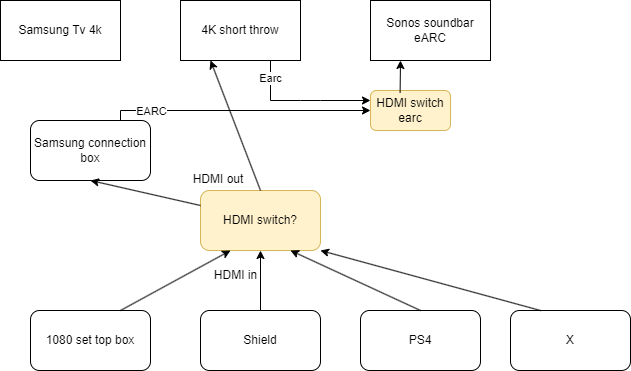
So the situation I have is as following I have a range of media devices (ps4, Nvidea shied, Calbe box, ...) and 2 output devices A Samsung 4K earc enabled tv and a formovie theatre 4k earc enabled short throw. The audio is connected to a sonos system (earc).

Everything works fine if I connect a single input to a single output and the earc out of either the tv or the ultra short throw to the earc sonos.
My goal is to buy some devices that enable me to switch easily between those devices and stream to the desired output device (they never play at the same time). (the switch boxes are displayed on the schema in orange - yet to be bought).

I would obviously prefer a single remote/device to orchestrate this : aka select desired input and output with it's respective earc to the sonos. Does such a device exist or any tips on how to set this up?
Any help on this would be greatly appreciated.


This topic has been closed for further comments. You can use the search bar to find a similar topic, or create a new one by clicking Create Topic at the top of the page.
Anubis012Answer
Contributor I
Sep 1, 2023 2:07 PM UTC

Hooked it up today, DV with Dolby Atmos/DTS-HD playing perfectly!!! From all sources including the internal apps from the projector!

Thanks for the help guys.

21 replies

Anubis012Author
Contributor I
Aug 29, 2023 9:53 PM UTC


It would look something like this then…
Would this work?

Translate
Anubis012Author
Contributor I
Aug 29, 2023 9:58 PM UTC

That VMS14201 has that, I think, @Ken_Griffiths 

The next question is why does the OP think that the various Sonos sound bars don’t support optical? I’d think they all do, at the least through this, although that does restrict you to what bandwidth that optical can carry, I,e, Dolby Digital.

The challenge I perceive is that a projector wants to be at the opposite end of the room from the speakers, and you end up with lots of extra cables. And, to be honest, there are extremely few projectors that have ARC, much less eARC in them.

The projector has arc/earc with Dolby Atmos, Dolby Audio, DTS:X, DTS-HD so going optical might be possible but bit of a waste I would say, hence why I really wanna go the arc route.

The projector is a formovie theater 4k https://www.formovie.com/products/formovie-theater-4k-laser-projector

Translate
buzz
Grand Maestro
Aug 29, 2023 10:31 PM UTC

Let’s back up a bit. Is there a need to play audio from an App that is running on the TV or projector?

Translate
Anubis012Author
Contributor I
Aug 29, 2023 10:43 PM UTC

Let’s back up a bit. Is there a need to play audio from an App that is running on the TV or projector?

Yeah the projector has arc out and indeed leading that into the sonos would be perfect.

That's where the Feintech VAX04101k seems very promising. Except only one output screen. 

Translate
Anubis012Author
Contributor I
Aug 29, 2023 11:09 PM UTC

Euhm isn't this exactly what I need?

https://feintech.eu/en/products/vax04201-hdmi-earc-pass-matrix-switch-4x2-fur-soundbar :o


The connection picture seems like my setup. 

Translate
Airgetlam
Aug 30, 2023 12:32 AM UTC

3 inputs, not 4.

Translate
Bruce
Anubis012Author
Contributor I
Aug 30, 2023 7:21 AM UTC

3 inputs, not 4.

true but if that’s the sacrifice I have to make and all else is in one device + feedback from the projector. I can probably live with switching out the occasional x device.

Translate
Anubis012Author
Contributor I
Aug 31, 2023 11:40 AM UTC

Small update : I bought it and i’ll update the thread with my findings once I get it. Might help some other people later.

Translate
Anubis012AuthorAnswer
Contributor I
Sep 1, 2023 2:07 PM UTC

Hooked it up today, DV with Dolby Atmos/DTS-HD playing perfectly!!! From all sources including the internal apps from the projector!

Thanks for the help guys.

Translate
Contributor II
Sep 4, 2023 5:39 AM UTC

I have a Samsung TV (UA55ES7500M purchased in 2013) with a Sonos Arc soundbar purchased a year ago, connected to a Sonos Amp (with Silver brand speakers). The HDMI (arc) connection has been working perfectly, since I installed the Arc.

Three days ago (1 sep) it stopped working and the sound output defaulted to the TV speakers. A TV factory reset restored the sound output connection to the HDMI (arc) port and sound again came through the arc sound bar.  However after the next power off/on, the TV sound output again defaulted to the TV speakers.

Here is a very strange thing. If I manually change the TV sound output to the HDMI(arc) port, the sound is played through the arc soundbar - I.e. it  actually works but ONLY on 2 free to air TV channels (12 and 15) plus the internet app Samsung TV channels. I have checked this several times and channels 12 and 15 have sound via the sound bar but none of the other free to air channels have sound via the sound bar.

Does anyone have any ideas?

My suspicion is that a Samsung TV software update around the 1 Sep triggered the change in behaviour but how do I convince Samsung of this?

Elsewhere is this discussion there is talk of an upgrade to HDMI version 2.1 cables being a fix. Is this worth pursuing?

cheers

Translate