
Trending Lyricist I
Oct 11, 2026 3:31 PM UTC

Found issue with unable to tune True Cinema w/ Sonos Ace Ultra Headphones

I found if I close my blackout curtains on either side of the soundbar TrueCinema says it is unable to tune after playing the sweep tones and trying for calibrate for about 10 seconds. If I open the curtains on either side of the Arc Ultra soundbar True Cinema tuning succeeds. The curtains are approximately 2ft away from each end of the Sonos Arc Ultra soundbar which is sitting under the TV. The room is ~11x11ft with a few extra feet for the door. The two images were shot wide angle to get both side walls/window into each image. Technical support was unable to find any information on the size of the room affecting TrueCinema. Note - I can TruePlay the room fine with the curtains closed using an iPhone and walking back and forth in front of the TV waving the phone up and down. I am using Era300’s as surrounds with a Sub Gen 3 not shown in the images. Sonos told me a while back that the blackout curtains would not affect TruePlay, but obviously they affect True Cinema. For now I am fine running TrueCinema with the front curtains open, but wanted to pass this along to Sonos. It took me quite a while to isolate the issue. Note too - I had this same problem with the original Sonos Ace headphones, but never solved it until now.
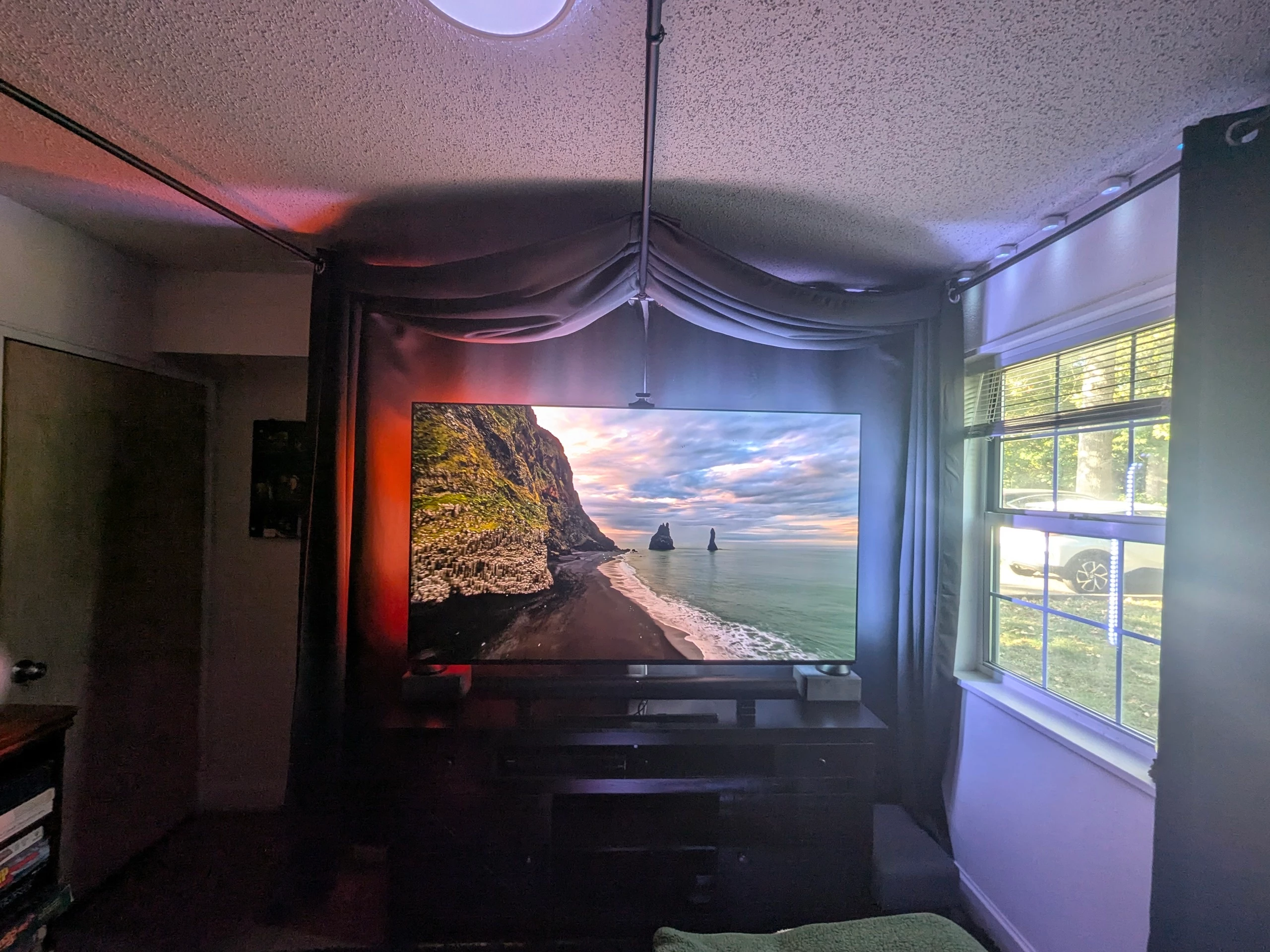
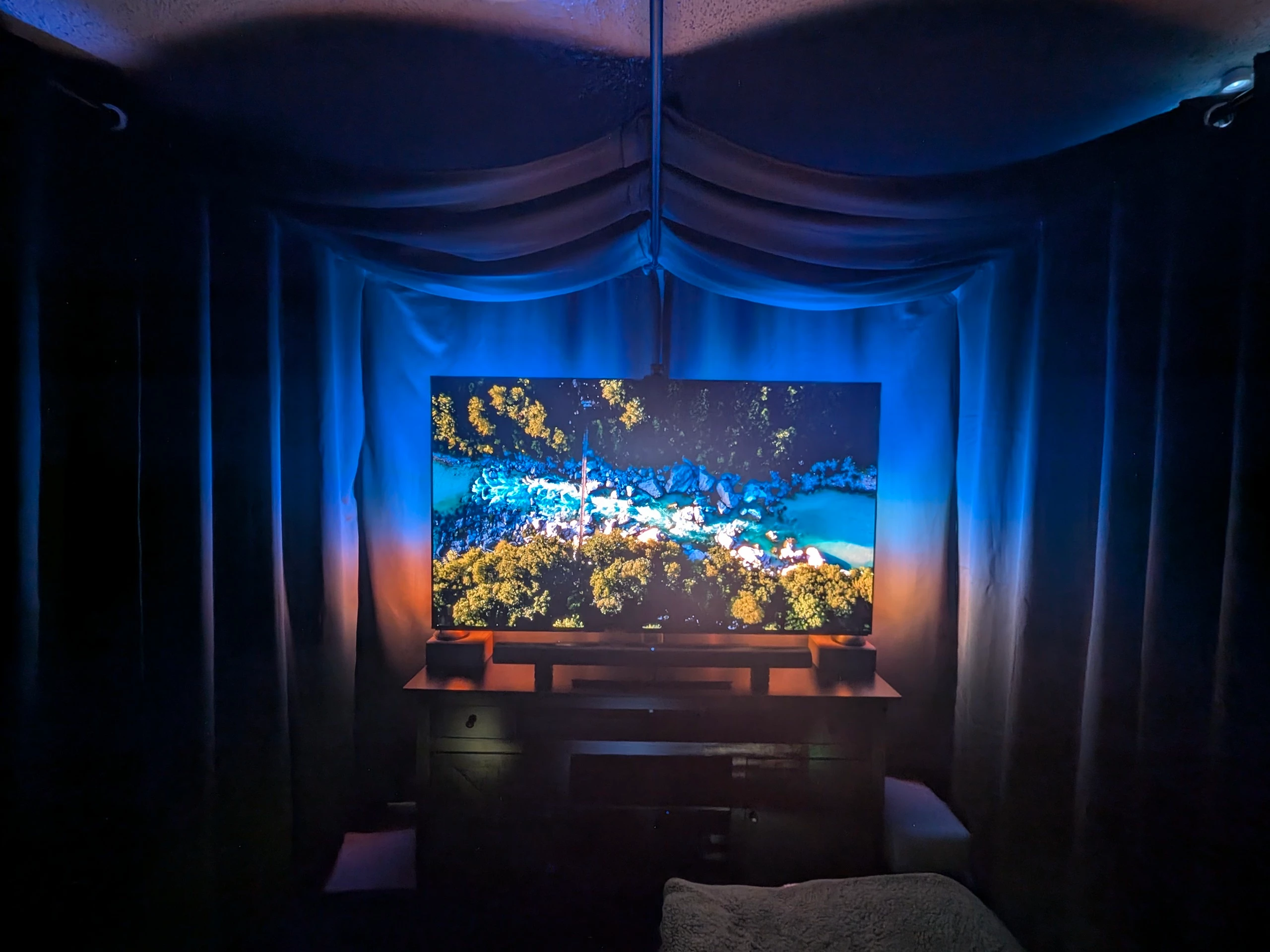
 

8 replies

Jamie A
Sonos Staff
Oct 12, 2026 2:54 PM UTC

Hi ​@DanAtTheMovies, 

I’m sorry to hear that you’re having issues with True Cinema.

I had a look into the case and the diagnostics that was attached to it. The diagnostics was showing a timeout error when performing True Cinema which is related to connection errors. However, looking through what you’ve done with support, you’ve already tried the next steps that I would suggest on the community.

The case notes suggest using a different device to perform True Cinema. If the error is because it’s timing out then it may not resolve this issue, but it’s still worth trying. I’ve left a note on the case for the next agent, so I would suggest performing True Cinema (with another controller as support suggested), submitting a diagnostics after the error occurs, then contacting support again by replying to the email that the last agent you spoke with sent you.

I hope this information helps.

Translate
Trending Lyricist I
Oct 13, 2026 12:26 PM UTC

I can certainly try that; however, I got TrueCinema to work by opening the curtains which makes me think it is truly a sound wave issue and has nothing to do with the app. If TrueCinema doesn't pass using an iPhone, I think I'm going to put a half inch thick bounce board into the bottom half of that window and then close the curtains to see if that creates enough bounce to make TrueCinema work even though Trueplay works without it.

Translate
kdowling
Oct 13, 2026 4:09 PM UTC

Just a thought... Since True Cinema tuning works with the curtains open, it has done it’s job. The Ace Ultra have been tuned for the room at that point. Once you have TV Audio Swapped to the Ace Ultra, there is no need for further room interaction, curtains open or closed. It’s all now in the headphones that were tuned to the room.

Edit to add: True Cinema uses the Ace Ultra mic, not your phone or the app, for tuning.

Set up TrueCinema for Sonos Ace

Tips to ensure good TrueCinema tuning

Minimize noise: Do your best to minimize noise during TrueCinema tuning. Sounds such as talking, footsteps, and loud appliances may cause problems during tuning. Be sure not to block or touch the Sonos Ace microphone.

Get comfortable: For best results, try to sit in your typical TV-watching seat during TrueCinema tuning. Sonos Ace must be worn during the entire tuning process.


Translate
Stanley_4
Grand Maestro
Oct 13, 2026 5:11 PM UTC

I'm guessing since we users can't see the data but the Trueplay tuning for curtains open and closed are likely to be quite different. I'd expect the sound heard to be noticibly different too, the curtains are surely altering the amount of absorption and reflection.

That the room, with curtains closed falls outside the true cinema tuning range is something Sonos should look into.

Translate
kdowling
Oct 13, 2026 5:52 PM UTC

Agreed. I must say that using a soundbar that relies on sound reflection to work is probably not going to sound it’s best in that environment.

Translate
Trending Lyricist I
Oct 24, 2026 4:16 PM UTC

I finally got around to getting a half inch thick piece of MDF board and placed it in the bottom half of the window. This allowed me to close the two front curtains and TrueCinema succeeded; but I then discovered I had to open the back curtains in the corners a little more for the Era300’s to produce enough bounce. I think the take away here is TrueCinema (using the in-speaker mics) unlike TruePlay requires a little more bounce to succeed and my heavy blackout curtains are good sound absorbers/room deadeners negating the need for acoustic panels. Now that I know this I’m going to re-TruePlay with the back curtains opened a little more. What I haven’t tried is Quick TruePlay to see if it suffers the same problem as True Cinema. I also plan to try TrueCinema using an iPhone when I can get my hands on one, which should be fairly soon.

Window with MDF board

Back right Era300

Back left Era300

Back right Era300 w/ curtains closed too much

Translate
Trending Lyricist I
Oct 31, 2026 2:40 PM UTC

Tried True Cinema with an iPhone and as suspected it failed as well with the curtains closed too much (see image above). In summary True Cinema requires more bounce to succeed than TruePlay. Sonos might want to make a note of this.

Translate
kdowling
Oct 31, 2026 2:53 PM UTC

That makes sense. Since True Cinema tuning is done with the headphone mic, it isn’t dependent on the phone used. Thanks for confirming that.

Translate