
Avid Contributor I
Apr 6, 2026 7:19 PM UTC

Why Isn't the Sub on/off switch on the speaker output selector pop up window?

I have a mini sub and I typically have it turned off out of respect for my neighbors.  When I decide to turn the sub on or off there are about 7 or 8 taps/steps I need to go through to achieve that.  It’s not so much the taps but more about remembering the mapping to get there each and every time.

So here is my suggestion….. and Its crystal clear in the image below that I created for you.  Include the sub at the bottom of the output selector page and even though it doesn’t have a volume you could use the slider to adjust the amount of bass.  Plus I can turn it on or off RIGHT THERE!!!!  No more 8 steps to turn on and then another 8 steps to turn it off.  I just saved your customer 16 steps.
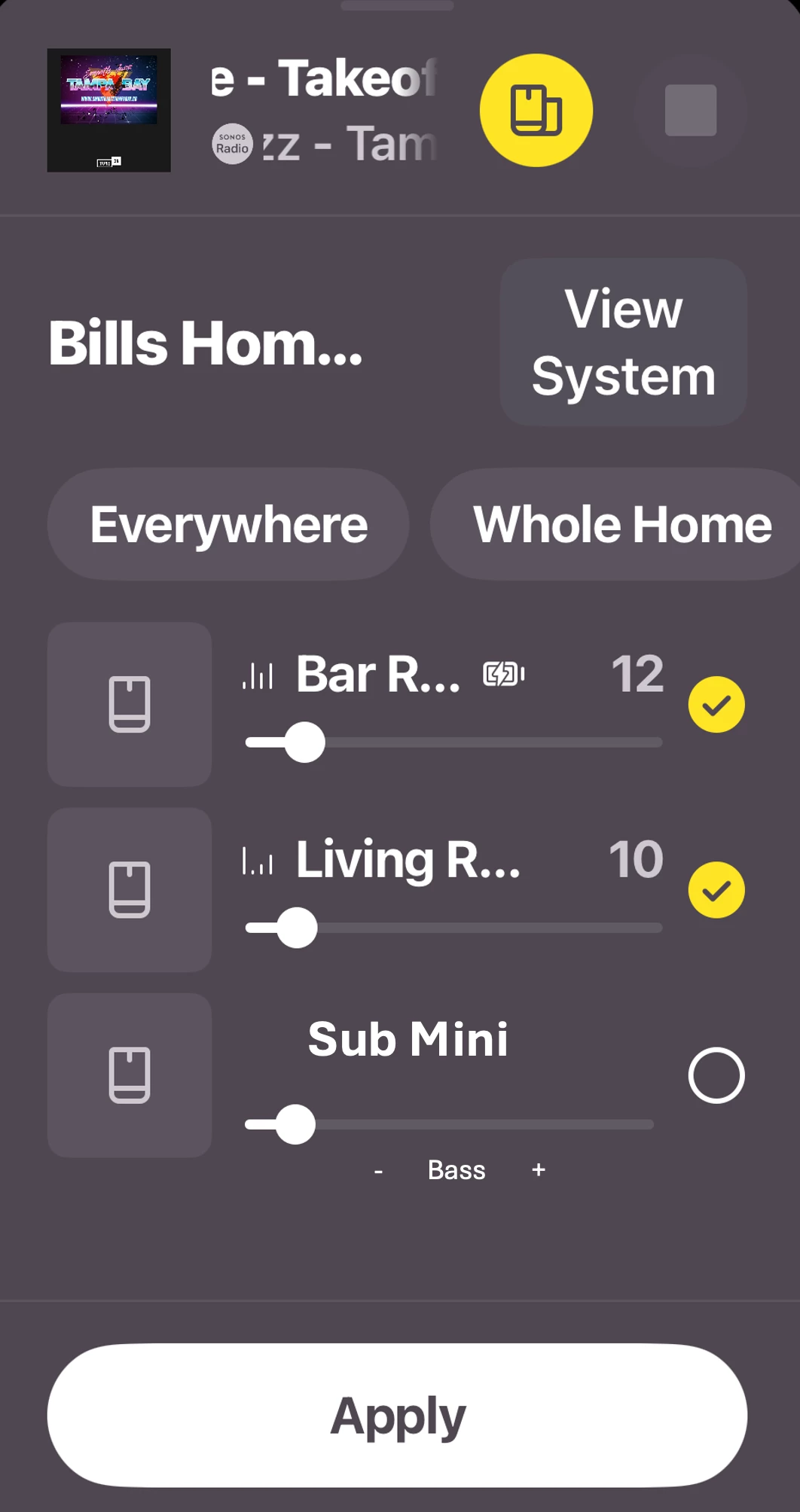
You can’t make it any easier than THAT!  😊   Plus I know engineers love to complicate things so they could add a toggle under the Sub Mini options to “SHOW/HIDE” the sub control in the Output Selector page if so desired.  That way the Output Selector won’t get too full if the user doesn’t find this helpful.


This topic has been closed for further comments. You can use the search bar to find a similar topic, or create a new one by clicking Create Topic at the top of the page.

23 replies

MoPac
Headliner III
Apr 7, 2026 9:47 PM UTC

Maybe on the equalization screen that pops up from the volume control screen to go with the Loudness toggle? 


 I’m on up-to-date IOS.  Don’t see the EQ popup from the volume screen.  How do I get the EQ to pop up?

Translate
Mr. T
Apr 7, 2026 10:40 PM UTC

Maybe on the equalization screen that pops up from the volume control screen to go with the Loudness toggle? 


 I’m on up-to-date IOS.  Don’t see the EQ popup from the volume screen.  How do I get the EQ to pop up?

You need to enable the EQ shortcut toggle first under > Account > App Preferences… before seeing the EQ shortcut icon after interacting with the volume slider.

Translate
Senior Virtuoso
Apr 8, 2026 11:41 AM UTC

When I decide to turn the sub on or off there are about 7 or 8 taps/steps I need to go through to achieve that. 


How are you doing it? Settings (step/tap1), <choose room> (step/tap2), Sub Audio (step/tap 3), and there’s the Sub on/off toggle. 


Yes, you busted me on that. It’s not quite as in depth, but there’s still a lot of changing windows and scrolling in order to find the toggle.  My job in our company is to make things easier, and I am always looking for shortcuts and ways to simplify things that are easy to understand from a consumers point of view and not an engineers point of view. But thank you for your input. That was very helpful.


So if I understand you correctly, you admit it’s only three steps rather than the 7 or 8 you first claimed, but 3 is still too many steps? There will (almost) always need to be 2: <select room> and <audio controls> or something similar, to pull up a Sub on/off toggle (or there’s a lot of scrolling to find all the features for settings in a room). So all the engineering effort is to potentially save one step? 
 

Translate