
Avid Contributor I
Apr 6, 2026 7:19 PM UTC

Why Isn't the Sub on/off switch on the speaker output selector pop up window?

I have a mini sub and I typically have it turned off out of respect for my neighbors.  When I decide to turn the sub on or off there are about 7 or 8 taps/steps I need to go through to achieve that.  It’s not so much the taps but more about remembering the mapping to get there each and every time.

So here is my suggestion….. and Its crystal clear in the image below that I created for you.  Include the sub at the bottom of the output selector page and even though it doesn’t have a volume you could use the slider to adjust the amount of bass.  Plus I can turn it on or off RIGHT THERE!!!!  No more 8 steps to turn on and then another 8 steps to turn it off.  I just saved your customer 16 steps.
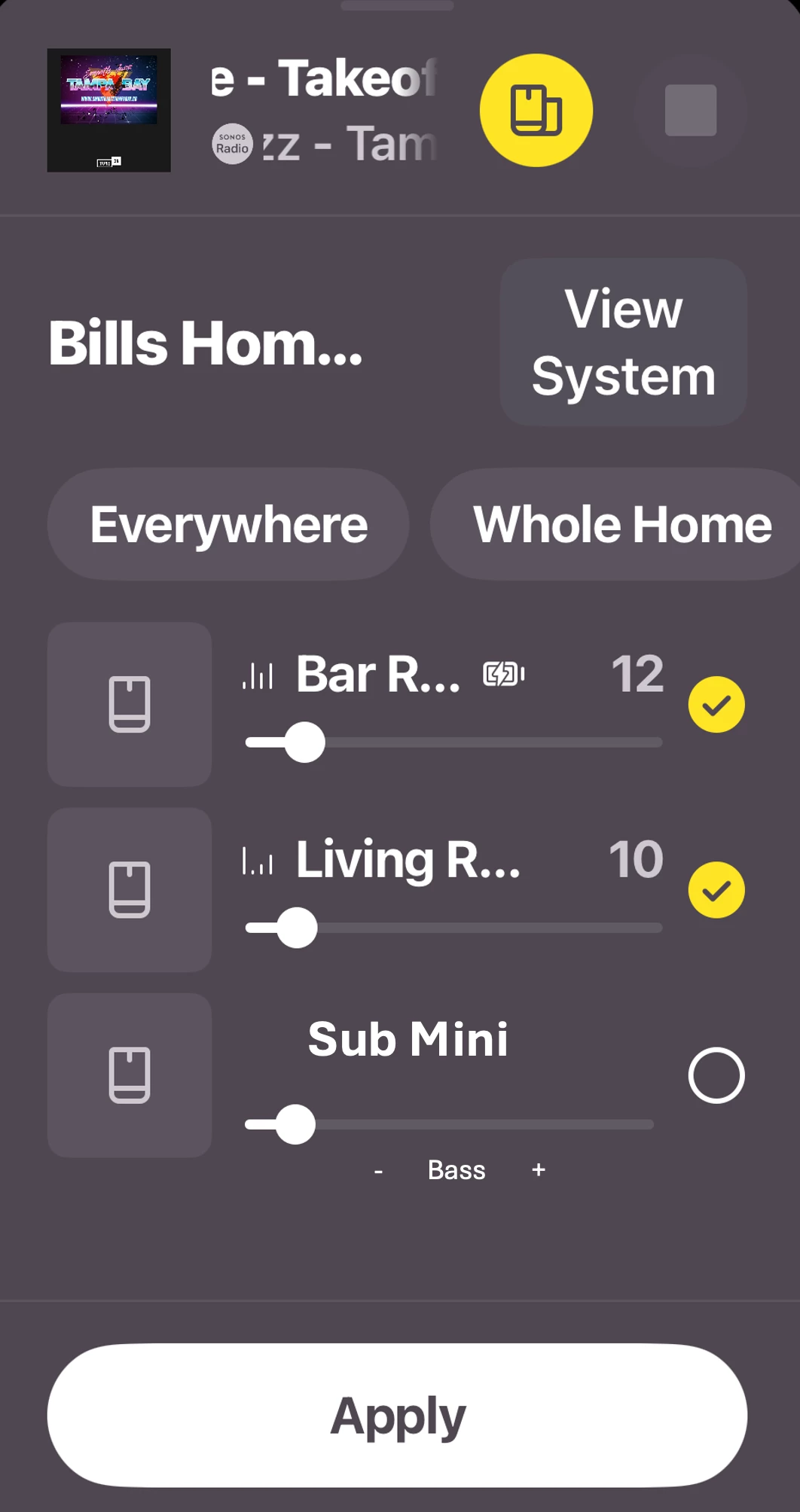
You can’t make it any easier than THAT!  😊   Plus I know engineers love to complicate things so they could add a toggle under the Sub Mini options to “SHOW/HIDE” the sub control in the Output Selector page if so desired.  That way the Output Selector won’t get too full if the user doesn’t find this helpful.


This topic has been closed for further comments. You can use the search bar to find a similar topic, or create a new one by clicking Create Topic at the top of the page.

23 replies

MoPac
Headliner III
Apr 6, 2026 7:33 PM UTC

 That would be cool.  At this point though the Sub is not a separate “Room”.  Don’t know if it would help to just drop the bass level by the max allowed.


Translate
jgatie
Apr 6, 2026 7:39 PM UTC

That’s not the “Output Selector page”, it’s the Room Grouping screen.  It’s purpose is to group a room or rooms to other rooms.  I’d find it extremely confusing if one check box caused a room to group or ungroup, and another turned a single unit within a room on/off.  Also listing a Sub, which is part of a room, separately from the room itself, plus other rooms, is not logical at all. 

Personally, I have neighbors on both sides and on my ceiling, and I’ve never found the need to turn off my sub(s).  Also, I count 4 steps to turn one off - Tap Settings, Room Name, Sub Audio, switch to Off.  

Translate
Stanley_4
Grand Maestro
Apr 6, 2026 8:51 PM UTC

Maybe on the equalization screen that pops up from the volume control screen to go with the Loudness toggle? 


Translate
Senior Virtuoso
Apr 7, 2026 8:17 AM UTC

When I decide to turn the sub on or off there are about 7 or 8 taps/steps I need to go through to achieve that. 


How are you doing it? Settings (step/tap1), <choose room> (step/tap2), Sub Audio (step/tap 3), and there’s the Sub on/off toggle. 

Translate
106rallye
Apr 7, 2026 8:28 AM UTC

Not sure if Sonos would want to do this. As I understand it the speaker the Sub (Mini) is connected to will alter it's sound profile because (some of) the bass is taken care of by the Sub. I'm not sure this profile changes when you simply turn off the Sub, so you'd have no base at all ans ist would not be up to Sonos’sound quality standards. If this was possible wouldn't the system have to remember different sound profiles? Even  more so when the room is Trueplayed?

Translate
Mr. T
Apr 7, 2026 9:27 AM UTC

I wondered why the app mock-up was based on a historic version of the app…


From the “Output Selector”, you can now click on the device pic to take you to that particular room’s settings. You still have to scroll down, even more so now, due to the absurd design decision to put large device pics at the top of each room to locate the Sub Audio option. But that is another method to currently access the Sub On/Off control toggle.

Translate
Stanley_4
Grand Maestro
Apr 7, 2026 1:14 PM UTC

Not sure if Sonos would want to do this. As I understand it the speaker the Sub (Mini) is connected to will alter it's sound profile because (some of) the bass is taken care of by the Sub. I'm not sure this profile changes when you simply turn off the Sub, so you'd have no base at all ans ist would not be up to Sonos’sound quality standards. If this was possible wouldn't the system have to remember different sound profiles? Even  more so when the room is Trueplayed?

This isn't asking for something new, just easier access to something already in the app.

Translate
Stanley_4
Grand Maestro
Apr 7, 2026 1:24 PM UTC

From the “Output Selector”, you can now click on the device pic to take you to that particular room’s settings

You still have to scroll down, even more so now, due to the absurd design decision to put large device pics at the top of each room to locate the Sub Audio option. 

That shortcut is something I will use several times a day, and never even suspected it existed.

Does it seem like the app is designed by people that don't actually use the app? Even on my huge (pre cataract surgery) 12" tablet using it is frustrating, particularly in landscape mode.

Translate
Mr. T
Apr 7, 2026 2:03 PM UTC

From the “Output Selector”, you can now click on the device pic to take you to that particular room’s settings

You still have to scroll down, even more so now, due to the absurd design decision to put large device pics at the top of each room to locate the Sub Audio option. 

That shortcut is something I will use several times a day, and never even suspected it existed.

Does it seem like the app is designed by people that don't actually use the app? Even on my huge (pre cataract surgery) 12" tablet using it is frustrating, particularly in landscape mode.

I only found the shortcut existed after someone posted about it on r/sonos a few months ago.

There are certainly some questionable design decisions that have been made and continue to be made in recent updates. The Sonos app is definitely not optimised for tablet use. I can see more detail in some popup menus on my iPhone Pro Max than I can on my iPad Pro! 

Translate
Gref38Author
Avid Contributor I
Apr 7, 2026 2:42 PM UTC

 That would be cool.  At this point though the Sub is not a separate “Room”.  Don’t know if it would help to just drop the bass level by the max allowed.


I see what you’re saying. But what if it was just a simple on off and possibly if the sub would align itself right underneath the speakers of that room??  There is a way to do this. And it would be helpful. Thank you for your input

Translate