

Dogdad
Headliner III
February 10, 2024

when you are FORCED to do these updates

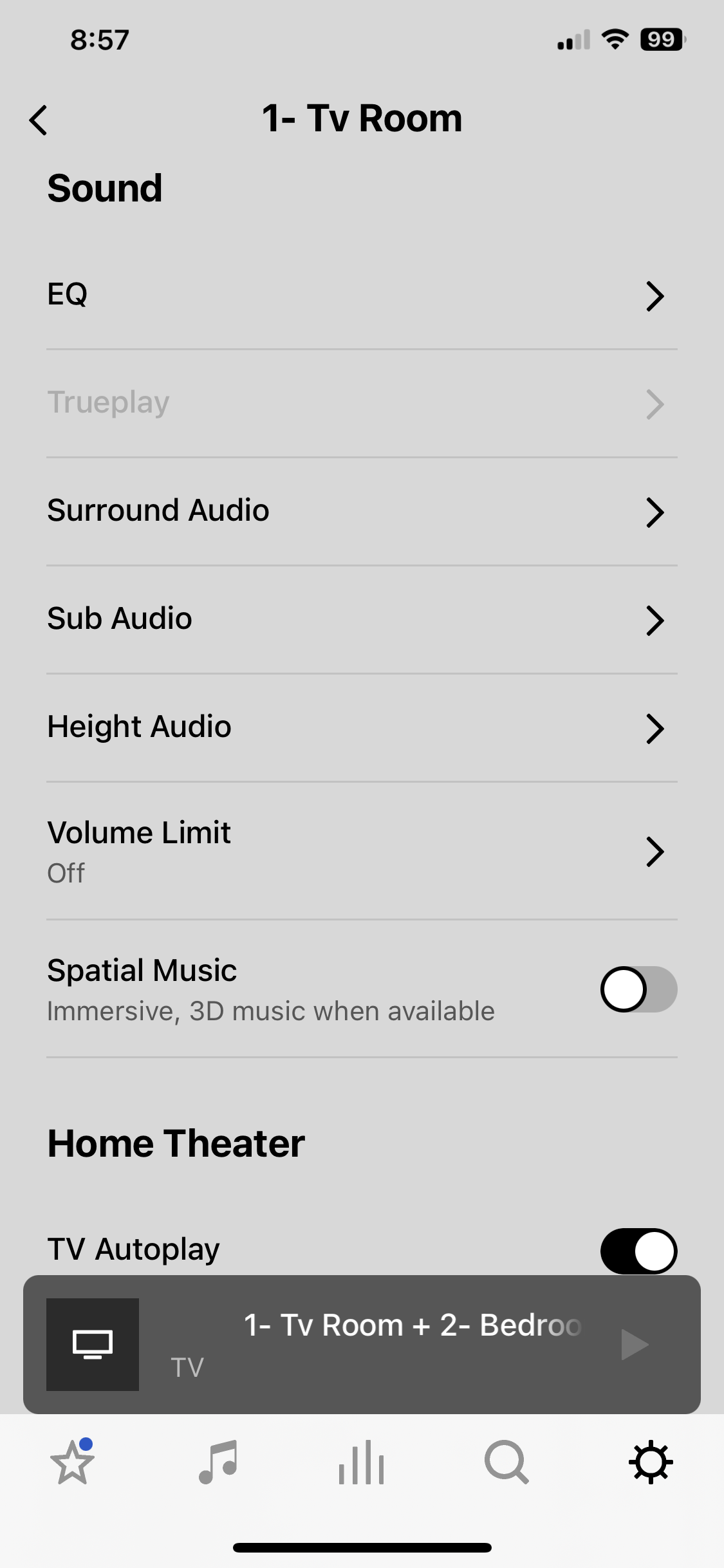
As you can see…true play option is greyed out because I don’t want to do these updates and happy with the sound as it is.…spend a fortune on these speakers and you’re at their beg and call to do these ridiculous generic non descriptive updates. If you don’t you get penalized ….i have to agree with others that Sonos is starting to suck….
 

This topic has been closed for further comments. You can use the search bar to find a similar topic, or create a new one by clicking Create Topic at the top of the page.

25 replies

Dogdad
DogdadAuthor
Headliner III
February 10, 2024

You need to turn off iOS App updates for the App Store, not the Sonos background app refresh.

If you look at the pic above I posted.. Sonos app update is off. 

Senior Virtuoso
February 10, 2024

You need to turn off iOS App updates for the App Store, not the Sonos background app refresh.

If you look at the pic above I posted.. Sonos app update is off. 

And we asked (or tried to): for the Sonos app (on your phone App Update settings) as well as in the Sonos app? Both have to be set to not auto-update. 
 

Senior Virtuoso
February 10, 2024

You need to turn off iOS App updates for the App Store, not the Sonos background app refresh.

If you look at the pic above I posted.. Sonos app update is off. 


If you look at my pic above you can see that Trueplay is enabled even though an update is available.
 

My setup has App Store app auto-update turned off and Auto-update turned off within the Sonos app. What setup do you have? 

Belly M
February 10, 2024

You need to turn off iOS App updates for the App Store, not the Sonos background app refresh.

If you look at the pic above I posted.. Sonos app update is off. 

That’s not the right place DogginDad


How to turn on or turn off automatic updates on your iPhone or iPad

  1. Go to Settings.
  2. Tap App Store.
  3. Turn on or turn off App Updates.
Senior Virtuoso
February 10, 2024

That’s not the right place DogginDad


Love it! Will it survive the moderators? 

Dogdad
DogdadAuthor
Headliner III
February 10, 2024

You need to turn off iOS App updates for the App Store, not the Sonos background app refresh.

If you look at the pic above I posted.. Sonos app update is off. 

That’s not the right place DogginDad


How to turn on or turn off automatic updates on your iPhone or iPad

  1. Go to Settings.
  2. Tap App Store.
  3. Turn on or turn off App Updates.

Then what’s the purpose of the App refresh option on the Sonos app I turned off??

Belly M
February 10, 2024

You need to turn off iOS App updates for the App Store, not the Sonos background app refresh.

If you look at the pic above I posted.. Sonos app update is off. 

That’s not the right place DogginDad


How to turn on or turn off automatic updates on your iPhone or iPad

  1. Go to Settings.
  2. Tap App Store.
  3. Turn on or turn off App Updates.

Then what’s the purpose of the App refresh option on the Sonos app I turned off??


This stops Apps (any) running in the background and refreshing data. i.e. pulling new emails, pictures, artwork updates etc.

106rallye
February 10, 2024

You state “I don’t want to do these updates”. Why are updates such a problem? On my system I do not notice the updates (that take place in the middle of the night).

Your speakers are connected to the internet, so can make your network vulnerable to outside threats. Updates keep your system safe too.  So why not do them.

Bumper
February 10, 2024

You state “I don’t want to do these updates”. Why are updates such a problem? On my system I do not notice the updates (that take place in the middle of the night).

Your speakers are connected to the internet, so can make your network vulnerable to outside threats. Updates keep your system safe too.  So why not do them.

I don’t have auto updates on because I prefer to let people like you do the informal beta test for bugs. Will update later if the reported bugs don’t affected me. Sonos has not added a new features I use that I can remember so it’s not worth the risk to me to be given the updates add nothing to my system. 
 

@Dogdad FYI every iOS device with Sonos app on your network needs to have auto updates turned off. 
 

Sonos should let us run mismatched app/firmware without losing features or locking out parts of the controller for “performance improvements” updates but I’m sure they have their “reasons “ 🙄

Dogdad
DogdadAuthor
Headliner III
February 11, 2024

You state “I don’t want to do these updates”. Why are updates such a problem? On my system I do not notice the updates (that take place in the middle of the night).

Your speakers are connected to the internet, so can make your network vulnerable to outside threats. Updates keep your system safe too.  So why not do them.

Because I don’t trust the updates and don’t care for some of the changes. Best sound Sonos had was 14.10. They went down hill from there. Don’t believe me..watch these two videos. Sonos got hammered with complaints on the forums because of their screw ups.