
Avid Contributor I
February 2, 2024

Sonos/Spotify Family sharing and Recently Played Playlist issue

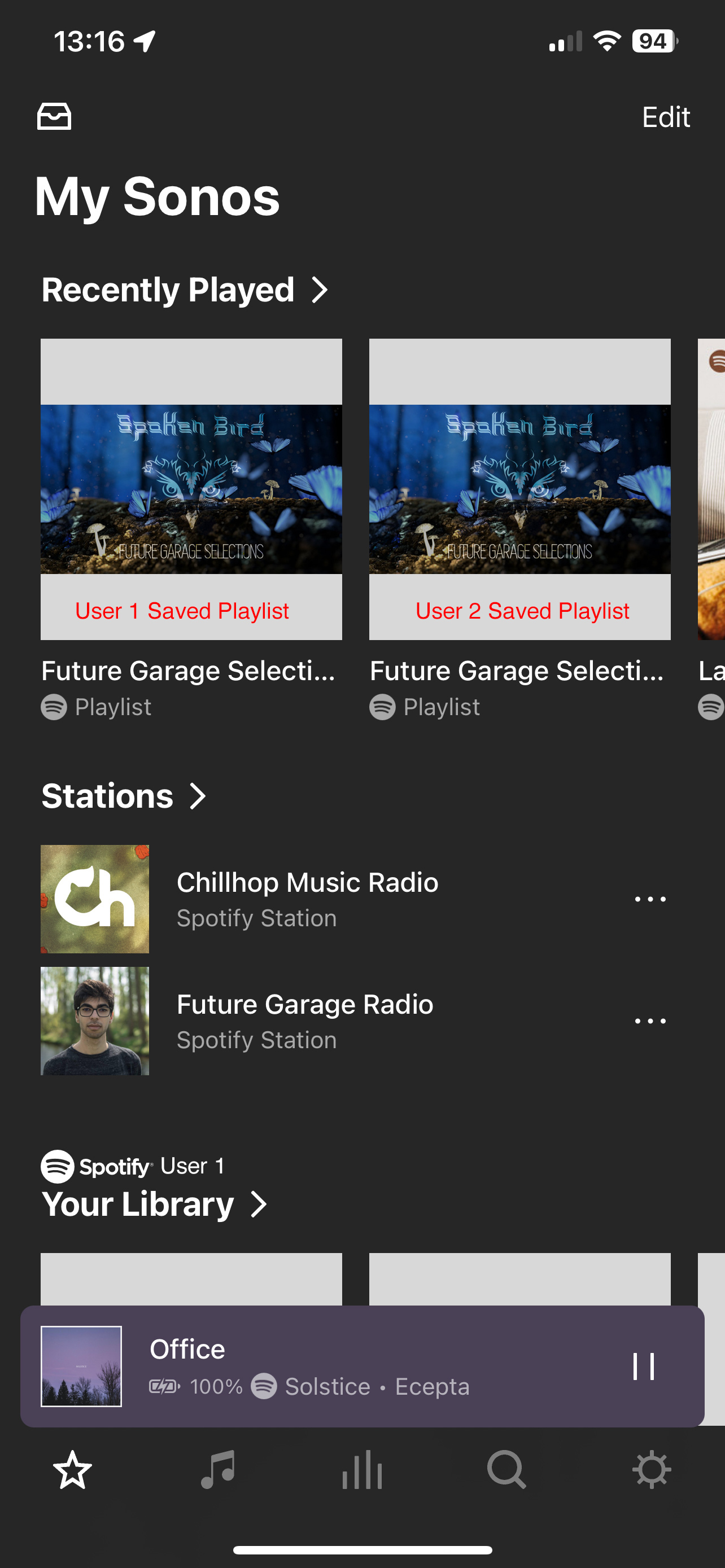
When using the Sonos app with more than one user account in Spotify (Family Plan), there’s no way to tell what recently played playlist is part of which member’s account.

The biggest issue we’ve been experiencing is the classic, one person is playing their music outside the home, but then someone at home plays a playlist from the recently played, and it cuts the other person off. Then a bit of back and forth stealing playing rights before figuring out what is going on. 

It would be great to add the Spotify user avatar or initials in a small bubble over the album/playlist art in any area of the UI where music sources from multiple accounts are displayed (ie - Recently Played, Albums, or Playlists). 
 

This topic has been closed for further comments. You can use the search bar to find a similar topic, or create a new one by clicking Create Topic at the top of the page.

24 replies

Avid Contributor I
February 6, 2024

@Bumper - So in your Recently played, you see the Apple Music account that the playlist or track was played from? If so, then I would like a Sonos Dev to help explain what is missing from the Spotify side (given the information is clearly available within the UI).

For example, when I click on the playlist from Recently Played, and click the 3 dots menu at the top right, the “More” section of that sub-menu shows “Spotify ([myUserNameHere])” Which means that data is already associated with it.

jgatie
February 6, 2024

Like clockwork.

I get it Sonos can’t do anything, music services have rights, very logical, buses, money etc. Same crap for like 10 years, same crappy sonos app.


Sonos has pledged that the music service has the right to display data any way they choose and Sonos will not interfere.


Oh really


i. We have guidelines on building a good app/product that you agree to work towards.
j. If you are a content service, you additionally agree to comply with the Sonos Music API terms and conditions. As a content service, you can sign in to your existing account or create a new account here.


You really need to read further.  Sure there are guidelines.  However, further in the documents it explains in great detail that display of data is solely up to the service.  Trust me, you aren't going to win this one.  We have a poster who is an actual Sonos SMAPI developer, with years of experience, who has confirmed who and what is the responsibility of Sonos vs. the service.

Bumper
February 6, 2024

@Bumper - So in your Recently played, you see the Apple Music account that the playlist or track was played from? If so, then I would like a Sonos Dev to help explain what is missing from the Spotify side (given the information is clearly available within the UI).

For example, when I click on the playlist from Recently Played, and click the 3 dots menu at the top right, the “More” section of that sub-menu shows “Spotify ([myUserNameHere])” Which means that data is already associated with it.

I just checked and I was wrong it does not correctly display in Recently Played (had to add a family member as they just cast, don’t use the all).
 

This is a Sonos part of the app, data from different services is displayed there so seems like a Sonos issue though right perhaps. 

Avid Contributor I
February 6, 2024

We have a poster who is an actual Sonos SMAPI developer, with years of experience, who has confirmed who and what is the responsibility of Sonos vs. the service.

@jgatie - As I’ve stated above, I could be wrong as I’m not a Sonos SMAPI dev, however, as a dev myself, and looking at the API integration - it does show the data I’m asking for is currently a part of the Sonos SMAPI, and is being supplied by Spotify. This information is also displayed in the Sonos app right now - just not in all the areas it should for a better and more friendly user experience. I would love to hear from this dev to confirm or deny my assumption based on the API documents.

jgatie
February 6, 2024

We have a poster who is an actual Sonos SMAPI developer, with years of experience, who has confirmed who and what is the responsibility of Sonos vs. the service.

@jgatie - As I’ve stated above, I could be wrong as I’m not a Sonos SMAPI dev, however, as a dev myself, and looking at the API integration - it does show the data I’m asking for is currently a part of the Sonos SMAPI, and is being supplied by Spotify. This information is also displayed in the Sonos app right now - just not in all the areas it should for a better and more friendly user experience. I would love to hear from this dev to confirm or deny my assumption based on the API documents.


It’s been stated many times, how and where the data is displayed is a Spotify issue.  Besides basic guidelines, Sonos allows the services to determine the look and feel of their Sonos implementations.  The developer’s name is @controlav, and they will confirm my statements, as they have many times in the past. 

controlav
Lead Maestro
February 7, 2024

In this specific case the Sonos app could display exactly which account is being used for a stream, but only if the stream was started from a Sonos app. If a stream is started from the Spotify app, the url will be lacking the id that is required to determine which account was being used.

My own Sonos apps do not do this, they display the generic account name (eg “Spotify”), but next time I update it I’ll see about putting the account nickname in there, as I already do when browsing.

Author of the leading independent Sonos apps for Android, MacOS, iOS, Windows and Xbox.
controlav
Lead Maestro
February 7, 2024

On catching up with this thread after some coffee, my reply above is purely for the Now Playing screen which could show which account the stream came from.

The OP was asking about the Recently Played data, and that is a whole other ballgame which will take me longer to dig into. More coffee, and I’m on it.

Author of the leading independent Sonos apps for Android, MacOS, iOS, Windows and Xbox.
Bumper
February 7, 2024

On catching up with this thread after some coffee, my reply above is purely for the Now Playing screen which could show which account the stream came from.

The OP was asking about the Recently Played data, and that is a whole other ballgame which will take me longer to dig into. More coffee, and I’m on it.

Will be interested to read your response. 
 

I noticed yesterday that with Apple Music, the recently played list in Sonos shows the account that played an album (albeit you need to find it: Recently Played item > context menu > more) - but not apple or personal playlists. 

controlav
Lead Maestro
February 7, 2024

Ok so I hacked this up just now, and yes. the Recently Played data does include the necessary data to show which account was used. My test involved a playlist from mine and my wife’s Spotify account:

Unreleased version of Phonos Universal


Author of the leading independent Sonos apps for Android, MacOS, iOS, Windows and Xbox.
Avid Contributor I
February 7, 2024

@controlav Wow, thank you for taking the time to read through AND provide a prototype as proof of concept! This is exactly what I was looking for. 
 

To have the ability to look at the recently played (and/or) Now playing source and user profile name (while played via the Sonos app) is exactly what I was hoping for!

This will solve our accidental streams from each other’s accounts. 
 

cheers!