
Answered

REQUEST: iPad now playing cover size

  • October 3, 2025
  • 5 replies
  • 117 views

Forum|alt.badge.img+5

Hi, 

I would like to do a feature request. 

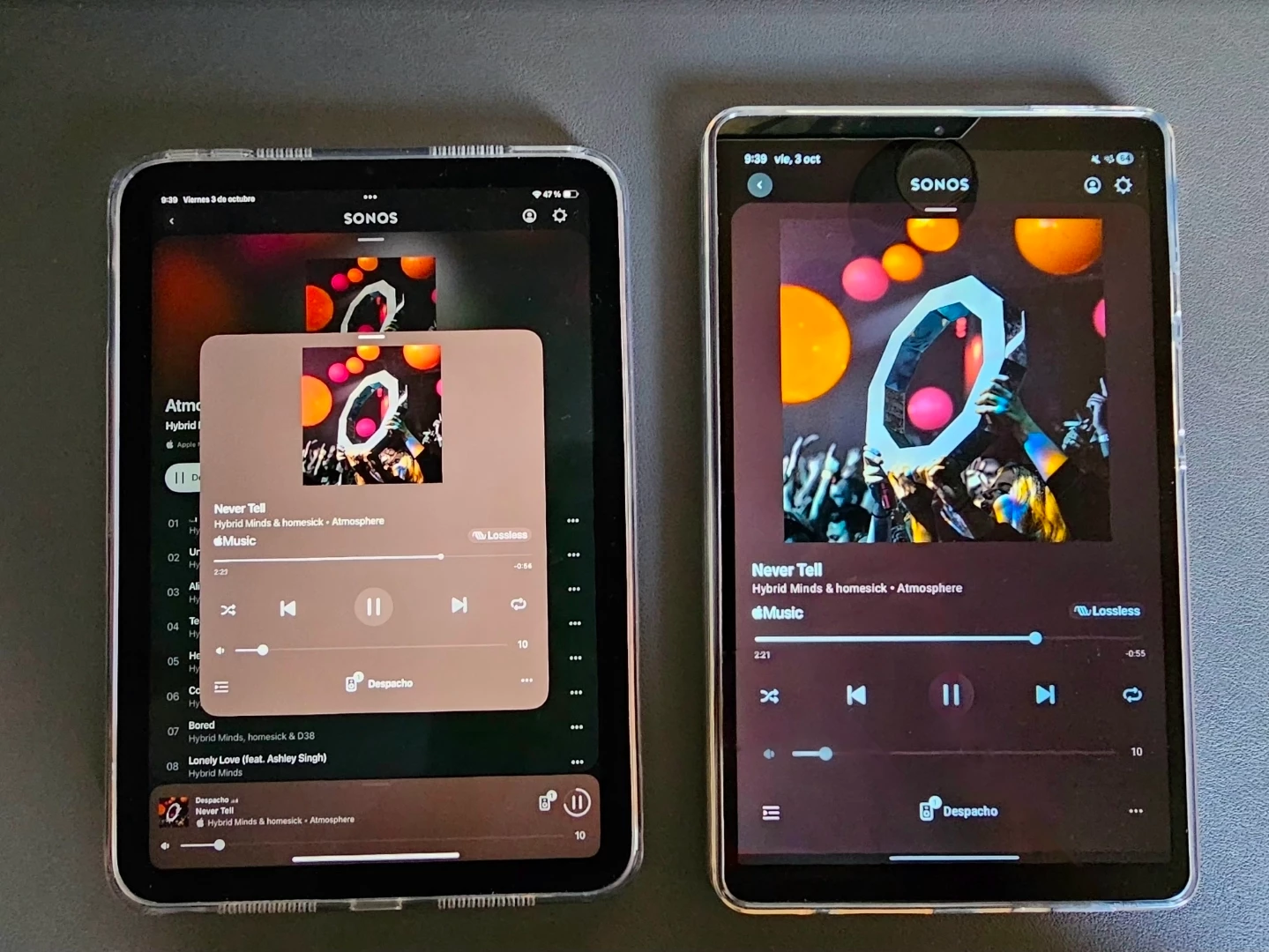
I would like to have the possibility to have the cover in full screen in the Now Playing window on iPad.

Here you have a comparison between the iPad mini and Galaxy tab A9 now playing window cover size. 

In iPad is very small compared to the Galaxy tab. 

Could it be possible to address this change? 

I think the people who loves to see the covers would like this feature in iPad. 


Thanks!
 

Best answer by Sotiris C.

Hello ​@kdth_jhspk69, welcome back!

I’ve marked this thread as a feature request and forwarded it to the appropriate teams for consideration.

Thank you for the post and feedback, it is much appreciated!

5 replies

bockersjv
Forum|alt.badge.img+21
  • Local Superstar
  • October 3, 2025

Yes!  Agree.  Lots of time spent painstakingly getting album are sorted for my full collection and on the iPad it comes up in a window no bigger than an iPhone screen.


Sotiris C.
Forum|alt.badge.img+16
  • Sonos Staff
  • Answer
  • October 3, 2025

Hello ​@kdth_jhspk69, welcome back!

I’ve marked this thread as a feature request and forwarded it to the appropriate teams for consideration.

Thank you for the post and feedback, it is much appreciated!


controlav
Forum|alt.badge.img+24
  • Lead Maestro
  • October 3, 2025

My iOS app (see profile) has this feature.


  • Lyricist I
  • October 24, 2025

This has been one of my biggest frustrations with the May 2024 Sonos iPad IOS update. My family has Sonos Speakers throughout our house and we have a family iPad Pro that sits in a horizontal format on the Kitchen Counter to control our Sonos System.  We love listening to music together and want to be able to look across the room and see what is playing. We also use our iPhones to control our system and have no complaints about the UX on those.  However, as you can see in the photos below and the photo shared by the original poster above, the Now Playing view on an iPad is a cluttered confusing mess with multiple images of the album playing (all of them too small to be enjoyable). Multiple volume and playback controls shown, and both volume sliders move when you use the one on the Now Playing pop up.  If I mistakenly use the lower volume slider, then the Now Playing screen disappears.  Maddening.  Why the now playing screen does not expand to fit the full screen is a mystery. It used to before the May 2024 update.  The other image is our workaround to be able to get larger album artwork through the use of the paid SonoPad App.  I don’t love the graphic design of the SonoPad App, but at least I get large Album Art.  Please fix this feature on the Sonos iPad iOS App. 🙏🏻

View of the cluttered Sonos Now Playing Album Art on a horizontal iPad Pro
View of full screen Album Art work around by using the paid SonoPad App


controlav
Forum|alt.badge.img+24
  • Lead Maestro
  • October 25, 2025

FYI Last I checked, Apple Music offers the highest resolution album art of any Sonos-supported service, up to 1200x1200.
