
Trending Lyricist I
September 12, 2026
Answered

Why does the iOS queue not render?

  • September 12, 2026
  • 13 replies
  • 119 views

I uninstalled the Sonos Controller from my iPhone and then reinstalled, so I presume have the latest build of it.

I added 34 entries to a queue using the Add to end of queue and Add next options. When I click the queue button, the Queue page opens and never fully realizes--all I see is a grey list of items with no data in it. It does render the correct track count. See screen shot.
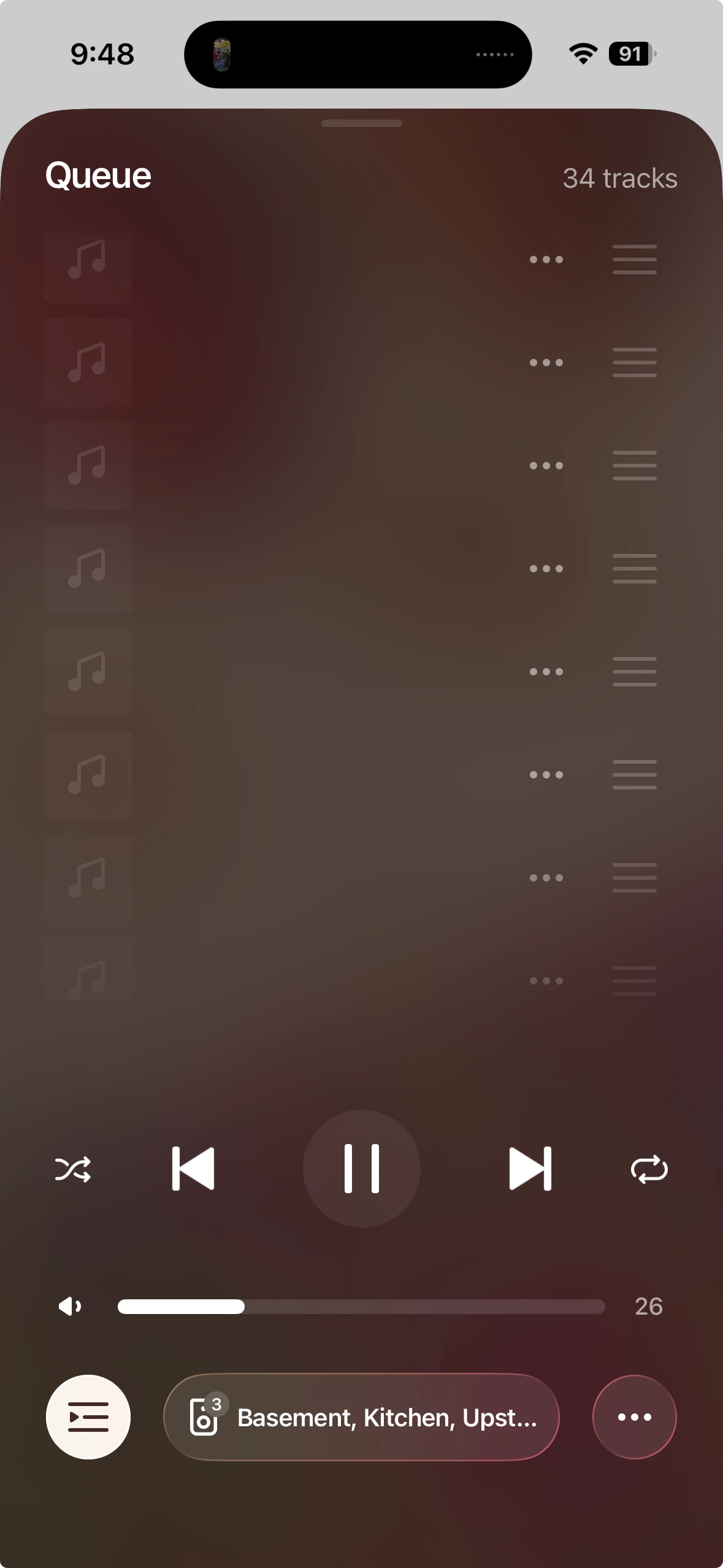
I tried leaving the queue up for a while and it did not seem to render.

I am loading tracks from a (large) personal library, though it seems like that should not matter.

This feature does work on my MacOS controller on my MacBook Pro--I can see all of the songs just fine.

This feature appears to have been broken for me since two years ago--so is it just me? I can’t fathom why such a major and fundamental feature would remain broken for everyone.

Best answer by Airgetlam

Have you submitted a system diagnostic within 10 minutes of reproducing the issue, and called Sonos Support to discuss it? Don’t post the resulting diagnostic number here.

There may be information included in the diagnostic that will help Sonos pinpoint the issue and help you find a solution. Or, if it is a bug, having detailed information to pass on might help. 

When you speak directly to the Support staff, they have tools at their disposal that will allow them to give you advice specific to your network and Sonos system.

13 replies

jjlangrAuthor
Trending Lyricist I
September 14, 2026

Have you submitted a system diagnostic within 10 minutes of reproducing the issue, and called Sonos Support to discuss it? Don’t post the resulting diagnostic number here.

There may be information included in the diagnostic that will help Sonos pinpoint the issue and help you find a solution. Or, if it is a bug, having detailed information to pass on might help. 

When you speak directly to the Support staff, they have tools at their disposal that will allow them to give you advice specific to your network and Sonos system.

thanks--will do this

jjlangrAuthor
Trending Lyricist I
September 18, 2026

Have you submitted a system diagnostic within 10 minutes of reproducing the issue, and called Sonos Support to discuss it? Don’t post the resulting diagnostic number here.

Generally they want you to chat with their AI first, and then interact with a support person, who will solicit a diagnostic.

In my case: I chatted with the AI for about 15 minutes, then worked with a tier 1 support person for maybe a half hour, and then a 2nd-tier support person for at least an hour.

No solution yet. :-(

Stanley_4
Grand Maestro
September 18, 2026

Submitting a diagnostic when the problem has just happened, within 10 minutes or so, can capture the cause of the issue.

A diagnostic captured at the time of the support call might not include the data from the issue, logs are limited to recent events in many instances.

They are free and easy to send so doing one at the problem time is often worthwhile.