
Chromatic Producer I
June 8, 2024
Answered

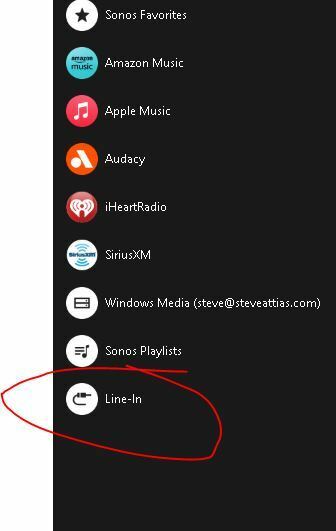
where the hell did they put the Line-In "service" in the new mobile app (ios and android)

  • June 8, 2024
  • 6 replies
  • 733 views

besides hating the new app, I cannot see where the line-in function is.  It is still clearly visible on the Windows desktop app, but I don’t see it anywhere on the mobile apps!!


This topic has been closed for further comments. You can use the search bar to find a similar topic, or create a new one by clicking Create Topic at the top of the page.
Best answer by NPRFAN

I neglected to describe how to move the sources.  Go to the bottom of the list and click on Edit Home.  Make your desired changes and then scroll to the bottom and click on Done.

6 replies

controlav
Lead Maestro
June 8, 2024

Its under Your Sources, I get TV, Music Library, and Line-in.

However, as we all know, the new mobile app is super unreliable at showing some or all of those on some systems.

As usual, Desktop app ftw.

Author of the leading independent Sonos apps for Android, MacOS, iOS, Windows and Xbox.
cap3344Author
Chromatic Producer I
June 8, 2024

Thanks,  now I see it, never scroll down that low… would be nice if Line-In was allowed to be tagged a a favorite.  Been  a SONOS user for a whole bunch of years and this app was the worse thing they’ve done since dumping the CC Controller (yeah, I had 4 of those). Even worse than S1/S2 split.  I’ve done a few betas for SONOS, wish I saw a beta for the app (was there one????).   😣

NPRFAN
Trending Lyricist I
June 8, 2024

You can actually move Sources (TV and Linein up to the top of the list if you want. 

NPRFAN
NPRFANAnswer
Trending Lyricist I
June 8, 2024

I neglected to describe how to move the sources.  Go to the bottom of the list and click on Edit Home.  Make your desired changes and then scroll to the bottom and click on Done.

Lyricist III
June 9, 2024

Fun fact: since the update my Sonos system can’t make up its mind on which side my line-in is..  used to be the right one of two paired play5 speakers (this one is connected to LAN) - and it’s still plugged in like it was the last two years. But now the system insists on that the line-in is on the left side (a speaker which is connected to the right one with SonosNET). 
 

Lyricist III
June 30, 2024

Still cannot work this out and no help from Sonos at all.  Help!  Any idea of how to connect line in to a speaker please?

So much for buying Sonos speakers....never ever again!