

IanJShaw
Chromatic Producer I
August 22, 2024
Answered

Web app controller: Pinned collection no longer available

  • August 22, 2024
  • 14 replies
  • 332 views

I’m persevering with the new web app controller but this has now appeared on the home screen:
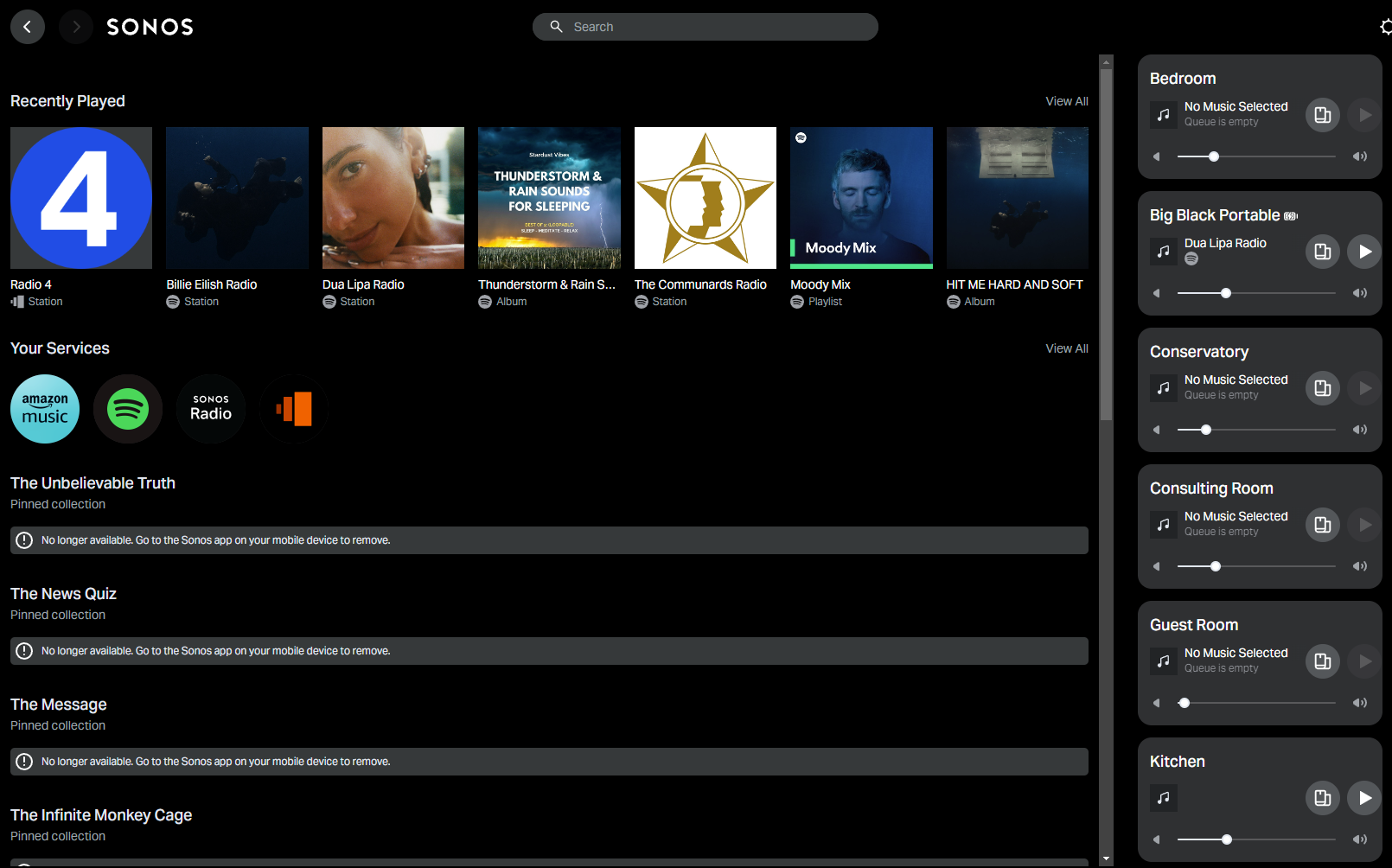


A whole list of BBC Sounds shows, labelled as “Pinned collection” with the error message underneath each one:  “No longer available.  Go to the Sonos app on your mobile device to remove”.


I have no idea how to get rid of these.


They do not appear under any favourites list on my mobile app.  They do not appear as saved shows in the BBC Sounds Service when accessed via either the desktop controller or the mobile app.  (They are shows that I have listened to via BBC Sounds in the past but they aren’t on any “pinned collection” that I can find).


Does anyone have any idea how to get rid of these?


Many thanks.


Moderator edit: changed “Windows” to “web app” as screenshots show web app, not Windows Desktop controller.

This topic has been closed for further comments. You can use the search bar to find a similar topic, or create a new one by clicking Create Topic at the top of the page.
Best answer by IanJShaw

Ok, I’ve found a way to fix this.


After one of the Mods changed the title of my question from “Windows Desktop Controller” to “Web App Controller” I wondered if the old Windows Desktop Controller is still a “thing”.  So I opened it, nervously allowed it to update and:  Ta-Dah!  All the broken links appear in the Sonos Favourites list (they didn’t show up in Sonos Favourites on the Android Controller).


I was able to delete all the broken links via the Windows Desktop Controller and they no longer appear in the Web App Controller.


This has, however, left me slightly confused.  I’d assumed that the release of the new mobile Apps required us to migrate from the Windows Desktop Controller to the Web App Controller.  Is this not the case?  Are both supported in parallel?  (Am I a bit thick for assuming I had to abandon the Windows Desktop Controller? - actually, please don’t answer that one….).

14 replies

IanJShaw
IanJShawAuthor
Chromatic Producer I
August 23, 2024

Hi @Corry P 


I’ve just tried to replicate with a Spotify playlist:

 - Created a new private playlist in the Spotify Windows app

 - added to Sonos Favourites in the Sonos Android App

 - Playlist now visible as a Favourite in the Sonos Web App

 - Deleted playlist in the Spotify Windows app

 - Playlist remains visible and playable in both Sonos Android App and Sonos Web App!


If I were brave enough, the next step would be to remove Spotify as a music service but I’m afraid I just don’t have enough faith in the Sonos infrastructure right now to mess with that.  It may be irrational, but I don’t want to risk removing Spotify and then not being able to get it to work again.


Sorry I haven’t been able to replicate the earlier error however I do find it slightly odd that when I delete a playlist from a Music Service it remains visible and usable in the Sonos Favourites until I also remove it via the Sonos Android App.

Corry P
Sonos Staff
August 23, 2024

Hi @IanJShaw 

Thanks for that - much appreciated! I just wanted to know if it was happening with all items regardless of the source, but it appears not.

If I were brave enough, the next step would be to remove Spotify as a music service but I’m afraid I just don’t have enough faith in the Sonos infrastructure right now to mess with that.  It may be irrational, but I don’t want to risk removing Spotify and then not being able to get it to work again.

No need - you’ve done enough!

Sorry I haven’t been able to replicate the earlier error however I do find it slightly odd that when I delete a playlist from a Music Service it remains visible and usable in the Sonos Favourites until I also remove it via the Sonos Android App.

I think this may just be a result of caching - it may take a wee while for cloud changes to reflect in the app. If it remains for more than a day, please let me know.

Thanks again!

"Common sense is the collection of prejudices acquired by age eighteen." - Albert Einstein
Local Superstar
August 23, 2024

There is another tiny issue @Corry P . I had TuneIn service active a couple of years ago, and some Sonos favourites for radio stations, I no longer use TuneIn, and I noticed I was unable to remove the old TuneIn Sonos Favourites from the App.

TuneIn has since changed, so I had to re-authorise TuneIn on the App, where I had to create a TuneIn account (previously, I don’t recall having a TuneIn account when the Sonos Favourites were created), then I was able to delete the favourites.

It should be possible to delete a ‘stale’ favourite from Sonos App, even if the music service is no longer active.

 ​it may take a wee while for cloud changes to reflect in the app. If it remains for more than a day,

That is a long wee 😂


Corry P
Sonos Staff
August 23, 2024

Hi @craigski 

Yes - I have seen a few reports to this effect. I’ll see if I can get a ticket raised, if there isn’t one already.

 ​it may take a wee while for cloud changes to reflect in the app. If it remains for more than a day,

That is a long wee 😂

Careful! Mocking Scots for their Scottish-ness never goes well! 😂

"Common sense is the collection of prejudices acquired by age eighteen." - Albert Einstein