
Contributor I
January 18, 2021
Answered

Unable to play X - and the song is not encoded correctly

I was getting this error from time to time, but now I'm getting it on 3/4 of songs... Seems random, as sometimes a song that was working fine would refuse to play and start showing this error (or vice versa). 

My music source is YouTube Music. I've tried rebooting the speaker, reinstalling te app, rebooting the Wi-Fi router, etc. Also tried using an ethernet cable instead of Wi-Fi. Nothing seems to work. 

Diagnostic number : 1167656549

Screenshot :
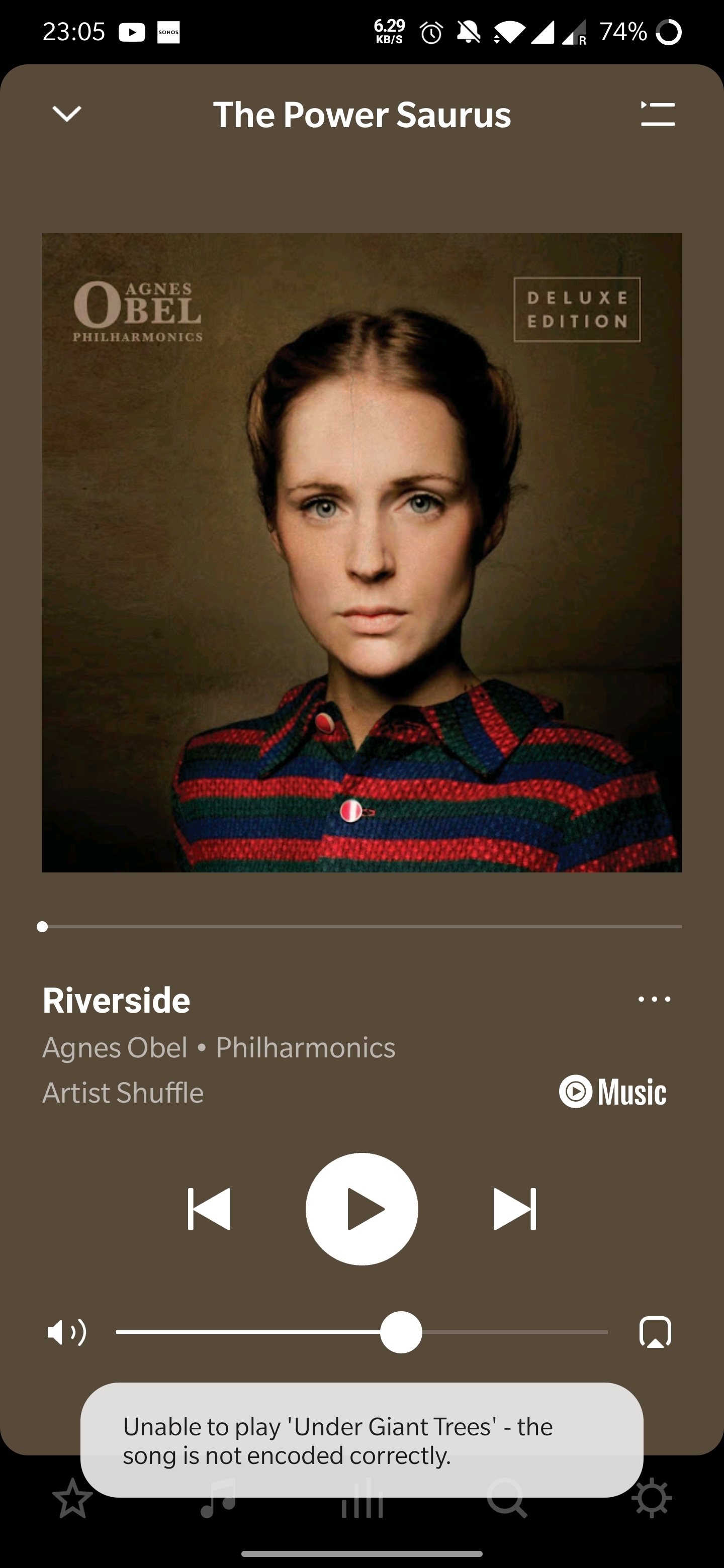
Thanks in advance! 

 

This topic has been closed for further comments. You can use the search bar to find a similar topic, or create a new one by clicking Create Topic at the top of the page.
Annazel S
Annazel SAnswer
Retired Sonos Staff
January 22, 2021

Hi @kubulozaurus.rex.

Thanks for your response and update.

Upon checking the diagnostic report, errors that we observed on the initial diagnostic are still showing and the Android controller’s WiFi connection is ‘unknown’.

We appreciate the time and effort you've spent troubleshooting with us, but at this point, it would be best to reach out to Sonos Support so we can take a closer look at this in real-time and expedite the process. I suggest our phone team for they have more resources available on their system for advanced troubleshooting, and the tools our agents can use would be very useful in this case, there can be an advantage if they need to remote into the controller to see what's going on.


​If you have any questions, please feel free to let us know.

Help others find useful content by clicking the like button and selecting the best answer to your question

101 replies

Annazel S
Retired Sonos Staff
January 19, 2021

Hi @kubulozaurus.rex.

Thanks for reaching out and welcome to the community! Let me check it for you.

Upon checking the diagnostic report, transport errors and symptoms indicative of interference have been detected on one or more Sonos components running on the WiFi. Commonly, this issue can come as a result of wireless interference, this article will help you reduce wireless interference around your Sonos products. 

You may try to refresh your network, please follow the steps accordingly:

  • Unplugged your Sonos device from power
  • Reboot router
  • Once the router boots up, plug back in the speaker 
  • Test and see if that resolves it.


If the above advice was followed and the issue persists, please submit a new diagnostic report, and reply with the confirmation number so I can review your system further and see if there’s anything else causing this issue.


Let us know how that goes.

Help others find useful content by clicking the like button and selecting the best answer to your question
Contributor I
January 22, 2021

Hello! Thank you for the advice.

Unfortunately it didn't help much... 

Over the last few days I've tried most of the solutions mentioned in "reduce wireless interference". I've changed the Wi-Fi channel of my router, tried it out, then next day changed the channel of my speaker, etc. Also, I've tried to move things around in my flat and I've disconnected some Wi-Fi-using devices that were close to the speaker. But, as I live in a small apartment the middle of Paris, there is a lot of Wi-Fi networks around and a lot of connected devices close by, and there will only be more. So in the end I've just connected the speaker with an Ethernet cable to my router.

(BTW I've been regularly rebooting both the speaker and the router during all this).

The results are a bit underwhelming... At some points (e.g. after connecting the Ethernet cable) it was working better for some time (I don't know if this was just random or some strange real effect), so I thought that the problem was solved, but after a while it got back to the old behavior:

Could you please provide other options for dealing with this issue? 

BTW, how is it possible to have "wireless interface" when my speaker is now wired (Ethernet cable)?... 

Here are 2 new diagnostic numbers:

- 2094634783

- 122505127

Thanks in advance :) 

Annazel S
Annazel SAnswer
Retired Sonos Staff
January 22, 2021

Hi @kubulozaurus.rex.

Thanks for your response and update.

Upon checking the diagnostic report, errors that we observed on the initial diagnostic are still showing and the Android controller’s WiFi connection is ‘unknown’.

We appreciate the time and effort you've spent troubleshooting with us, but at this point, it would be best to reach out to Sonos Support so we can take a closer look at this in real-time and expedite the process. I suggest our phone team for they have more resources available on their system for advanced troubleshooting, and the tools our agents can use would be very useful in this case, there can be an advantage if they need to remote into the controller to see what's going on.


​If you have any questions, please feel free to let us know.

Help others find useful content by clicking the like button and selecting the best answer to your question
Contributor I
February 12, 2021

OK. For anyone else experiencing similar issues, here’s what I found out.

After around two hours spent actively investigating the problem with the Sonos Support, this is the final answer I got (copy-paste from the transcript):

J'ai réussi à vérifier votre anomalie sur YouTube avec un des nos ingénieurs et nous souhaitons vous informer que le soucis que vous avez sur YouTube  c'est un problème général dont nous sommes conscients  et nous travaillons activement avec Youtube Music pour le résoudre. Il sera résolu dans une future mise à jour du logiciel, mais nous n'avons pas de délais à partager pour le moment. 


Basically:

  • This is a general and known problem.
  • Sonos engineers are working with YouTube Music to solve it.
  • It will be solved in a future software update.
  • No time frame for the solution is currently known.

I’ll write here when (if?) the problem is ever solved.

(I must say that I’m quite unhappy about lack of any concrete assurance from Sonos after all this. I’ve asked what if the problem is not solved in 6 months and I was only told again that I should wait and that no time frame is available.)

Airgetlam
February 12, 2021

The way I interpret that is the issue is on YouTube’s end, and the Sonos engineers, while helping the YouTube engineers, don’t know exactly when YouTube will release a fix to the YouTube Music servers. 

Bruce
Contributor I
February 12, 2021

The way I interpret that is the issue is on YouTube’s end, and the Sonos engineers, while helping the YouTube engineers, don’t know exactly when YouTube will release a fix to the YouTube Music servers. 

Actually the Sonos Support person told me that they didn't know if the technical responsability was on Sonos' side or YouTube’s side.

Airgetlam
February 12, 2021

That seems odd, since the Sonos player software is the same across all streaming services. I’d think if there was any particular issue with the Sonos side, it would manifest itself across other streams as well. But the Sonos support person would have better information than I. I can only assume they were trying not to throw a partner under ‘the bus’, or I’m completely wrong. 

Bruce
Contributor I
February 12, 2021

BTW I've tried using 3 other music sources and only YouTube Music has this problem... 

Maybe it's the YouTube side that "caused" the problem (there was the migration from Google Music to YouTube Music in the last few months) maybe it's Sonos (the new version of the Sonos app was rolled out in the last few months), maybe it's both, difficult to say... 😐 

Lyricist I
July 26, 2021

I have had this problem periodically with serius/xm as well.  Usually closing the app and giving it a few mins and it works fine

Lyricist I
October 22, 2021

Same "encoding error" on almost all my Amazon playlists. I think it has to do with Amazon introducing HD, but why are people seeing the issue on YouTube? I don't know, but all my playlists are ruined!