

Sjoop1985
October 1, 2022
Answered

"Unable to add tracks to queue" error when adding Spotify Liked Songs

Reviving my account here to post this:

My music library is completely in Spotify and I rarely listen to playlists, I simply shuffle my entire “My liked songs” list. I've done this on Sonos for years, with a list of just under 3000 songs.

Now, I am having exactly the issue  described in this topic: (that was apparently never satisfactorily resolved)

I'm consistently getting the “unable to add tracks to queue” error when I try to play or shuffle my liked songs. Not sure when this started, I think it is on the order of days, maybe a few weeks. Most of the time my Sonos queue is filled and I don't have to re-add tracks, and I don't remember when it last worked successfully.

Of course I will get the boilerplate response, but I'd like to head that off by saying:

  • I have restarted my network and my entire Sonos system sequentially as per the standard procedure. (twice)
  • This used to work flawlessly with exactly the same amount of tracks, on exactly the same network until very recently.
  • This topic: 

    Seems to indicate a max number of tracks of approx. 6750, mine is 2949. It also says that the attempt will time out after 20 seconds, but my system returns an error after maybe 10 seconds.

Interestingly, there is still one way of getting all tracks in the queue. The Windows client still lets me select all tracks and drag them to the queue. It takes ages though (> 5 minutes) and I get this progress bar.
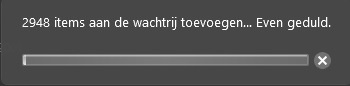
 

Has anything changed on Sonos' side that could cause this behavior? Or is Spotify the culprit here? I reiterate, none of the parameters of my setup has changed, and I had no issues until very recently.

Diagnostics no. 1253425884

This topic has been closed for further comments. You can use the search bar to find a similar topic, or create a new one by clicking Create Topic at the top of the page.
Corry P
Corry PAnswer
Sonos Staff
October 10, 2022

Hi @Sjoop1985 

If this is happening to your wired devices then it clearly has nothing to do with interference - seeing as the wired units are wired to the main node.

When rebooting your network, did you leave things unplugged for at least 30 seconds? If not, I recommend you try this.

Failing that, the only likely issue I can see relates to which device is acting as the STP root bridge. We can alter this by telling a wired unit to act in that regard instead of the Google mesh. Please visit http://192.168.86.105:1400/advconfig, set FirstZP to Enabled and click Submit. Once done, please reboot Kantoor.

If this doesn’t help, I recommend you get in touch with our technical support team, for some real-time troubleshooting.

I hope this helps.


"Common sense is the collection of prejudices acquired by age eighteen." - Albert Einstein

18 replies

Sjoop1985
Sjoop1985Author
October 14, 2022

I will try this, but the setup has been like this with Google Wifi as the STP root bridge since 4 years before this issue occurred.

Also interesting that another user is having this same issue since recently, on two different Sonos households. I appreciate the help trying to find a problem with my setup, but I get a feeling this is not hardware/config related.

Life is what happens to you while you're busy making other plans (John Lennon) --- Living room: Arc, Sub, 2x One - Kitchen: One - Bedroom: Play 3 - Office: Beam - Bathroom: Play 1
Lyricist I
November 8, 2022

Didn’t see a clear resolution here—I’ve been having a similar problem.

My most frequent method of adding tracks to the Sonos queue is to shuffle my Liked Songs from Spotify (about 2k tracks). This used to work fine until ~3 weeks ago.

Now, I cannot even add a single track from my Liked Songs without getting the 701 error. If I choose the exact same song from a different playlist, then it works fine. So it’s not just the shuffling/adding of 2,000 songs at once…there seems to be some malfunction when it comes to queuing anything from Spotify Likes.

 I’ve tried all the standard troubleshooting, including logging out and re-authorizing my Spotify account within the Sonos app.

controlav
Lead Maestro
November 8, 2022

Sonos recommend music services do not offer up Collections with more than 500 items, for this very reason:

https://developer.sonos.com/build/content-service-add-features/add-play-shuffle-all/

“In containers with many playable items (500+) this can cause a delay while the Sonos player processes the request. Sonos may even time out and give the listener an error. We recommend limiting the number of playable items in these types of containers as a palliative measure.”

Author of the leading independent Sonos apps for Android, MacOS, iOS, Windows and Xbox.
Sjoop1985
Sjoop1985Author
November 9, 2022

I'm amazed by the quote above from Sonos. Normally, I've always been nothing but positive, but this is a pretty severe usability issue. I use the Spotify "my liked songs” feature to curate my complete music library, independent of artist, album or genre and sometimes I just want to shuffle through that.

I remember that years ago, people with large music libraries (above Sonos’ track limit) were always told that the future was streaming, but now we're getting similar limitations there?

The quote also doesn't explain why I could add almost 3000 tracks without problems up to 2 months ago...

Life is what happens to you while you're busy making other plans (John Lennon) --- Living room: Arc, Sub, 2x One - Kitchen: One - Bedroom: Play 3 - Office: Beam - Bathroom: Play 1
controlav
Lead Maestro
November 10, 2022

The quote also doesn't explain why I could add almost 3000 tracks without problems up to 2 months ago...

Maybe something has slowed down, either your connection to Spotify (eg its picking a different CDN or network route) or some local network condition.

The timeout is ten seconds I think, and if that used to take 9 seconds, but now takes 11 seconds, then that would be enough for a failure now.

Sonos could theoretically fix this by using paging in this scenario: the doc I linked specifically says it does not use paging, though it doesn’t say why.

Author of the leading independent Sonos apps for Android, MacOS, iOS, Windows and Xbox.
Lyricist I
November 12, 2022

Weeks I have been struggling with the error code “An error occurred while tracks to the queue (701)” from selecting the ‘Liked Song’ within the Sonos app.

If I copy 1-2-1 to a playlist there is no problem. With another playlist or Albums there isn’t a problem.

Playing from Spotify and connect to my speaker isn’t a problem. 

​​​​​​​+ there is a second account of my partner, and she hasn’t that problem at all.


On another location the Spotify Liked songs within the Sonos app works without any problem.


<My setup>

[beam + x 2 Play 1] → wired connection → one room (tv setup)

[Play 3] → wireless connection → one room 

[Roam roam] 


<Troubleshoot>

contacted the helpdesk and did the following steps.

  • Remove my account from the Sonos App (mobile and desktop version) & added it again. Even removed the app and reinstall.
  • Reboot my network + Sonos + added all my services. (Did it probably 5 times) 
  • Changed my DNS. 
  • Changed the channels of the Sonos mesh 

{outstide the sonos environment}

  • went to my Spotif account logged out everywhere.  
  • changed my Spotif password
  • Check my geolocation (credit card & account related address) 


casenumber: 04313898


any help is welcome! 


Lyricist I
November 16, 2022

Same problem here since approx 1,5 months. Always used to use “my liked songs” directly in every room without problems. Just opened the app selected the room and pressed shuffle in “my liked songs” (“nummers” in dutch) and done.

Now i always encounter the 701 error. The work around mentioned above works for me, but is a slow process (only works when using my windows app (select all songs and drag them into the queue window which starts a slow adding songs process). My list contains more than 2500 songs, but was never ever a problem (it still isnt a problem when i drag all the songs in the queue). Even double clicking 1 song only in the most right window of the windows app gives me a 701 error, but dragging 1 song to the middle window (the queue part of the app) doesnt give me a problem.


This dragging songs workaround can only be done on a computer and doesnt work in an android phone, so once you lose your “liked songs” list in a room you need to use the slow workaround again on a computer.

This also works (not the way and less than ideal btw): open spotify on your phone > play “liked songs” > dive into settings and select the room you want. In this way you dont use the sonos app at all. I use remote buttons from ikea to start my music with normally and want every room pre-loaded with my liked songs, this doesnt work the way it should anymore.


Please help us and fix this.

Im pretty sure nobody changed anything in their network (i know i havent). This really seems to be a combination problem between sonos+Spotify.

These problems seemed to pop up like 6 weeks ago approx for everyone above. Change it back please :)


Helpppp


One more less related thing. Not all songs in spotify have the same volume, within spotify itself you can check a function thats called something like “normalize volume”, but we cannot use this feature within sonos, this causes awkward situations sometimes. can this function be added in the future somehow?


But yes:

HELP pls

Lyricist I
November 27, 2022

I was having the same issues after I updated last night. I also have worked hard involving a half dozen playlists with the “liked songs” being the ones I enjoy the most at that particular time. In my case my Son and his family were here on a vacation and I recalled he used his phone to pull up his music. Upon that revelation I checked the settings on my iPad and noticed my Sonos settings had both Bluetooth and network settings on. I turned Bluetooth off and I again was able to play my liked songs. I hope this may help others solve a very frustrating problem for music enthusiasts like myself.