

Sjoop1985
October 1, 2022
Answered

"Unable to add tracks to queue" error when adding Spotify Liked Songs

Reviving my account here to post this:

My music library is completely in Spotify and I rarely listen to playlists, I simply shuffle my entire “My liked songs” list. I've done this on Sonos for years, with a list of just under 3000 songs.

Now, I am having exactly the issue  described in this topic: (that was apparently never satisfactorily resolved)

I'm consistently getting the “unable to add tracks to queue” error when I try to play or shuffle my liked songs. Not sure when this started, I think it is on the order of days, maybe a few weeks. Most of the time my Sonos queue is filled and I don't have to re-add tracks, and I don't remember when it last worked successfully.

Of course I will get the boilerplate response, but I'd like to head that off by saying:

  • I have restarted my network and my entire Sonos system sequentially as per the standard procedure. (twice)
  • This used to work flawlessly with exactly the same amount of tracks, on exactly the same network until very recently.
  • This topic: 

    Seems to indicate a max number of tracks of approx. 6750, mine is 2949. It also says that the attempt will time out after 20 seconds, but my system returns an error after maybe 10 seconds.

Interestingly, there is still one way of getting all tracks in the queue. The Windows client still lets me select all tracks and drag them to the queue. It takes ages though (> 5 minutes) and I get this progress bar.
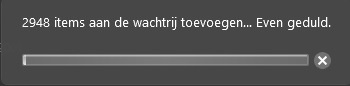
 

Has anything changed on Sonos' side that could cause this behavior? Or is Spotify the culprit here? I reiterate, none of the parameters of my setup has changed, and I had no issues until very recently.

Diagnostics no. 1253425884

This topic has been closed for further comments. You can use the search bar to find a similar topic, or create a new one by clicking Create Topic at the top of the page.
Corry P
Corry PAnswer
Sonos Staff
October 10, 2022

Hi @Sjoop1985 

If this is happening to your wired devices then it clearly has nothing to do with interference - seeing as the wired units are wired to the main node.

When rebooting your network, did you leave things unplugged for at least 30 seconds? If not, I recommend you try this.

Failing that, the only likely issue I can see relates to which device is acting as the STP root bridge. We can alter this by telling a wired unit to act in that regard instead of the Google mesh. Please visit http://192.168.86.105:1400/advconfig, set FirstZP to Enabled and click Submit. Once done, please reboot Kantoor.

If this doesn’t help, I recommend you get in touch with our technical support team, for some real-time troubleshooting.

I hope this helps.


"Common sense is the collection of prejudices acquired by age eighteen." - Albert Einstein

18 replies

ratty
October 1, 2022

I suspect you’re hitting the regular Sonos queue-loading timeout, perhaps because Spotify is slow to respond. Weekend evenings could be the peak of server demand.

The desktop controller interaction you describe would execute as thousands of single-track queue additions, each of which would obviously complete in a fraction of the normal timeout period.

Sjoop1985
Sjoop1985Author
October 2, 2022

It is independent of time or day, and it does this consistently - i.e. it throws the error every single time. 

If it had to do with server load, I would expect it to be hit or miss.

I tried adding "My liked songs" to a Sonos playlist, to see if that would work. Adding directly threw a similar error, but saving the Sonos queue as a Sonos playlist works. I can then play the Sonos playlist without problems. I'm assuming that is because the references to the tracks have then been stored in the system and don't need to be fetched from Spotify on the fly.

I'll use that as a workaround for now, but I hope this gets fixed, because there doesn't appear to be anything I can do myself to fix this.

Life is what happens to you while you're busy making other plans (John Lennon) --- Living room: Arc, Sub, 2x One - Kitchen: One - Bedroom: Play 3 - Office: Beam - Bathroom: Play 1
ratty
October 2, 2022

Sonos does indeed store the URIs in a Sonos Playlist. I routinely use an 8k+ track Sonos playlist, of which about 50% are Amazon Music tracks. It loads into the queue instantly.

Loading playlists from a service itself always tends to be subject to limits, whether it be maximum size or a timeout. I used to use Deezer where the practical playlist max size to stay within the timeout limit was around 1-1.5k. Amazon won’t load more than 500 tracks from a playlist come what may.

October 3, 2022

Hi!

Same issue for me as well since recent days/ weeks. Unable to play a large (2.5K songs) Spotify playlist.

My workaround was to split the large playlist into parts of 1K songs and then add them one by one to queue via Sonos app.

Don't know where the problem is: is it Sonos's Spotify module or the Spotify services lag, but some weeks before it worked for me well. 

/Alexey.

Sjoop1985
Sjoop1985Author
October 3, 2022

Glad to hear I'm not the only one. Sorry, I accidentally marked your post as "best answer" when I wanted to like it.


*Moderator edit...removed the “Best Answer” flag*

Life is what happens to you while you're busy making other plans (John Lennon) --- Living room: Arc, Sub, 2x One - Kitchen: One - Bedroom: Play 3 - Office: Beam - Bathroom: Play 1
Corry P
Sonos Staff
October 7, 2022

Hi @Sjoop1985 

Thanks for your post!

Which room(s) are you having this issue in? Keuken in particular is having problems with interference. I recommend a read of our help page Reducing wireless interference.

Do you have the same issue if you try to play to your ethernet-wired Beam? If so, what is it ethernet-wired to? If it’s wired to a Google mesh node, is it the main node?

Finally, how close to the Beam is the Sub?

"Common sense is the collection of prejudices acquired by age eighteen." - Albert Einstein
Sjoop1985
Sjoop1985Author
October 9, 2022

Sorry, I didn't see this reply until now.

I have this issue with every single room, wired or not. As I mentioned in the OP,  nothing has changed in my network or in the wireless environment, as far as I know (and as far as I can do anything about). My network matrix has looked the same for years, including some interference here and there that never caused much issue.

Wired speakers Beam and Arc are wired to the main node (router) of a Google WiFi system. Sub is bonded to the Arc and sits about 2 ft from the Arc, next to the cabinet the Arc is on (not sure how this is relevant).


And, as mentioned: this used to work ever since I started using Sonos, until 2 weeks or so ago, similar to what @Alexey Sharayev is reporting.

Life is what happens to you while you're busy making other plans (John Lennon) --- Living room: Arc, Sub, 2x One - Kitchen: One - Bedroom: Play 3 - Office: Beam - Bathroom: Play 1
October 9, 2022

In my case, I have two houses with sonos,  and the issue is for both homes. I cannot add to queue a Spotify playlist of 2,5K songs in both my networks.

Sjoop1985
Sjoop1985Author
October 9, 2022

This occurring in two different houses, to me, more or less demonstrates that it is not related to interference or network issues. My suspicion is that it's somehow related to the Spotify/Sonos integration.

Life is what happens to you while you're busy making other plans (John Lennon) --- Living room: Arc, Sub, 2x One - Kitchen: One - Bedroom: Play 3 - Office: Beam - Bathroom: Play 1
Corry P
Corry PAnswer
Sonos Staff
October 10, 2022

Hi @Sjoop1985 

If this is happening to your wired devices then it clearly has nothing to do with interference - seeing as the wired units are wired to the main node.

When rebooting your network, did you leave things unplugged for at least 30 seconds? If not, I recommend you try this.

Failing that, the only likely issue I can see relates to which device is acting as the STP root bridge. We can alter this by telling a wired unit to act in that regard instead of the Google mesh. Please visit http://192.168.86.105:1400/advconfig, set FirstZP to Enabled and click Submit. Once done, please reboot Kantoor.

If this doesn’t help, I recommend you get in touch with our technical support team, for some real-time troubleshooting.

I hope this helps.


"Common sense is the collection of prejudices acquired by age eighteen." - Albert Einstein