This topic has been closed for further comments. You can use the search bar to find a similar topic, or create a new one by clicking Create Topic at the top of the page.
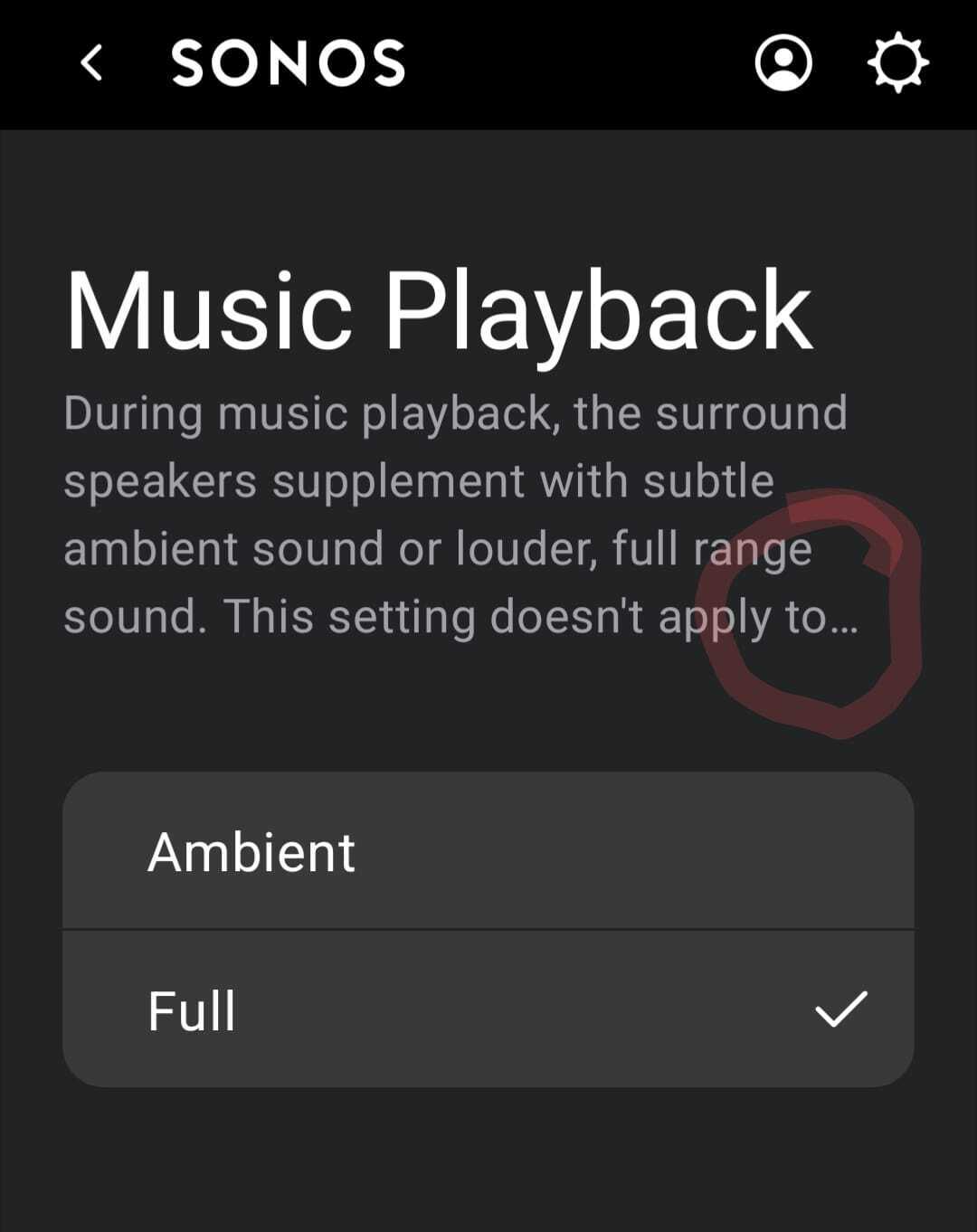
What controller device is it - make/model? Only I see the full text on my iPhone XR controller. Could it be you are using a larger/bolder device font? See image below:
What controller device is it - make/model? Only I see the full text on my iPhone XR controller. Could it be you are using a larger/bolder deviceee image below font? S:
Pixel 7 and you are right about larger font, but the UI should be able to deal with this.
What controller device is it - make/model? Only I see the full text on my iPhone XR controller. Could it be you are using a larger/bolder device font? See image below:
Font size or type should not matter to the app if it is coded properly. People who use large fonts should be accommodated by the app. Basic accessibility.
What controller device is it - make/model? Only I see the full text on my iPhone XR controller. Could it be you are using a larger/bolder device font? See image below:
Font size or type should not matter to the app if it is coded properly. People who use large fonts should be accommodated by the app. Basic accessibility.
I don’t disagree @almazri - I was just trying to help establish perhaps what the issue was here. If the Sonos Staff also don’t pickup this thread too, it’s worthwhile @furacaopr reporting the matter to Sonos Support via this link:
I’m suspect that the truncating of text on your device has anything to do with the Sonos app. I have a iPhone 15 ProMax and the following slides detail how I have maxed the Display Settings for Text and Zoom. The last slide shows the Music Playback section for surrounds in the Sonos App. The rendering is in full complete text and graphic (readable)…but just blown waaay out of portion.
That said I’d look further into your device software and settings. You might try rebooting your device to correct the issue.
Edit: If using an Android device there may be an issue with the Sonos app code when using enlarged text and zoom features. However, I can’t prove or disprove that theory. That said you may want to contact Sonos Tech support. If you want @Corry P to look into it I’d send him a PM for a faster response.
Font size or type should not matter to the app if it is coded properly. People who use large fonts should be accommodated by the app. Basic accessibility.
Same goes for Landscape mode, far too many things are unreachable until you rotate your device to Portrait.
I apologize….I do have an Android device. However, it’s a Galaxy Tab A9+ running Android 14. I only recently bought the device to get a modicum of understanding of how the Sonos App behaves in the Android OS.
I’m still learning the device and haven’t yet mastered uploading screen shots so I can’t provide visuals. However, this is what I did;
In settings I went to Accessibility (for Vision, Hearing and Dexterity) and selected Large Display
I realize that my Galaxy Tab has much more display real estate in both portrait and landscape mode. However, in both modes the section of the Sonos app being discussed herein; rendered properly.
That said IMO it’s either a Software incompatibility depending upon what version of Android OS your Pixel 7 is running; or it’s just that Android tablets do a better job of displaying apps in the Large Display mode.🤔
Yes I have an Android tablet that works too with the largest text/display settings. I just don’t have an Android phone, so perhaps not a good comparison - the iPhone XR I have displays that same text okay too with largest text size.
That said IMO it’s either a Software incompatibility depending upon what version of Android OS your Pixel 7 is running; or it’s just that Android tablets do a better job of displaying apps in the Large Display mode.🤔
The Sonos app has known issues with scaling fonts eg the still unfixed bug that blocks accepting the EULA with large fonts active. It seems way more likely this is a Sonos issue notwithstanding your Galaxy Tab.