
bigkid
Contributor I
June 5, 2026
Answered

Stereo pair of Sonos Ones appearing as separate devices not stereo pair in android apps

  • June 5, 2026
  • 15 replies
  • 224 views

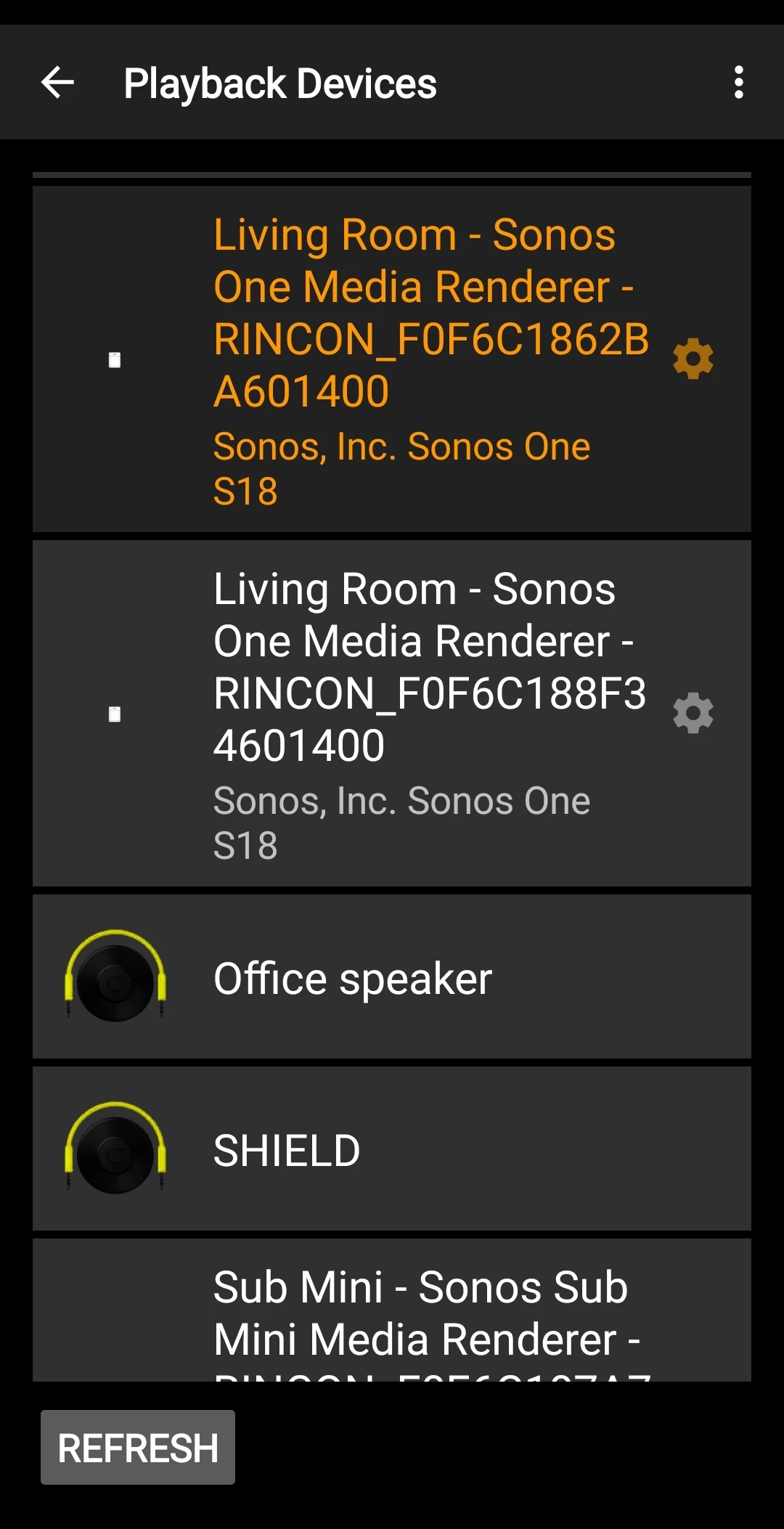
Hi all. First time poster.  I have setup a stereo pair of One Gen 2’s and a sub mini in the Living Room and identified the group as ‘Living Room - Sonos’.  While Spotify on my android phone identifies the group as ‘Living Room - Sonos’ and plays music through both speakers, the app I am using (Hi-Fi Cast) only sees the group as separate devices. If I select the right speaker, sound comes out of it, and only it. Select the left speaker and the song won’t play. I have recreated the group a couple of times but still end up with the same issue. Weirdly, if I use the Spotify app on my phone, the music plays through both speakers, and if I close it and then use Hi-Fi app, while it sees the devices still as separate entities, it will play music from both speakers. As I said, Weird. The problem returns if I select the other Sonos device. A pic of the Hi-Fi devices tab is attached. I am sure there is something fundamental I am getting wrong with the setup. Appreciate advice on how this might be remedied. Cheers. 


This topic has been closed for further comments. You can use the search bar to find a similar topic, or create a new one by clicking Create Topic at the top of the page.
Best answer by User117655

Don't have experience of specific app but in a stereo pair both speakers maintain independent presence on local network. As against surround bonds where the router may maintain leases but bonded speakers are not on local network directly…

From what you say it would seem that the HiFi Cast app is picking up speakers by LAN presence rather than Sonos configuration. Sonos uses one speaker as a primary which controls the second speaker so when you cast to the primary two speakers will play, when you cast to the secondary only that one will play.

So in short you are not missing any tricks or miss configuring anything, but rather exposing implementation differences across apps.

(Subs can not function as standalone speakers so are excluded from casting...)


15 replies

jgatie
June 5, 2026

I believe the coordinator in a stereo pair is always the Left speaker.  But it’s been a while since I was in a discussion about that so I could be misremembering. 

User117655
Prodigy II
June 5, 2026

I believe the coordinator in a stereo pair is always the Left speaker.  But it’s been a while since I was in a discussion about that so I could be misremembering. 

Me too, think it is in the Sonos documentation somewhere...

bigkid
bigkidAuthor
Contributor I
June 6, 2026

Morning all (morning in Oz :-) ).

Thanks for the detailed responses. I have also tested with another UPnP app Bubbleupnp. I see this and Hi-Fi Cast as recommended on various forums for streaming from android phone to Sonos speakers. Bubbleupnp also sees the Sonos speakers as separate devices, consistent with your comments above ​@User117655.  I can get them to work as a stereo pair with the left as the coordinator, by selecting the left speaker.

​@controlav, re your comment on 50% chance of getting it right - there is a down side to getting it wrong in my config.  Pick the left speaker and the speakers work as a stereo pair. All good. Pick the right and there is no audio and tracks do not play in the app. Then things really go awry. Select the left speaker and sound will only come out of the right speaker, even after deleting the cache and rebooting the app. I can get stereo audio again only after rebooting the speakers or something really weird like connecting to the ‘Living Room - Sonos’ group with Spotify and then returning to Hi-Fi Cast.

OK, so really all I need do is remember which of the speakers in the app is the coordinating speaker from its ID Code to have problem free stereo playback. No biggie. However, it just plays on my obsessive compulsion for things to just work as expected. :-)  

​@controlav, would you suggest another app that might work ‘smarter’?

​@MoPac, will check out your solution.

​@nik9669a  yes, the app recognises the hyphen correctly. I have also tested without the hyphen - still got the same issue. I don’t have any other Sonos speakers. I’ll chase up the app dev and see what they say. Thanks.

Cheers.

Allan

MoPac
Headliner III
June 6, 2026

​@bigkid 

I believe Open Home will only work if the Sonos device connected to a DAC.  That’s why my Sonos Port, connected to a DAC, is able to be set as an Open Home renderer but no other Sonos speaker is compatible.

One reason I believe this is because of the stupid incident I had with my Melco N1Z combo NAS/Player.  It is connected to a DAC.  One day I tried to find it in the Linn app.  For some reason it was not shown.  Went through all the settings + internet lookup etc.  Nothing worked until I finally noticed the DAC was turned off.  Duuuuh.

bigkid
bigkidAuthor
Contributor I
June 6, 2026

​@bigkid 

I believe Open Home will only work if the Sonos device connected to a DAC.  That’s why my Sonos Port, connected to a DAC, is able to be set as an Open Home renderer but no other Sonos speaker is compatible.

One reason I believe this is because of the stupid incident I had with my Melco N1Z combo NAS/Player.  It is connected to a DAC.  One day I tried to find it in the Linn app.  For some reason it was not shown.  Went through all the settings + internet lookup etc.  Nothing worked until I finally noticed the DAC was turned off.  Duuuuh.

Haha! We’ve all been there! Yes, it didn’t much research to work out Open Home was not suitable for my use case. In any case, I have a workaround. Cheers.