
Contributor I
November 9, 2023

Spotify Connect Issues

  • November 9, 2023
  • 16 replies
  • 15862 views

Creating a separate post regarding the below as this was marked as answered but the issue has not been resolved. 


I personally use Spotify Connect 99% of the time to play music to my Sonos speakers, I think we can all agree it provides a much nicer UI for finding and playing music than the Sonos app (and has better audio quality than AirPlay)… However I have always noticed it tends to be a bit unreliable especially when switching rooms (say you listen to music in the kitchen then go upstairs and want to switch to bedroom without pausing the music). This will work sometimes but on a lot of occasions the new room will show as selected but no audio will play from the speakers (yet the song time will continue to advance). Scrubbing the track will then result in it quickly skipping 2-3 songs, and the audio playing will then be a different one to the displayed “Now Playing” (typically the song before in the queue)


I have recently gotten round to debugging this a bit more and have found a reliable way of reproducing the issue. The easiest way I have found to reproduce this is by playing a song on the Spotify app on “This Device” then selecting a Sonos device, going back to “This Device” then reselecting the Sonos device. This results in no audio coming out of the Sonos device yet the now playing screen says something is playing and the current track time is moving. Scrubbing the track will then results in it skipping 2-3 songs and displaying the wrong “Now Playing” (while playing something else).


I’ve tested this on multiple different systems (with completely different network setups) so I am sure this is not a network issue. Also - this does not happen on other Spotify Connect devices so this is not a Spotify issue.


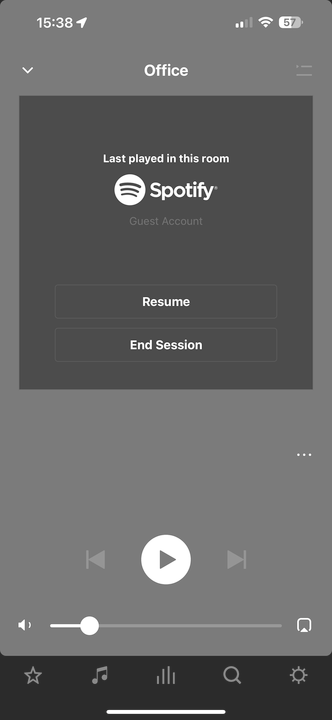
In fact, when a Sonos device was recently streaming from Spotify Connect it will show as the below image. Clicking “End Session” before re-connecting to that device via Spotify Connect ensures that the issue doesn't occur.

Obviously not a fix but confirms even more that this is a Sonos issue. I have even created a program that automatically “ends session” when a room is no longer connected to Spotify Connect and it has been much more reliable since.
 

This topic has been closed for further comments. You can use the search bar to find a similar topic, or create a new one by clicking Create Topic at the top of the page.

16 replies

Corry P
Sonos Staff
January 8, 2024

Hi @KKenfield 

I presume that is why the documentation that I found recommended using the Spotify app for podcast playback - our interface is optimised for music playback. This will not have been addressed because the Spotify app is a workable alternative.

"Common sense is the collection of prejudices acquired by age eighteen." - Albert Einstein
Lyricist II
January 8, 2024

@Corry P 

Actually, it doesn’t work with the Spotify app or the Sonos app. I was told by the rep on the phone that she talked to an engineer and the ability to go back or forth in a podcast is not functional with a Sonos speaker at all. Doesn’t matter what app you use. So there is not alternative, just a product that doesn’t work with podcasts. I checked and have the same issue with Audible so I think Sonos is incapable of skipping 15 seconds with anything.

Corry P
Sonos Staff
January 8, 2024

Hi @KKenfield 

Ah - apologies for the misunderstanding! I’m not personally familiar with the Spotify app and was basically following the contents of our Listen to podcasts on Sonos help page.

I notice you have a Sonos Move, however - if you connect your phone to it via Bluetooth, the audio coming from the Move will be exactly what it would be if you were just playing on your phone. The Move will neither know nor care that you are playing a Podcast rather than music, nor will it be aware of the ultimate source.

I checked and have the same issue with Audible so I think Sonos is incapable of skipping 15 seconds with anything.

Play any music file (local or streaming) and you’ll find that this is simply not the case - there’s a playback progress indicator in the Now Playing screen that can be swiped to any position, forwards or backwards from the current playback point.

I hope this helps.

"Common sense is the collection of prejudices acquired by age eighteen." - Albert Einstein
Lyricist II
January 8, 2024

The reason I bought this was so I could play it through Wi-Fi, not bluetooth. And it’s the skip 15 seconds button that doesn’t work. 

Lyricist I
January 11, 2024

agree with Mic30Z as far as the issues with Sonos.

Very annoying when you have a party and Sonos starts ‘stuttering” and the Apple iPad with the Spotify Playlist has no control over the Sonos system whatsoever. This wk-end it happened every night and we’re now looking into alternative sound systems.


I'm also experiencing stutter through Spotify playback. Only device I have that has this issue is a play 3 and a recent development. Have over 500mb connection in area and tried WiFi and wired into access point to see no improvement. Sonos app also reports frequently it's lost connection with Spotify. Really do need to look into this. Having been a long time advocate of Sonos, and ability to stream between rooms being a big part of that, this isn't good enough. 

Lyricist II
January 23, 2024

Thanks F8CMF, appreciate that.

The past 4 days I just simply tried to stop Sonos from playing music in order to watch TV. Just a simple action on SONOS, right?...

Everytime it “lost connection”.

I really believe SONOS lost its Moyo and we all have to move on to a different Sound System, since they are not doing any effort to fix any of it.