
Contributor I
December 15, 2023
Answered

Specific streaming station not playing on S1/S2

  • December 15, 2023
  • 20 replies
  • 462 views

Hello, I have both Sonos S1 and S2 apps and products. A couple of months ago 1 station, Chilltrax, stopped playing on both systems. I listen from MyTuner Radio, since TuneIn has gone to commercials for the free service. I have tried EVERYTHING or likely everything but 1 since it still will not play. Deleted it from favorites, resets, reboots, updates. I finally just gave up and listen to it on my laptop. I CAN get the station to play online, and from the MyTunerRadio website on my computer. It will simply not play on Sonos S1 or S2. Any ideas? I emailed both Sonos and Chilltrax, no answer. Thanks Sonos for not responding to a customer of 10 years. 
This topic has been closed for further comments. You can use the search bar to find a similar topic, or create a new one by clicking Create Topic at the top of the page.
Best answer by bryan554

Update:

Because I can almost always figure these things out and this was driving me crazy.

I deleted TuneIn from my music services.

I re-added TuneIn to my music services.

Instead of searching for Chilltrax from TuneIn’s list of stations, I went to the Chilltrax website and copied the URL.

I went to TuneIn and chose “manage” + “add radio station” and then copied the URL into the field, named it “Chilltrax Stream” to differentiate which one I was using. Saved.

Now playing on S1, NO commercials, no intros with the notes. I have paused, stopped, played other stations, and then gone back and still no delays, intros, commercials from TuneIn.

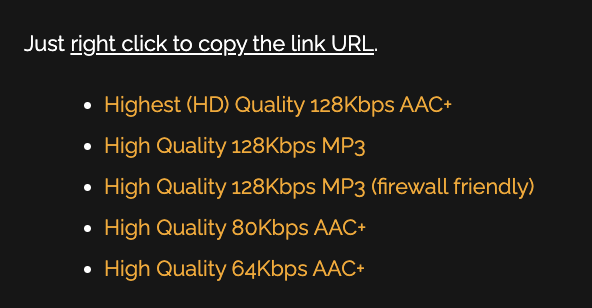
The only thing I did differently was the URL. These are the choices from the Chilltrax website. I always have chosen the first, this time I chose the 3rd (firewall friendly). Not sure if that is what did it or something else. Hmmm. Anyway, for the first time in 3 months I have Chilltrax on my S1. 

I also reset the app earlier (although I have done that dozens of times to no avail)


20 replies

bryan554Author
Contributor I
December 15, 2023

Frustrating because this is my go-to while working. Chilltrax is a free station to stream, although I do donate to support them, thus the aversion to TuneIn. Sigh. I will try reaching out to Chilltrax directly again. Thanks. 

Ken_Griffiths
December 15, 2023

What’s a MSP?

Music Service Provider (myTuner Radio in this instance)

bryan554Author
Contributor I
December 15, 2023

What’s a MSP?

I took it to mean “Music Service Provider”. 

Airgetlam
December 15, 2023

I had no idea. I hate both ‘jargon’ and unexplained abbreviations. 

Bruce
Ken_Griffiths
December 15, 2023

Sorry for the misunderstanding 🙏. I took MSP for granted and I perhaps should have clarified it.


Airgetlam
December 15, 2023

As long as you allow me to poke you…. ;)

Bruce
Ken_Griffiths
December 15, 2023

As long as you allow me to poke you…. ;)

T-Shirts For Sale..😁


Airgetlam
December 15, 2023

In that format, it takes on a completely different meaning than intended ;)

Bruce
Ken_Griffiths
December 15, 2023

See what happens when you misunderstand things … ha ha 😀

I promise I will try to explain things much more clearly in the future.

bryan554AuthorAnswer
Contributor I
December 15, 2023

Update:

Because I can almost always figure these things out and this was driving me crazy.

I deleted TuneIn from my music services.

I re-added TuneIn to my music services.

Instead of searching for Chilltrax from TuneIn’s list of stations, I went to the Chilltrax website and copied the URL.

I went to TuneIn and chose “manage” + “add radio station” and then copied the URL into the field, named it “Chilltrax Stream” to differentiate which one I was using. Saved.

Now playing on S1, NO commercials, no intros with the notes. I have paused, stopped, played other stations, and then gone back and still no delays, intros, commercials from TuneIn.

The only thing I did differently was the URL. These are the choices from the Chilltrax website. I always have chosen the first, this time I chose the 3rd (firewall friendly). Not sure if that is what did it or something else. Hmmm. Anyway, for the first time in 3 months I have Chilltrax on my S1. 

I also reset the app earlier (although I have done that dozens of times to no avail)