
April 2, 2024
Answered

Sonos radio is not launching some TuneIn stations anymore

  • April 2, 2024
  • 17 replies
  • 3130 views

Hello there, 


Sonos Radio seems unable to launch some of the TuneIn stations anymore. For instance, all the stations from Radio France (french national network) are unresponsive : franceinfo, France Inter, France culture… When selected and launch, nothing happens. 


This does not happen with other Sonos radio stations nor with other TuneIn stations. 
This topic has been closed for further comments. You can use the search bar to find a similar topic, or create a new one by clicking Create Topic at the top of the page.
Best answer by Nautjp

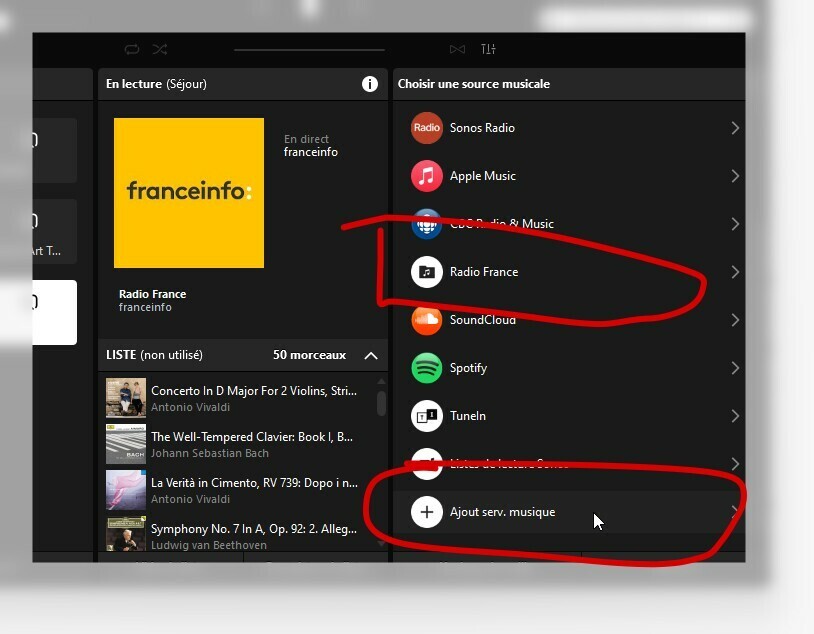
The solution is to go in “Add music service” in Sonos App and you will find the addon “Radio France” service. Install the service et you will get France Inter, France Info, France Bleu, Culture, musique FIP and Mouv’


17 replies

Lyricist II
April 5, 2024

Nautjp's answer is great for use with smartphone.

I've installed Radioplayer and Radio France on Sonos app.

Nevertheless, i own a Sonos Roam with Sonos Voice Control. As i ask "play France Inter" or "play France Inter with Radioplayer", Roam always plays "France Inter" (french radio) through Tune In ; so as this service is no longer available, it plays "white noise" radio :o(

How can i do ton play this Radio with Sonos Voice Control ? Which sentence is correct, please ?

Corry P
Sonos Staff
April 5, 2024

Hi @F4e 

Welcome to the Sonos Community!

Sonos Voice Control is not compatible with either the Radioplayer, nor the Radio France, music services. As a result, you will no longer be able to play Radio France with a command given via SVC.

I believe there is an option, however, to add the France Inter skill to Alexa - this would allow the voice-commanded ability to play such stations on your Sonos speakers.

I hope this helps.

"Common sense is the collection of prejudices acquired by age eighteen." - Albert Einstein
Lyricist II
April 5, 2024

Thanks you very much @Corry P for your answer.

Indeed, i'll try to switch to Alexa or Google assistant (this one integrates Radio France app). I'll Come back for feedback.

Contributor I
April 9, 2024

Hi,

I used to use google assistant to play France Inter everyday.

Since it changes with Radio France app directly in Sonos, I added the Radio France service, anyway each time I ask Google Assistant to play France Inter, it stills tries to play France Inter with tune-in, and therefore point on an american radio Hott 95.3 !

I have updated all apps, and uninstalled the google assistant service and reinstalled it.

I even uninstalled Tune In service in the Sonos app, it’s now not liste in my services, but even tough, the voice still says “Ok let’s play France Inter with Tune-in” (in french as I am french ;) ) and route to Hott radio !


If I ask, please play France Inter on Radio France, it first answer “sure, let’s play France Inter on Radio France”, and then say “sorry, an error occured”.


How can I do ?


Lyricist II
April 9, 2024

@Corry P was right ! It works perfectly with Alexa (and unfortunately not with Google Assistant as @ozedix reported...)

I don't know if every steps below are necessary but it worked for me.

On smartphone :

- install "Radio France" app, create an account and login

- in sonos app (with Roam switched on) : add "Alexa" as vocal assistant.

- during this process you have to connect with an existing account (or create one). I didn't have to select any music app.

On sonos Roam :

"Alexa, play France Inter"

The radio is played with "radio France" !!!

It's launched really quicker than with sonos Voice/tune in. About 1s versus 10 to 15s with tune in !

Once more, there are no adds ;o)

Corry P
Sonos Staff
April 10, 2024

Hi @ozedix 

Welcome to the Sonos Community!

To play something from France Inter via a Google Assistant command, I believe you would first need to add France Inter to Google Assistant - but, as far as I am aware, that is not an option. I don’t think Radioplayer is an option either. You could ask Google to include these, but I don’t think it would happen quickly. 

Therefore, I can only recommend you remove Google Assistant from your speaker and install Alexa instead. Or, install the Alexa app on your phone and give it the command to play on your Sonos speaker each time.

I hope this helps.

"Common sense is the collection of prejudices acquired by age eighteen." - Albert Einstein
Corry P
Sonos Staff
April 10, 2024

Hi @F4e 

Good to hear it’s an improvement for you too! Did you know you can have Alexa and Sonos Voice Control running on the same speaker at the same time? No need to use one or the other!

I hope this helps.

"Common sense is the collection of prejudices acquired by age eighteen." - Albert Einstein