
Renowned Enthusiast I
May 16, 2024

Sonos Music Library Management Issues With Mac

  • May 16, 2024
  • 36 replies
  • 3008 views

I’m currently using an iMac with macOS Sonoma 14.4.1 with four Sonos Play 1 speakers using Sonos OS S2 version 16.2. After updating, the path to my Music folder no longer appears in the Sonos Music Library Settings nor am I able to reconnect to the Music folder:
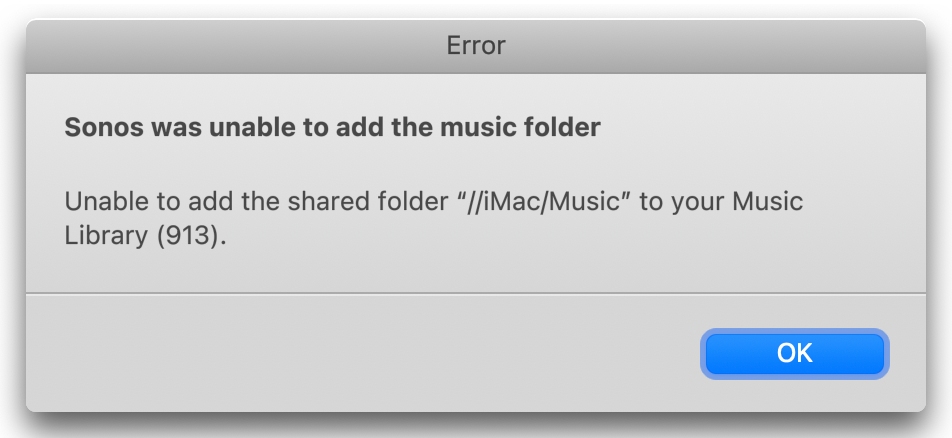
When I try the “Advanced” method, I get this - note that the Music Library folder is faded and cannot be selected.
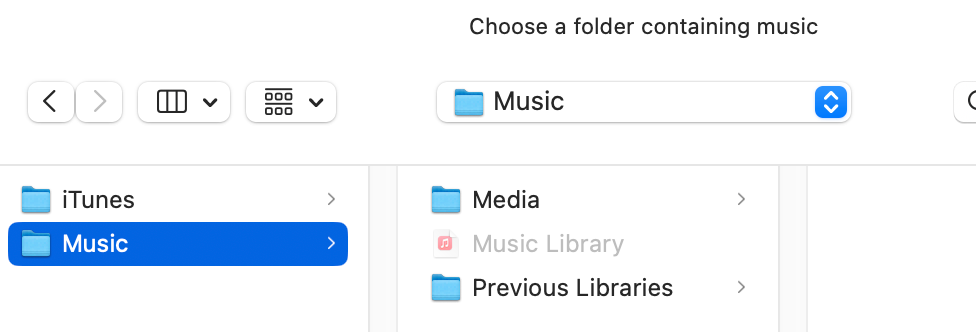
After chatting with a Sonos Support Tech they confirmed that the access to the Mac’s Music Library was removed from the app and while Sonos has been made aware of the problem there is no estimated date as to when access will be restored. I now have a nice collection of Sonos paper weights.

Any other Mac users find the same thing?

This topic has been closed for further comments. You can use the search bar to find a similar topic, or create a new one by clicking Create Topic at the top of the page.

36 replies

Contributor I
May 20, 2024

Same problem.  Does anyone know if Sonos will fix???

RadleyAuthor
Renowned Enthusiast I
May 20, 2024

I wouldn’t hold my breath. Mid-June is when Sonos estimates the local library issue to be fixed. 

Lyricist II
May 20, 2024

There is a workaround detailed in here where you add the folder as a NAS drive option. It worked for me. 


RadleyAuthor
Renowned Enthusiast I
May 21, 2024

There is a workaround detailed in here where you add the folder as a NAS drive option. It worked for me. 


Thanks alfie . . . I tried that several times and it didn’t work for me. I’ve all but given up on Sonos, even though I’m a HUGE fan of palindromes. I’ll wait until the “fix is in” and enjoy my Ultimate Ears Boom speakers in the mean time.

Chromatic Producer I
May 24, 2024

WHY would Sonos think about removing access to the Music Library?  I mean, what is their rationale?

And no estimated fix ETA.  Gawd, what a dumpster fire they created here.

RadleyAuthor
Renowned Enthusiast I
June 5, 2024

Update: 5/5/24

I was able to create a path to the music folder . . . 

. . . but am unable to update the Music Library. When selecting “Manage>Update Music Library Now” on the Mac Sonos controller , Sonos will start indexing but will only do so for a second and no music has been loaded.

Go figure . . . the lights are on but nobody answers the door.

Chromatic Producer I
June 5, 2024

There is a workaround detailed in here where you add the folder as a NAS drive option. It worked for me. 


I tried this, and other options, and it does not work.

I note that Sonos applied an update the the MacOS controller -- I have (and am KEEPING) the older DMG in case they manage to hose this up just as badly.

Why they would program this without access to your local Library (ie: YOUR MUSIC THAT YOU PLAY) is well beyond anything I can imagine.

Lyricist II
June 5, 2024

Update: 5/5/24

I was able to create a path to the music folder . . . 

. . . but am unable to update the Music Library. When selecting “Manage>Update Music Library Now” on the Mac Sonos controller , Sonos will start indexing but will only do so for a second and no music has been loaded.

Go figure . . . the lights are on but nobody answers the door.

I ran into the same issue, was an error with my pathing,i had to change something in my path and it worked. example my path being on an external drive looks like this /Volumes/iTunes/iTunes/music.

Chromatic Producer I
June 6, 2024

I tried this approach, copying my “iTunes Music” onto an external drive, that was freshly formatted and has the correct permissions and ownership.  But interestingly it doesn’t work, but the error I get is also puzzling as it errors at it cannot use it as “//MacbookPro16/iTunes Music” even though I gave it a direct path from /Volumes/drive/iTunes Music.

I’m not sure what could be wrong here.

Lyricist I
June 8, 2024

I’m currently using an iMac with macOS Sonoma 14.4.1 with four Sonos Play 1 speakers using Sonos OS S2 version 16.2. After updating, the path to my Music folder no longer appears in the Sonos Music Library Settings nor am I able to reconnect to the Music folder:

When I try the “Advanced” method, I get this - note that the Music Library folder is faded and cannot be selected.

After chatting with a Sonos Support Tech they confirmed that the access to the Mac’s Music Library was removed from the app and while Sonos has been made aware of the problem there is no estimated date as to when access will be restored. I now have a nice collection of Sonos paper weights.

Any other Mac users find the same thing?

Exactly the same June 8 - can’t believe it doesn’t work and we have to wait for new update when they don’t warn us before updating They are aware of this problem and they could have saved me from updating and loosing all my ability to play music.