
Contributor I
April 6, 2023
Answered

Sonos duplicated rooms

Hi, I have recently moved house and had to reconfigure my system. 

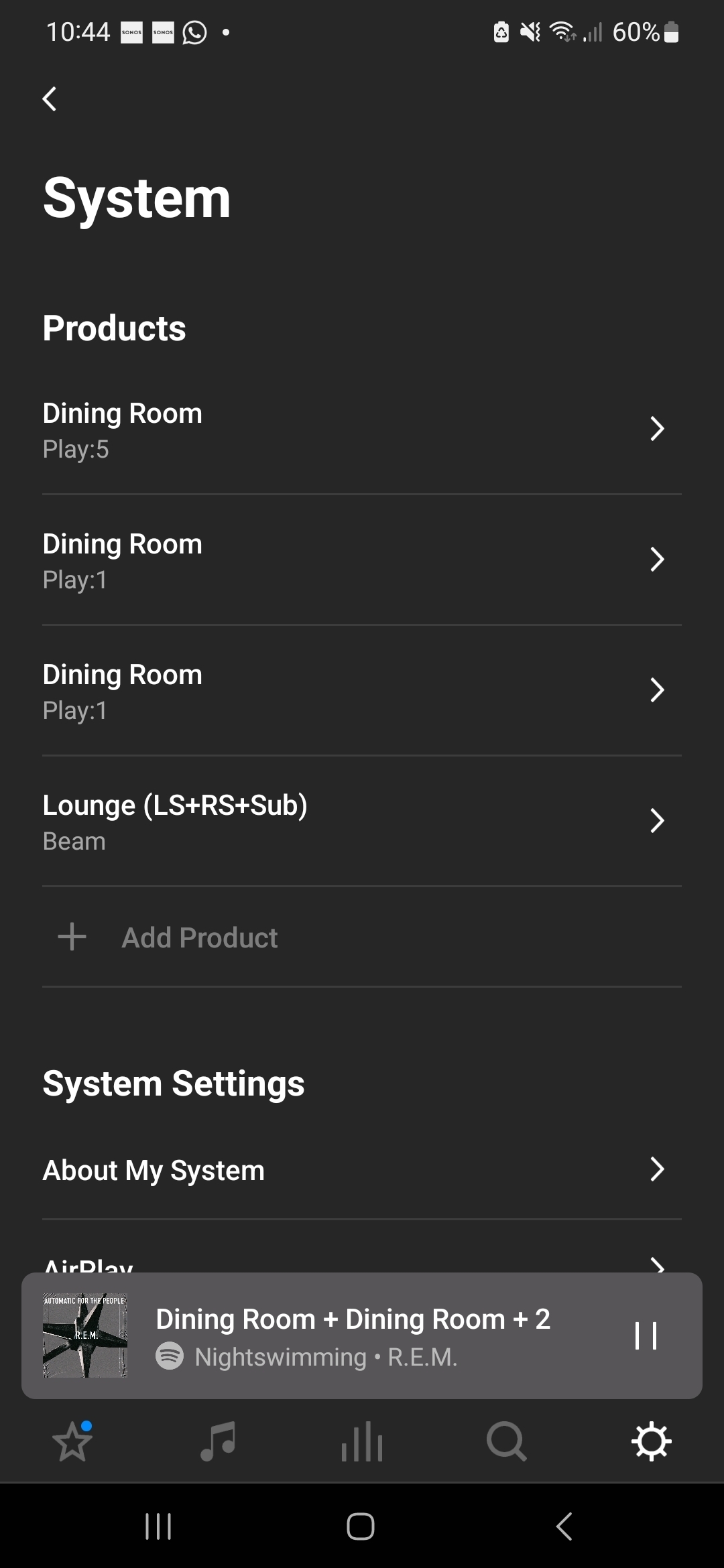
For some reason, Sonos has duplicated my 'Dining Room' so now I have three 'Dining Rooms', each with a separate component (see image). 

Is there a simple way to remove the duplicates and just have one Dining room with all the components in? 

Thanks 
 

This topic has been closed for further comments. You can use the search bar to find a similar topic, or create a new one by clicking Create Topic at the top of the page.
controlav
controlavAnswer
Lead Maestro
April 6, 2023

Just rename each speaker to whatever you want. Sonos doesn’t care about duplicated names (it uses unique ids to tell them apart), but it confuses humans. Once renamed, then Group them together (or Pair them if you want stereo pairs). Paired devices will show as a single “room”, Groups will show as “coordinator+X” where X is the number of linked devices.

Author of the leading independent Sonos apps for Android, MacOS, iOS, Windows and Xbox.

1 reply

controlav
controlavAnswer
Lead Maestro
April 6, 2023

Just rename each speaker to whatever you want. Sonos doesn’t care about duplicated names (it uses unique ids to tell them apart), but it confuses humans. Once renamed, then Group them together (or Pair them if you want stereo pairs). Paired devices will show as a single “room”, Groups will show as “coordinator+X” where X is the number of linked devices.

Author of the leading independent Sonos apps for Android, MacOS, iOS, Windows and Xbox.
