
Contributor II
November 16, 2022
Answered

Sonos Controller Update Failed. An Unexpected Error Occurred. Please Try Again

  • November 16, 2022
  • 53 replies
  • 26702 views

On MacOS 13.1, running on an M1 MacBook Pro.

Consistent error message when trying to update the MacOS Sonos app (on prompt in app). Only solution is to uninstall and reinstall.

Very frustrating!

Any ideas how to stop this happening?
This topic has been closed for further comments. You can use the search bar to find a similar topic, or create a new one by clicking Create Topic at the top of the page.
Best answer by ewolkoff

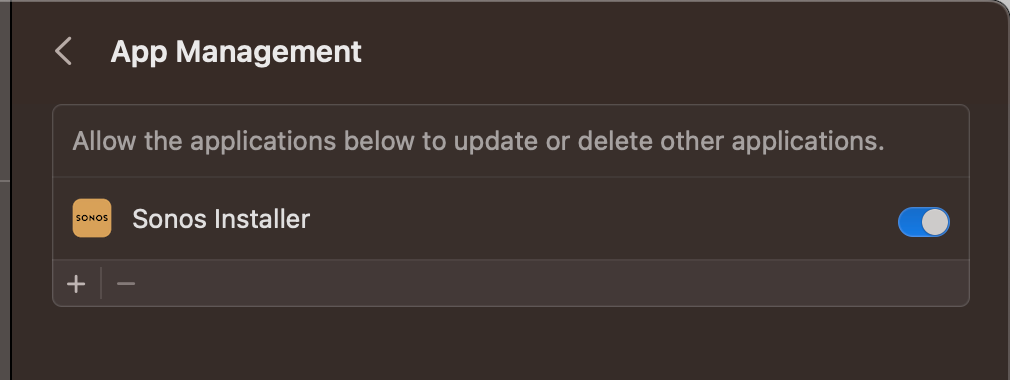
The true fix is to go to Settings-->Privacy and Security--->App Management--->Turn on Sonos Installer.   Then you won’t have this update issue anymore and the app will update as intended.  


53 replies

Lyricist I
August 16, 2023

This error is still happening as of August 16th, 2023. C’mon Sonos… your dev team sucks frankly. The Mac app has always been janky and updates flakey. This is an enormous hassle.

Contributor I
August 25, 2023

I’ve been dealing with this for a year. This finally resolved my problem.

Lyricist II
August 25, 2023

MacOS sonos app is complete garbage. Failing to update itself is expected behavior​​​. Super frustrating for what is supposed to be a mature product.

The interface is complete trash too but it’s been unchanged for years so I assume we all got used to it? 

Lyricist II
August 28, 2023

WOW, this week update WORKED after selecting the required items in App Management!! Sonos should actively indicate that in their required update notification, to avoid unnecessary anger among us =)

Lyricist I
September 1, 2023

Fantastic, why isn’t this the number 1 solutions that is given for everyone!

Contributor I
November 17, 2023

The true fix is to go to Settings-->Privacy and Security--->App Management--->Turn on Sonos Installer.   Then you won’t have this update issue anymore and the app will update as intended.  


please update the resolution on top of this post with the following quote, it’s the correct fix. The original answer listed is outdated and a subpar solution.

Lyricist I
November 18, 2023

If Sonos installer is not showing for you, its buried within the Sonos app. Follow these steps to add it to App Management:


  1. Browse your Applications folder, right-click Sonos then choose Show Package Contents
  2. Browse Contents > Resources and you’ll find the Sonos Installer app
  3. Drag the Sonos Installer app into App Management and enable the toggle
Lyricist I
November 18, 2023

Today, 11/18/23, I received this error message and was able to update to Sonos 15.10 by:

  • quit sonos
  • dragging the DMG file that Sonos was attempting to use for this installation out of the trash and opening it.
  • dragging the sonos.app icon in the DMG file to the Applications shortcut in the same DMG file


Contributor II
November 27, 2023

I found many suggestions. This one fixed it for me.

Lyricist III
December 18, 2023

The true fix is to go to Settings-->Privacy and Security--->App Management--->Turn on Sonos Installer.   Then you won’t have this update issue anymore and the app will update as intended.  


Worked for me - Thank you!