
Contributor II
November 30, 2022

Sonos cannot connect to USB drive on TP-Link router

  • November 30, 2022
  • 11 replies
  • 1046 views
Cannot share USB audio files with SONOS v2 system
Model: TP-Link Archer C8  
Hardware Version: V3
Firmware Version: 1.1.3 Build 20220510 rel.32759(5553)

The USB drive plugged into the Archer C8 shows it is active in the Archer C8 advanced USB settings.  All files are shared with no login required.

The network address is:  \\192.168.1.1\sda1\USB_Music

Windows explorer can find the music files OK and can play them,  but the SONOS v2 system cannot access the music library.

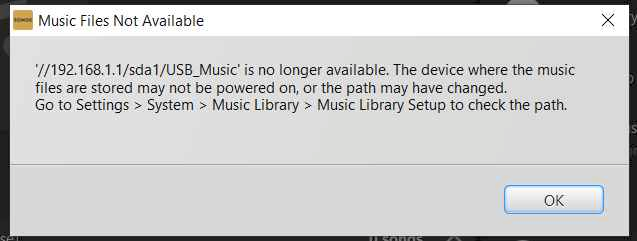
Sonos initially connects to the USB drive at the network address entered, but gives the error message below after about 10 seconds.

I have worked extensively with SONOS customer support, but they were unable to resolve this problem.  SONOS suspects a problem with the TP-Link Archer C8's implementation of SMB1 and/or SMB2 protocols.

I have tried sharing the USB drive with and without user login and password, but neither works.

I just updated this router to the latest version firmware, but that did not resolve this problem.

Any suggestions from other users would be welcomed.

SONOS Error messge below:
 

This topic has been closed for further comments. You can use the search bar to find a similar topic, or create a new one by clicking Create Topic at the top of the page.

11 replies

Contributor I
January 11, 2023

Hi all, just doing my 2 cents in.

I also have this problem.  Exactly.

TP-Link router providing 2.4GHz that I use for everything except my main TV. Internet is provided to TP-Link by ethernet from a NetComm modem at the other end of the house.

I had been using an unpowered external HDD as a fileshare.  It was unreliable and often wouldn't play.  Swapped a Seagate powered external HDD in for more capacity.  Removed the old share to set up a new one. Couldn't set up the media library. Tried the controller on my laptop and phone. Tried reconnecting the old HDD and I get the same error where it had been working just days ago.  No updates or changes as far a I'm aware (updates always cause chaos and orphan my phone controller).

I don't know how to check the SMBv1/v2 stuff yet or if be right in. Thought the problem was me 😀.

Very keen to hear of a fix. Hope this anecdote helps.

Marty