Contributor I
August 10, 2023

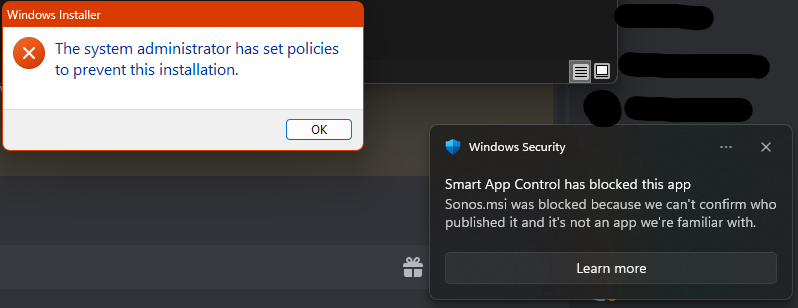
Smart App Control blocks install of Sonos App
  • August 10, 2023
  • 6 replies
  • 233 views


Smart App conrtol does not allow Sonos App to install, both from the official website and winget

This topic has been closed for further comments. You can use the search bar to find a similar topic, or create a new one by clicking Create Topic at the top of the page.

6 replies

Airgetlam
August 10, 2023

So maybe contact the folks at Smart App, and find out why?

Bruce
Airgetlam
August 10, 2023

Or is that a code word for a Windows control thing? In which case, log in as administrator, and install the app. 

Bruce
DaholliAuthor
Contributor I
August 10, 2023

No this means that that the developers at Sonos use a signature for their app that is not trusted by Microsoft.


I am the administrator, the setting is useful to stop malicious or untrusted apps from being installed.

controlav
Lead Maestro
August 10, 2023

Smart App Control is one of the weirdest Windows features, ever. You can only enable it when installing a fresh copy of Win 11, and if you ever disable it, that’s it, its gone forever.

Makes it damn difficult to test code against.

Author of the leading independent Sonos apps for Android, MacOS, iOS, Windows and Xbox.
controlav
Lead Maestro
August 10, 2023

Install my Windows app instead (see profile), Smart App should be happy to let it in as it is a Store app.

Author of the leading independent Sonos apps for Android, MacOS, iOS, Windows and Xbox.
DaholliAuthor
Contributor I
August 11, 2023

It really is not that hard to test, you just need to install a VM with it activated and have a checkpoint before you deactivate it :D


Anyways I would rather have the official app fix their signature before I get a third party app.