
Contributor I
November 17, 2022
Answered

S1 system has been working fine for years, but now will not connect to music library. So deleted it and trying to reconnect it say s there is a problem accessing the folder and give error 900 with PC and I pad
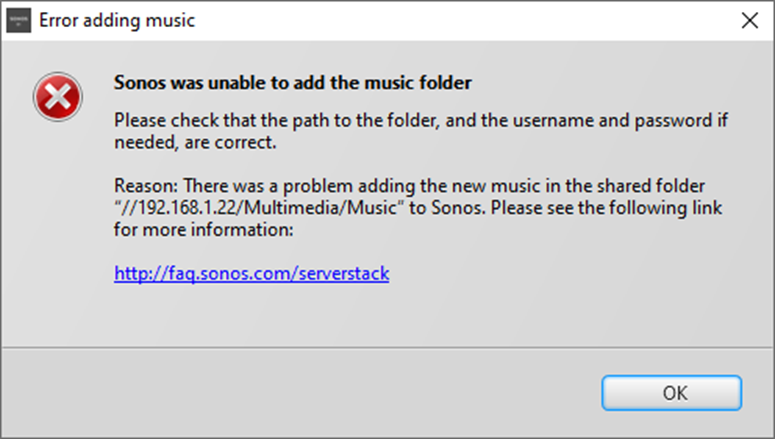
S1 system has been working fine for years, but now will not connect to music library. So deleted it and trying to reconnect it say s there is a problem accessing the folder and  give error 900 with PC and I pad


When I follow the steps and do what it asks on my PC I still get the same error.

I had a power cut today so everything has rebooted, it all works in every other way. The system is wired and connect with an ethernet cable.

Sonos is up to date

Anyone know what to try next.


This topic has been closed for further comments. You can use the search bar to find a similar topic, or create a new one by clicking Create Topic at the top of the page.
Airgetlam
AirgetlamAnswer
November 18, 2022

Unfortunately, most often “nothing has changed” is accurate from your perspective, but not from QNAPs, I suspect. My guess is that they’ve updated their firmware, and changed SMB v1 and NTML v1 without explicitly asking for your permission to do so. 

I’d certainly be looking rather strongly at the settings of the QNAP to make sure that it’s not now running SMB v3. 

I have experience, more than once, with Western Digital doing this to me.

Bruce

8 replies

Contributor I
November 17, 2022

The library is on a QNAP drive what has been fine for years and nothing has changed 

Airgetlam
AirgetlamAnswer
November 18, 2022

Unfortunately, most often “nothing has changed” is accurate from your perspective, but not from QNAPs, I suspect. My guess is that they’ve updated their firmware, and changed SMB v1 and NTML v1 without explicitly asking for your permission to do so. 

I’d certainly be looking rather strongly at the settings of the QNAP to make sure that it’s not now running SMB v3. 

I have experience, more than once, with Western Digital doing this to me.

Bruce
Contributor I
November 19, 2022

Looking at the release notes you are correct QNAP have upgraded to SMB V2 as it is more secure, so I will have to find out how to go backwards to SMB V1.

But then at the same time why is Sonos only on SMB V1, or does it not allow the option for V1 or V2

buzz
Grand Maestro
November 19, 2022

Older S1 only units do not have enough hardware resources to run the SMB V2 client.

Airgetlam
November 19, 2022

However, if you’re able to upgrade to S2, which means all your Sonos devices have more memory available, you can use SMB v2 or v3 as desired. 

Bruce
Contributor I
November 19, 2022

Thanks it would be nice to but with 4 Play 5 speaker 2 Play 1 speakers 1 Connect also 2 Amps and a sound bar, it is not really and option that is easy to afford. But I am open to any suggestion's.

buzz
Grand Maestro
November 20, 2022

Full disclosure: I’m not a PLEX user, but it may be an option for you.

Contributor I
November 23, 2022

Hi there thanks, when i Looked at Plex last you had to upload all your stuff to there site  first, and I do not really want  to do that when I have my own server.