
Chromatic Producer I
January 26, 2026
Question

S1 - having to press buttons twice iPhone/iPad

  • January 26, 2026
  • 15 replies
  • 131 views

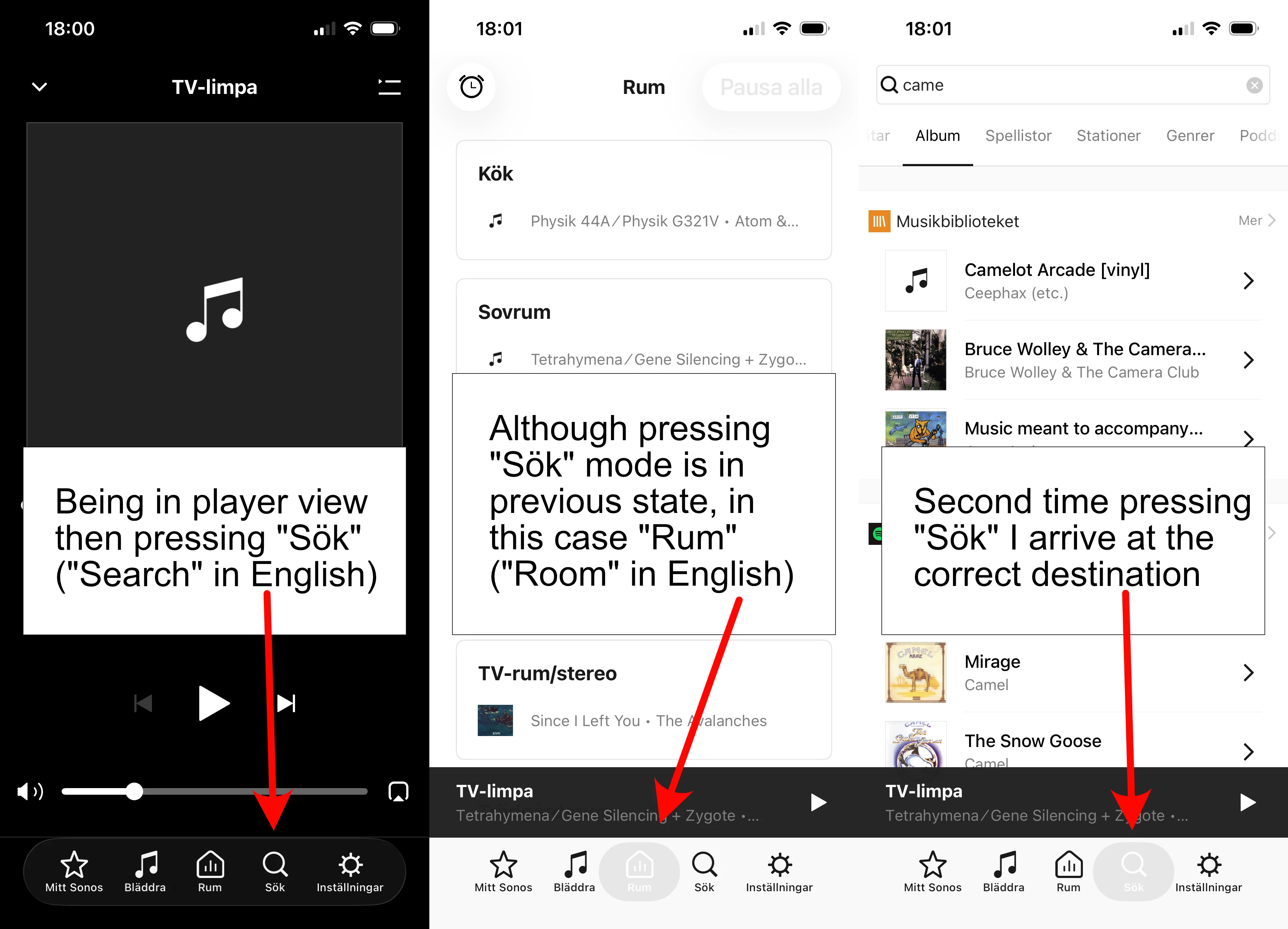
I’m not sure if I can do anything about this strange behavior in some settings or if it’s a bug. It’s present on both iPhone and iPad. If I’m in player mode like shown on left picture and want to go somewhere else the first time I press an icon, it doesn’t change to that mode but some previous mode. I’m pretty sure it did not work like this a couple of updates ago. Not sure when it changed.

On iPad it’s even worse because the controls jump from bottom to top when going from player mode in the same way as shown in the pictures. Seems like a minor bug to fix to me. If it’s not some obscure setting I haven’t found.
 

This topic has been closed for further comments. You can use the search bar to find a similar topic, or create a new one by clicking Create Topic at the top of the page.

15 replies

T-SAuthor
Chromatic Producer I
March 17, 2026

The ‘data’ supplied is your concern with the issue. 

As you can see others have made the same observation.

What about you, are you seing this on S1?

If I get your “data” and it’s different then described that’s interesting.


T-SAuthor
Chromatic Producer I
March 17, 2026

Just so you know you’re not alone. Yes, the S1 app is working like that. If the playing screen is displayed, the first press on any selection causes the playing screen to drop and display the screen behind it. The second press goes to where you are trying to go. The screen displayed when the playing screen drops, is what ever was there previously.

And, yes, it didn’t use to work like that.


Can yoyu remember when this changed, because I’m pretty sure it was not always like this? It’s like the “link” between the buttons and what they are supposed to do is bypassed at the first press. In the iPad variant it’s also as if those who program the UI simply forgot there actually is a bar at the bottom in play mode screen. When it’s not shown the field is unused, blank.


I’m not sure when it changed. There was an update about a week ago, 11.16.1, but I’m not positive that was the one. I don’t use the iOS S1 controller very often. I mostly use an android controller for S1.

The iPad S1 moving the selections from the bottom to the top is just crazy. Mine does that too. The android tablet app doesn’t. Again, I use an android tablet for S1 instead of my iPad.

Does the Android app still have the icons at the bottom?

Airgetlam
March 17, 2026

Unfortunately, I don’t have an S1 system to test this on. And I’m still a firm believer that numbers of calls about a particular issue carries greater weight than number of posts. 

Bruce
kdowling
March 17, 2026

Just so you know you’re not alone. Yes, the S1 app is working like that. If the playing screen is displayed, the first press on any selection causes the playing screen to drop and display the screen behind it. The second press goes to where you are trying to go. The screen displayed when the playing screen drops, is what ever was there previously.

And, yes, it didn’t use to work like that.


Can yoyu remember when this changed, because I’m pretty sure it was not always like this? It’s like the “link” between the buttons and what they are supposed to do is bypassed at the first press. In the iPad variant it’s also as if those who program the UI simply forgot there actually is a bar at the bottom in play mode screen. When it’s not shown the field is unused, blank.


I’m not sure when it changed. There was an update about a week ago, 11.16.1, but I’m not positive that was the one. I don’t use the iOS S1 controller very often. I mostly use an android controller for S1.

The iPad S1 moving the selections from the bottom to the top is just crazy. Mine does that too. The android tablet app doesn’t. Again, I use an android tablet for S1 instead of my iPad.

Does the Android app still have the icons at the bottom?

Yes, the Android tablet app has the icons at the bottom, and they stay there. Both the phone and tablet android S1 apps icons/selections work like you would expect. Press once.

T-SAuthor
Chromatic Producer I
March 19, 2026

Unfortunately, I don’t have an S1 system to test this on. And I’m still a firm believer that numbers of calls about a particular issue carries greater weight than number of posts. 

Sure, but it takes too much time and won’t produce anything. I call support when I believe there’s true prospect of actually getting an issue solved there and then.

Too bad Sonos doesn’t provide a  user feedback form. That’s where this would fit.